適用於資料庫和應用程式的 NetWorker 模組:DB2 連線備份失敗,並顯示錯誤“不允許SQL2413N連線備份,因為資料庫不可恢復”
Summary: NMDA DB2 線上備份失敗,並顯示錯誤 nsrdasv:由於備份要求失敗,無法備份範例資料庫 SQLCODE:-2413,不允許SQL2413N連線備份,因為資料庫不可恢復。
This article applies to
This article does not apply to
This article is not tied to any specific product.
Not all product versions are identified in this article.
Symptoms
從 NetWorker 管理主控台 (NMC) 或 DB2 伺服器執行的用於資料庫和應用程式的 NetWorker 模組 (NMDA) DB2 備份失敗,並顯示以下錯誤:「
不允許SQL2413N連線備份,因為資料庫無法恢復」。
不允許SQL2413N連線備份,因為資料庫無法恢復」。
Cause
缺省情況下,安裝的每個 DB2 資料庫都處於迴圈日誌記錄中。在迴圈日誌記錄中無法連線備份。
Resolution
啟用 DB2 歸檔紀錄記錄。
下面顯示的示例步驟適用於名為“Db4”的 DB2 資料庫。
下面顯示的示例步驟適用於名為“Db4”的 DB2 資料庫。
1. 在用戶端上開啟 DB2 命令視窗。
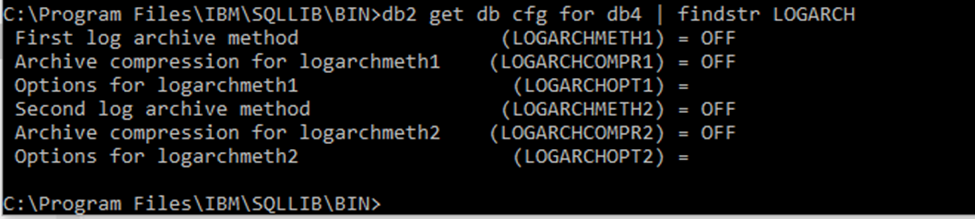
2. 使用命令檢查 DB2 紀錄模式,如以下螢幕擷取畫面所示:
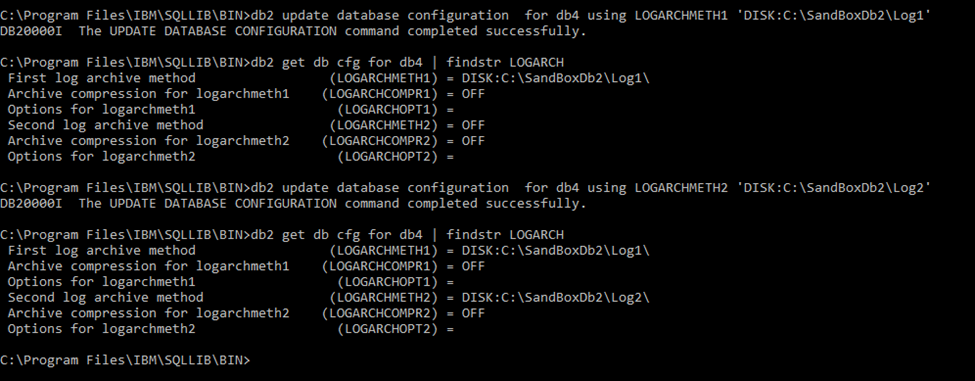
3.更新 logarchmeth 和 logarchopt ,而不是值「OFF」。例如:
4.使用 NMDA,DB2 事務記錄可自動歸檔至 Data Domain 儲存裝置。如需詳細步驟,請參閱 NMDA 管理指南。
2. 使用命令檢查 DB2 紀錄模式,如以下螢幕擷取畫面所示:
3.更新 logarchmeth 和 logarchopt ,而不是值「OFF」。例如:
4.使用 NMDA,DB2 事務記錄可自動歸檔至 Data Domain 儲存裝置。如需詳細步驟,請參閱 NMDA 管理指南。
Additional Information
適用於資料庫和應用程式的 NetWorker 模組管理指南可從 Dell 支援取得,網址為:https://www.dell.com/support/home/product-support/product/networker-module-for-databases-and-applications/docs。
Article Properties
Article Number: 000191364
Article Type: Solution
Last Modified: 09 Mar 2022
Version: 1
Find answers to your questions from other Dell users
Support Services
Check if your device is covered by Support Services.