PowerEdge: MX Networking SmartFabric Deployment How to Create the SmartFabric
Summary: This article provides information about how to create the SmartFabric in the Dell PowerEdge MX Networking SmartFabric infrastructure.
This article applies to
This article does not apply to
This article is not tied to any specific product.
Not all product versions are identified in this article.
Instructions
Create the SmartFabric
To create a SmartFabric using the OME-M console, perform the following steps:
Steps:
1. Open the OME-M console.
2. From the navigation menu, click Devices > Fabric.
3. In the Fabric pane, click Add Fabric.
4. In the Create Fabric window, complete the following:
a. Enter a name for the fabric in the Name box. In this example, SmartFabric was entered.
b. Optionally, enter a description in the Description box. In this example, the description SmartFabric using MX9116n/MX7116n in Fabric A was entered.
c. Click Next.
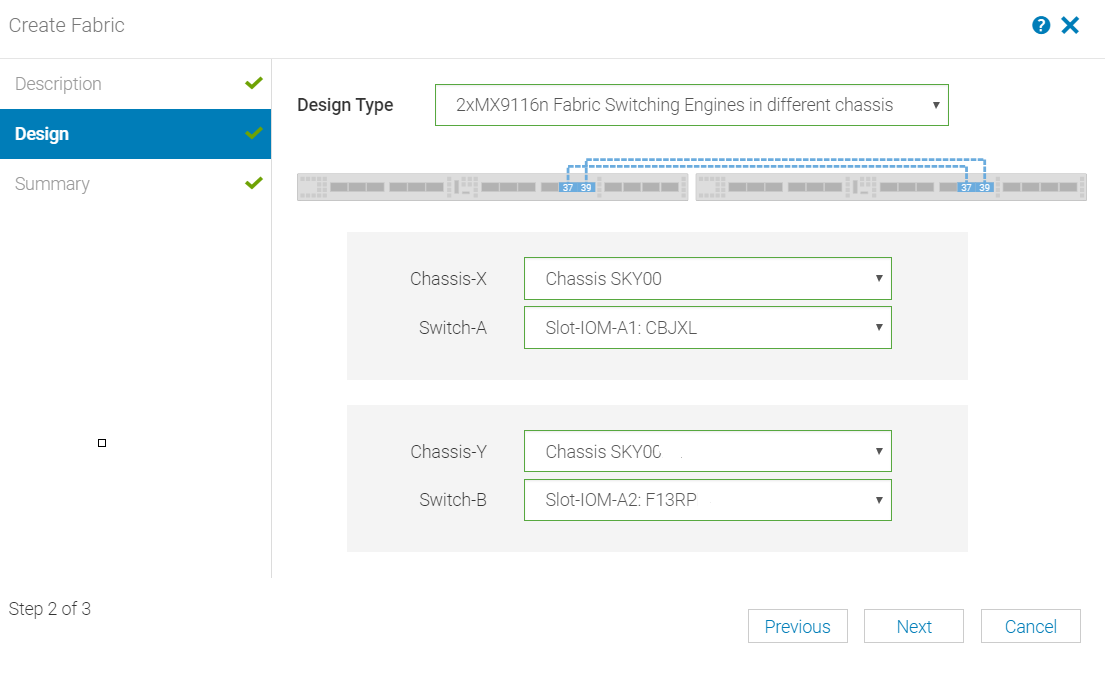
d. From the Design Type list, select the appropriate type. In this example, 2x MX9116n Fabric Switching Engine in different chassis was selected.
e. From the Chassis-X list, select the first MX7000 chassis.
f. From the Switch-A list, select Slot-IOM-A1.
g. From the Chassis-Y list, select the second MX7000 chassis to join the fabric.
h. From the Switch-B list, select Slot-IOM-A2.
i. Click Next.
j. On the Summary page, verify the proposed configuration and click Finish.
f. From the Switch-A list, select Slot-IOM-A1.
g. From the Chassis-Y list, select the second MX7000 chassis to join the fabric.
h. From the Switch-B list, select Slot-IOM-A2.
i. Click Next.
j. On the Summary page, verify the proposed configuration and click Finish.
Note: From the Summary window, a list of the physical cabling requirements can be printed.
The SmartFabric deploys. The process of Fabric creation can take up to 20 minutes to complete. During this time, all related switches are rebooted, and the operating mode changes from Full Switch to SmartFabric mode.
Note: After the fabric is created, the fabric health is critical until at least one uplink is created.
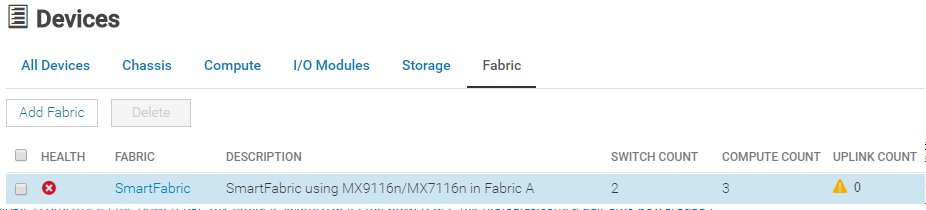
The figure below shows the new SmartFabric object and some basic information about the fabric.
For more details, see the SmartFabric Creation section of the Dell EMC PowerEdge MX Networking Deployment Guide
See this list below of related articles in this series with embedded how to videos:
Dell EMC PowerEdge MX Networking SmartFabric Deployment How to Define VLANs
Dell EMC PowerEdge MX Networking SmartFabric Deployment How to Configure Port Breakout
Dell EMC PowerEdge MX Networking SmartFabric Deployment How to Create an Uplink
Dell EMC PowerEdge MX Networking SmartFabric Deployment How to Create Identity Pools
Dell EMC PowerEdge MX Networking SmartFabric Deployment How to Deploy a Template
Dell EMC PowerEdge MX Networking SmartFabric Deployment How to Create Fibre Channel Uplinks
The figure below shows the new SmartFabric object and some basic information about the fabric.
For more details, see the SmartFabric Creation section of the Dell EMC PowerEdge MX Networking Deployment Guide
See this list below of related articles in this series with embedded how to videos:
Dell EMC PowerEdge MX Networking SmartFabric Deployment How to Define VLANs
Dell EMC PowerEdge MX Networking SmartFabric Deployment How to Configure Port Breakout
Dell EMC PowerEdge MX Networking SmartFabric Deployment How to Create an Uplink
Dell EMC PowerEdge MX Networking SmartFabric Deployment How to Create Identity Pools
Dell EMC PowerEdge MX Networking SmartFabric Deployment How to Deploy a Template
Dell EMC PowerEdge MX Networking SmartFabric Deployment How to Create Fibre Channel Uplinks
Affected Products
Dell EMC Networking MX5108n, Dell EMC Networking MX7116n, Dell EMC Networking MX9116n, Dell OpenManage Enterprise-ModularArticle Properties
Article Number: 000192281
Article Type: How To
Last Modified: 16 Mar 2026
Version: 8
Find answers to your questions from other Dell users
Support Services
Check if your device is covered by Support Services.