NVP vProxy:FLR参照がエラー「アカウント名とセキュリティIDの間のマッピングが行われませんでした」(Windows)で失敗する
Summary: Windows仮想マシン(VM)に対して、NetWorker VMware Protection (NVP)ファイル レベル リストア(FLR)のマウントが成功します。ローカル オペレーティング システム アカウントは、FLRマウント ユーザーとして.\username.として指定されます。マウント操作は成功します。ただし、参照操作は失敗します。「'.\xxxx' を 'c:\Program Files (x86)\EMC\vProxy FLR Agent\tmp\xxxxxxxxx' の所有者として割り当てられません: アカウント名とセキュリティID間のマッピングは行われませんでした。 ...
This article applies to
This article does not apply to
This article is not tied to any specific product.
Not all product versions are identified in this article.
Symptoms
NetWorker VMware Protection (NVP)を使用して実行されたWindows仮想マシン(VM)ファイル レベル リカバリー(FLR)中に、FLRマウントは成功しますが、次のエラーが表示されます。 FLRターゲットVMの「C:\Program Files (x86)\EMC\vProxy FLR Agent\logs\vflragentd\vflragentd-agent.log」も同様のエラーを報告します。
2025-10-14T12:55:17-04:00 INFO:   AppAgent #7: Application agent operation: FLR browse_files
2025-10-14T12:55:17-04:00 ERROR:  AppAgent #7: Unable to assign '.\Administrator' as the owner of 'C:\Program Files (x86)\EMC\vProxy FLR Agent\tmp\2521662446': No mapping between account names and security IDs was done.
2025-10-14T12:58:28-04:00 TRACE:  Discovering partitions and file systems (not under 'C:\Program Files (x86)\EMC\vProxy FLR Agent\flr\mountpoints')
2025-10-14T12:58:28-04:00 TRACE:  Discovered 3 partitions.
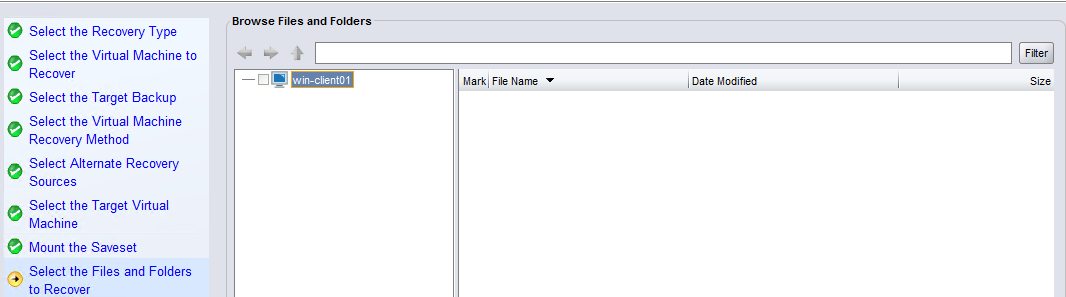
[Recover]ウィザードからFLRを参照することはできません。
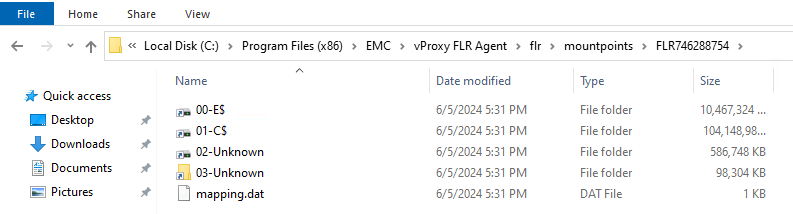
VMでは、「C:\Program Files (x86)\EMC\vProxy FLR Agent\flr\mountpoints\」の下のFLRマウントポイントにアクセスできます。
Cause
マウント操作中に、マウント ユーザーが.\Usernameを使用して指定されました。
メモ: 使用目的
.\username は、ドメイン ユーザー アカウントではなく、ローカル ユーザー アカウントとしてログインすることです。これは、ドメイン アカウントとローカル アカウントの両方を持つユーザー名を区別するために実行できます。たとえば、「管理者」などです。マウント中に使用されるロジックでは、ユーザー ログインは正常に行われますが、参照権限が正しく適用されません。
Resolution
必要なファイル/フォルダーは、C:\Program Files (x86)\EMC\vProxy FLR Agent\flr\mountpoints\のFLRマウントポイントからコピーできます。
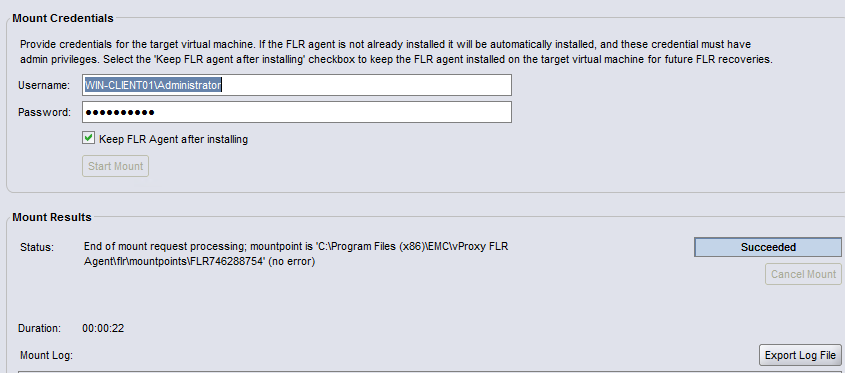
NetWorkerリカバリー ウィザードを使用するには、現在のFLRジョブを閉じて、FLRを再開します。ユーザーを指定する場合は、ユーザー名の前に.\を入力しないでください。
ローカル管理者アカウントを指定する場合は、次のように入力します。 HOSTNAME\Administratorの詳細を確認してください。例:
Affected Products
NetWorkerProducts
NetWorker FamilyArticle Properties
Article Number: 000192996
Article Type: Solution
Last Modified: 14 Oct 2025
Version: 2
Find answers to your questions from other Dell users
Support Services
Check if your device is covered by Support Services.