NVP vProxy: La navigazione FLR non riesce e restituisce l'errore "No mapping between account names, and security IDs was done" (Windows)
Summary: Il mount FLR (File Level Restore) di NetWorker VMware Protection (NVP) ha esito positivo per una macchina virtuale (VM) Windows. Un account del sistema operativo locale è specificato come utente di mounting FLR come .\username.. L'operazione di mount ha esito positivo; Tuttavia, l'operazione di ricerca ha esito negativo: " Impossibile assegnare '.\xxxx' come proprietario di 'c:\Program Files (x86)\EMC\vProxy FLR Agent\tmp\xxxxxxxxx': Non è stato eseguito alcun mapping tra i nomi degli account e gli ID di sicurezza." ...
This article applies to
This article does not apply to
This article is not tied to any specific product.
Not all product versions are identified in this article.
Symptoms
Durante un ripristino a livello di file (FLR) di una macchina virtuale (VM) Windows eseguito utilizzando NetWorker VMware Protection (NVP), il mount FLR ha esito positivo, ma viene visualizzato il seguente errore: "C:\Program Files (x86)\EMC\vProxy FLR Agent\logs\vflragentd\vflragentd-agent.log" sulla VM di destinazione FLR riporta errori simili.
2025-10-14T12:55:17-04:00 INFO:   AppAgent #7: Application agent operation: FLR browse_files
2025-10-14T12:55:17-04:00 ERROR:  AppAgent #7: Unable to assign '.\Administrator' as the owner of 'C:\Program Files (x86)\EMC\vProxy FLR Agent\tmp\2521662446': No mapping between account names and security IDs was done.
2025-10-14T12:58:28-04:00 TRACE:  Discovering partitions and file systems (not under 'C:\Program Files (x86)\EMC\vProxy FLR Agent\flr\mountpoints')
2025-10-14T12:58:28-04:00 TRACE:  Discovered 3 partitions.
Non è possibile sfogliare il FLR dalla procedura guidata Recover:

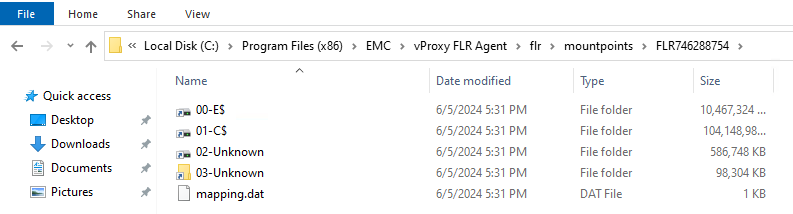
Sulla VM, è possibile accedere ai mount point FLR in "C:\Program Files (x86)\EMC\vProxy FLR Agent\flr\mountpoints\".
Cause
Durante l'operazione di montaggio, l'utente di mounting è stato specificato utilizzando .\Username.
NOTA: L'intenzione di utilizzare
.\username consente di accedere come account utente locale anziché come account utente di dominio. Questa operazione può essere eseguita per differenziare un nome utente che può avere sia un account di dominio che un account locale. Ad esempio, "Administrator". La logica utilizzata durante il mount consente l'accesso dell'utente, ma le autorizzazioni di navigazione non vengono applicate correttamente.
Resolution
È possibile copiare i file/le cartelle necessari dal mount point FLR in C:\Program Files (x86)\EMC\vProxy FLR Agent\flr\mountpoints\:
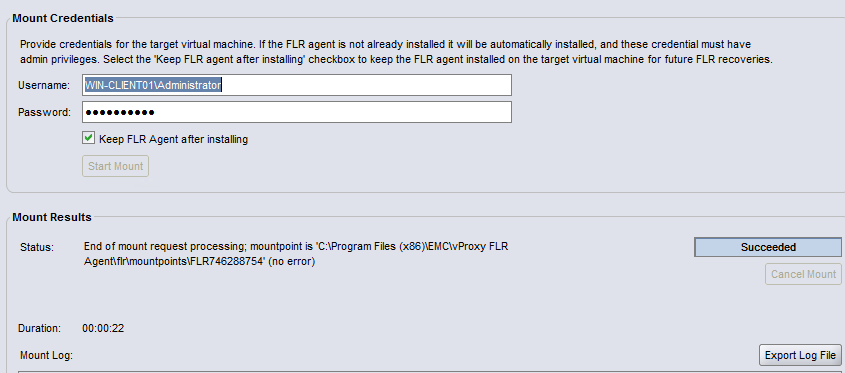
Per utilizzare la procedura guidata di ripristino di NetWorker, chiudere il processo FLR corrente e riavviare FLR. Quando si specifica l'utente, non immettere .\ prima del nome utente.
Se si desidera specificare l'account amministratore locale, immettere HOSTNAME\Administrator. Ad esempio:
Affected Products
NetWorkerProducts
NetWorker FamilyArticle Properties
Article Number: 000192996
Article Type: Solution
Last Modified: 14 Oct 2025
Version: 2
Find answers to your questions from other Dell users
Support Services
Check if your device is covered by Support Services.