PowerProtect DP 系列裝置和 IDPA:Appliance Configuration Manager 上允許 LDAP 匿名目錄存取。
Summary: 客戶在其執行 IDPA 2.7.1 版的 DP4400 上回報以下弱點。 輕量型目錄存取通訊協定 (LDAP) 可用來提供使用者、群組等相關資訊。 此系統上的 LDAP 服務允許匿名連線。若惡意使用者可存取此資訊,可能會協助他們發起進一步攻擊。
This article applies to
This article does not apply to
This article is not tied to any specific product.
Not all product versions are identified in this article.
Symptoms
客戶使用具有內部 LDAP 的 IDPA DP4400 系統,在 IDPA 系統上執行安全性掃描後,發生匿名 LDAP 綁定安全性問題。
Cause
ACM 具有 LDAP 匿名目錄存取,導致惡意使用者可以存取使用者、群組等。
Resolution
注意:停用 ACM 中的 LDAP 匿名查閱之後,會在 IDPA 軟體版本 2.7.3 開啟或之前,在目前的 ACM 密碼變更工作流程中觸發程式碼例外。如果實作此安全性解決方案後需要變更密碼,請遵循 KB 000212941,在 ACM 中重新啟用 LDAP 匿名查詢。成功完成密碼變更後,可以再次停用 LDAP 匿名查詢。
使用下列步驟,停用 Appliance Configuration Manager 上的 LDAP 匿名目錄存取。
1.開啟 ACM 上的 SSH,並使用「根」使用者登入。
2. 使用下列命令重新啟動 LDAP:systemctl restart slapd
3.請使用下列命令建立 ldif 檔案:
vi /etc/openldap/ldap_disable_bind_anon.ldif
在檔案中貼上下列內容:
dn: cn=config
changetype: modify
add: olcDisallows
olcDisallows: bind_anon

dn: cn=config
changetype: modify
add: olcRequires
olcRequires: authc

dn: olcDatabase={-1}frontend,cn=config
changetype: modify
add: olcRequires
olcRequires: authc
接著在 ACM 上執行下列命令:
ldapadd -Y EXTERNAL -H ldapi:/// -f /etc/openldap/ldap_disable_bind_anon.ldif
範例輸出
acm-xxxx:~ # ldapadd -Y EXTERNAL -H ldapi:/// -f /etc/openldap/ldap_disable_bind_anon.ldif
SASL/EXTERNAL authentication started
SASL username: gidNumber=0+uidNumber=0,cn=peercred,cn=external,cn=auth
SASL SSF: 0
modifying entry "cn=config"

modifying entry "cn=config"

modifying entry "olcDatabase={-1}frontend,cn=config"
4.執行下列命令,以測試修正程式是否已到位:
在版本 2.6 及更新版本上,執行下列命令:
ldapsearch -x -b "dc=idpa,dc=local" "*" -h |awk '/dn: / {print $2}'
在 2.5 及以下版本上,執行下列命令:
ldapsearch -x -b "dc=idpa,dc=com" "*" -h |awk '/dn: / {print $2}'
範例輸出:
acm-xxxxx:~ # ldapsearch -x -b "dc=idpa,dc=local" "*" -h acm-5800-crk.dp.ce.gslabs.lab.emc.com |awk '/dn: / {print $2}'
ldap_bind: Inappropriate authentication (48)
        additional info: anonymous bind disallowed
Additional Information
注意:在遵循上述 KB 之後,已回報問題。
停用 ACM 中的 LDAP 匿名查閱之後,會在 IDPA 軟體版本 2.7.3 開啟或之前,在目前的 ACM 密碼變更工作流程中觸發程式碼例外。如果在停用 LDAP 匿名存取後,裝置需要變更密碼,請依照文章000212941,在 ACM 中重新啟用 LDAP 匿名查詢。成功完成密碼變更後,可以再次停用 LDAP 匿名查詢。
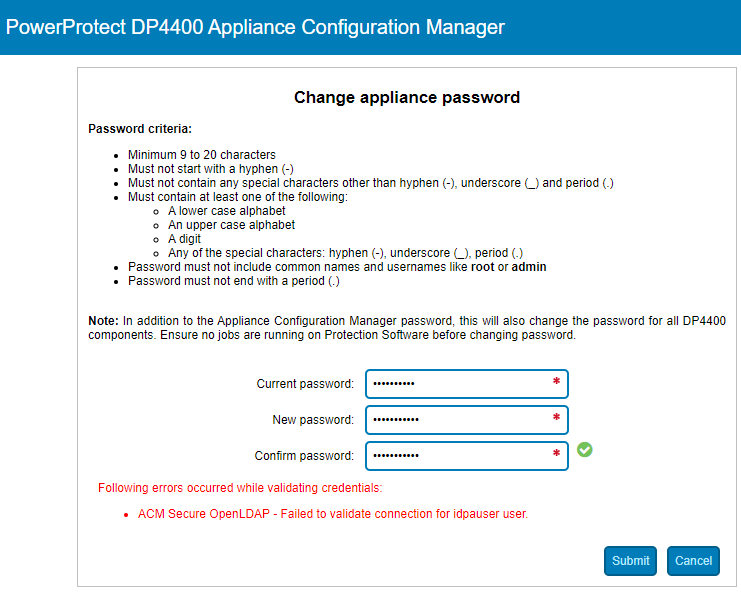
如需變更密碼,請依照文章000212941,在 ACM 中重新啟用 LDAP 匿名查閱。成功完成密碼變更後,可以再次停用 LDAP 匿名查詢。
停用 ACM 中的 LDAP 匿名查閱之後,會在 IDPA 軟體版本 2.7.3 開啟或之前,在目前的 ACM 密碼變更工作流程中觸發程式碼例外。如果在停用 LDAP 匿名存取後,裝置需要變更密碼,請依照文章000212941,在 ACM 中重新啟用 LDAP 匿名查詢。成功完成密碼變更後,可以再次停用 LDAP 匿名查詢。
如需變更密碼,請依照文章000212941,在 ACM 中重新啟用 LDAP 匿名查閱。成功完成密碼變更後,可以再次停用 LDAP 匿名查詢。
Affected Products
PowerProtect Data Protection Software, Integrated Data Protection Appliance Family, Integrated Data Protection Appliance SoftwareProducts
PowerProtect DP4400, PowerProtect DP5300, PowerProtect DP5800, PowerProtect DP8300, PowerProtect DP8800, PowerProtect DP5900, PowerProtect DP8400, PowerProtect DP8900Article Properties
Article Number: 000196092
Article Type: Solution
Last Modified: 03 May 2023
Version: 7
Find answers to your questions from other Dell users
Support Services
Check if your device is covered by Support Services.