ME5: How to Locate the PowerVault Enclosure Service Tag
Summary: The enclosure service tag is a seven-digit alphanumeric number. It is found using the PowerVault Manager, command-line interface (CLI), or on an information tag at the front of the enclosure. This information is used to route support calls to appropriate personnel when contacting Dell Technical Support. ...
This article applies to
This article does not apply to
This article is not tied to any specific product.
Not all product versions are identified in this article.
Instructions
On the enclosure
The Service Tag and Express Service Code are found on the front of the system by pulling out the information tag. Alternatively, the information may be on a sticker on the back of the storage system chassis.
Using PowerVault Manager
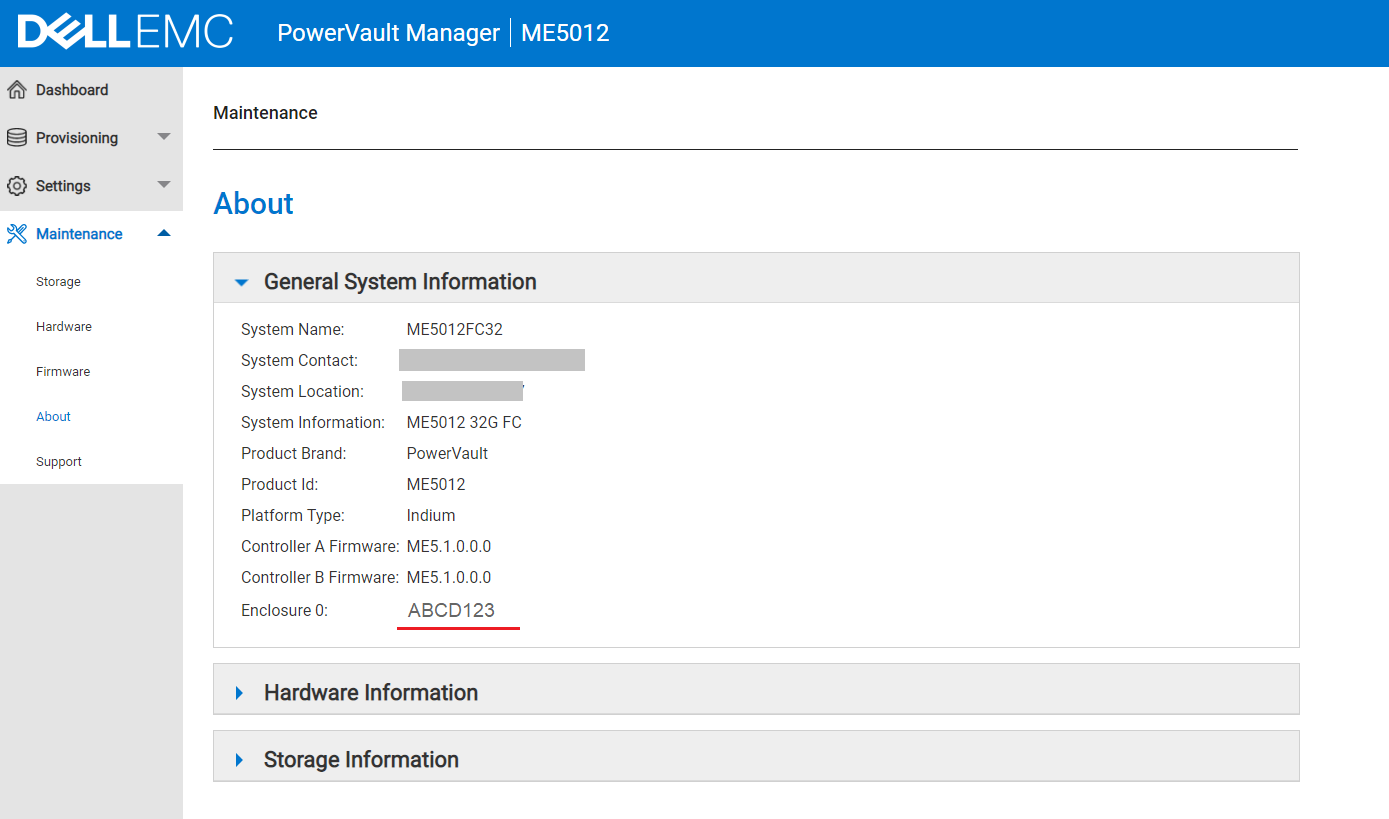
The About panel (Maintenance > About) shows information about the system; its hardware, and its storage configuration.
The Service Tag is the seven-digit alphanumeric number that is written after the enclosure <number>:
Using the Command-Line Interface (CLI)
The Service Tag is the seven-digit alphanumeric number that is shown in the output of either of the following commands:
show service-tag-infoshow enclosures
# show service-tag-info

Encl Service Tag
--------------------------------------
0    ABCD123
--------------------------------------
Success: Command completed successfully. (2022-01-21 04:16:23)
Additional Information
Watch this video:
How to Locate the PowerVault Enclosure Service Tag.
Duration: 00:01:34 (hh:mm:ss)
When available, closed caption (subtitles) language settings can be chosen using the CC icon on this video player.
You can also view this video on YouTube 
Affected Products
PowerVault ME5012, PowerVault ME5024, PowerVault ME5084Article Properties
Article Number: 000196714
Article Type: How To
Last Modified: 28 May 2025
Version: 4
Find answers to your questions from other Dell users
Support Services
Check if your device is covered by Support Services.