NetWorker: 오류 메시지 "'path'의 인덱스를 조회할 수 없습니다. 인덱스 세션이 잘못되었습니다." 오류 메시지가 표시됩니다.
Summary: 증분 백업이 실패하고 다음 오류가 발생합니다. "파일 인덱스를 가져올 수 없습니다. 인덱스 세션이 잘못되었습니다."
This article applies to
This article does not apply to
This article is not tied to any specific product.
Not all product versions are identified in this article.
Symptoms
전체 백업은 오류 없이 성공적으로 완료되지만 증분 백업은 다음 오류와 함께 완료되지 않습니다.
174422:save: Step (5 of 6) for PID-13894010: Reading the save sets and writing to the target device.
100690:save:<path>: File index could not be obtained due to <Unable to do Index lookup of path 'path'. The Index session is invalid
여기에는 정책 로그에 다음과 유사한 메시지도 포함될 수 있습니다.
Saving in pool '<Pool_Name>'.
Server enabled for immediate mode
...
RPC Authentication: <Client> failed to obtain RPCSEC_GSS credentials: Authentication error; why = Server rejected credential. Could not get a session key for GSS authentication.  Perhaps this authentication method is not allowed/supported by both the local and remote machines.
Failed to create lgto_auth credential for RPCSEC_GSS: Could not get session key from <Client> for GSS authentication with <NWS>: Authentication error; why = Server rejected credential.
Unable to acquire the user credentials for direct save nsrmmd authentication: Could not get session key from <Client> for GSS authentication with <NWS>: Authentication error; why = Server rejected credential.
175297:save: Unable to set up the direct save with server '<NWS>': Could not get session key from <Client> for GSS authentication with <Client>: Authentication error; why = Server rejected credential.
98520:save: Falling back to agent-assisted indirect save
Cause
NetWorker는 클라이언트 리소스의 세이브 세트 속성에 디렉토리 이름을 명시적으로 나열하고 이름이 변경된 디렉토리 백업이 활성화된 경우에만 이름이 변경된 디렉토리와 하위 폴더를 백업합니다.
예를 들어 세이브 세트 필드에 E:\ 가 포함되어 있는 경우 E:\test 디렉토리의 이름을 E:\test1로 변경하면 Backup renamed directory가 활성화되지 않은 상태에서 E:\test1 디렉토리를 백업하지 않습니다.
세이브 세트 필드에 E:\test 가 포함되어 있는 경우 E:\test 디렉토리의 이름을 E:\test1로 변경하면 이름이 변경된 디렉토리 백업을 활성화할 때 NetWorker가 E:\test1 디렉토리의 백업을 수행합니다.
NetWorker는 마지막 전체 이후 디렉토리 변경 사항에 대한 인덱스 검사를 수행하지만 이 단계에 도달하기 전에 Client Direct 연결이 성공적으로 완료되어야 합니다.
Resolution
이름이 변경된 디렉토리 백업을 선택합니다.
기본적으로 전체 백업 후 디렉토리 이름이 변경되었지만 디렉토리의 파일 또는 하위 폴더가 변경되지 않은 경우 NetWorker는 이름이 바뀐 디렉토리를 후속 증분 백업에 포함하지 않습니다. 이름이 변경된 디렉토리를 증분 백업에 포함하려면 클라이언트 리소스에서 이름이 변경된 디렉토리 백업 속성을 선택합니다.
이 설정은 NetWorker Management Console에서 클라이언트 속성을 열면 변경할 수 있습니다.
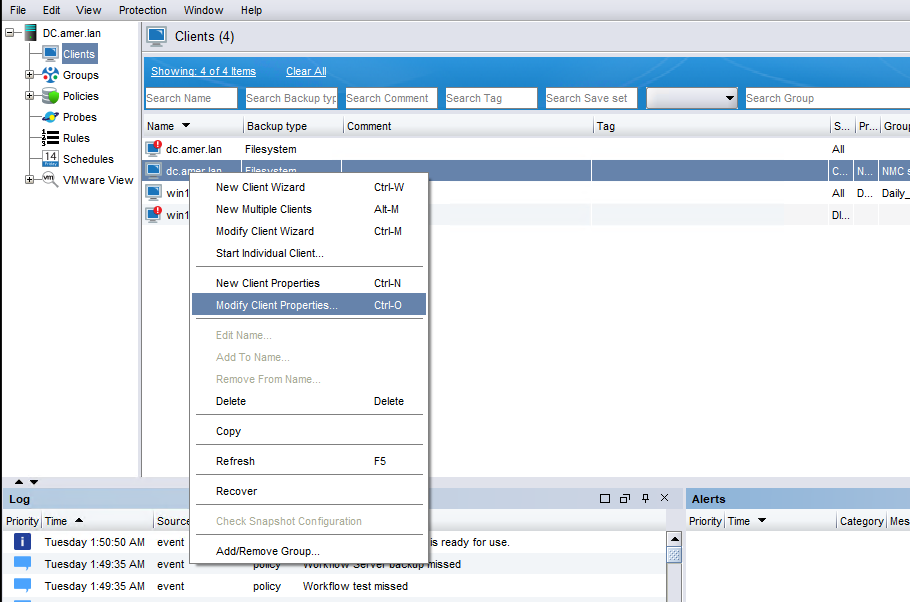
그림 1: NetWorker Management Console의 클라이언트 속성 탭 스크린샷
NetWorker Management Console의 일반 탭에는 이름이 변경된 디렉토리 백업 확인란이 있습니다.
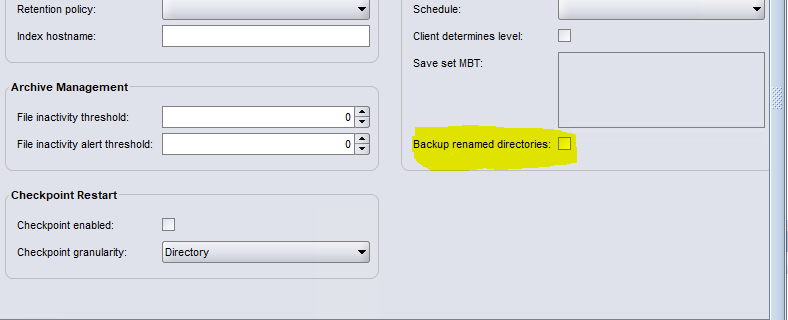
그림 2: NetWorker Management Console의 일반 탭에 있는 이름이 바뀐 디렉토리의 백업 확인란 스크린샷
클라이언트와 Data Domain 간의 Client Direct 연결을 수정합니다.
고객과 고객 간의 직접적인 커뮤니케이션 PowerProtect DD 일반적으로 권장되므로 클라이언트와 클라이언트 간의 연결 문제가 있는지 확인해야 합니다. PowerProtect DD 해결되었습니다.
업데이트 호스트 해결 방법:
클라이언트 및 Data Domain에서 /etc/hosts 파일 또는 DNS(Domain Name System) 항목이 올바르게 구성되어 있는지 확인합니다.
두 시스템 모두 서로의 호스트 이름을 정확하게 확인해야 합니다.
네트워크 연결을 확인합니다.
네트워크 팀에 문의하여 다음 포트가 열려 있고 양방향으로 액세스할 수 있는지 확인합니다.
111
2049
2051
2052
연결 문제가 해결되면 클라이언트에서 백업을 실행하여 백업이 오류 없이 성공적으로 완료되었는지 확인합니다.
포트 및 이름 확인은 NetWorker 시스템에서 nsrports 명령을 사용하여 수행됩니다.
nsrports -t HOSTNAME -p PORT클라이언트 속성에서 Client Direct 비활성화
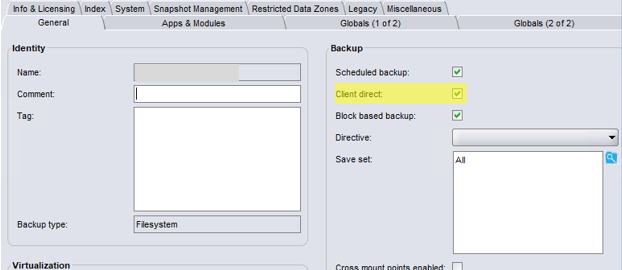
클라이언트에서 Data Domain으로 Client Direct 백업을 수행할 수 없고 직접 링크를 수정할 수 없는 경우 Client propertiesGeneral 탭에서 Client Direct를 모두 비활성화해야 할 수 있습니다.
Affected Products
NetWorkerArticle Properties
Article Number: 000199928
Article Type: Solution
Last Modified: 20 Oct 2025
Version: 5
Find answers to your questions from other Dell users
Support Services
Check if your device is covered by Support Services.