NetWorker:無法取得檔案索引,因為出現錯誤訊息:「無法對路徑『路徑』進行索引查詢。索引會話無效」
Summary: 增量備份失敗,並顯示錯誤:「由於以下原因,無法取得檔案索引。索引會話無效。
This article applies to
This article does not apply to
This article is not tied to any specific product.
Not all product versions are identified in this article.
Symptoms
完整備份已順利完成,沒有發生任何錯誤,而增量備份未完成,並出現以下錯誤:
174422:save: Step (5 of 6) for PID-13894010: Reading the save sets and writing to the target device.
100690:save:<path>: File index could not be obtained due to <Unable to do Index lookup of path 'path'. The Index session is invalid
這也可能包括原則記錄中類似以下內容的訊息:
Saving in pool '<Pool_Name>'.
Server enabled for immediate mode
...
RPC Authentication: <Client> failed to obtain RPCSEC_GSS credentials: Authentication error; why = Server rejected credential. Could not get a session key for GSS authentication.  Perhaps this authentication method is not allowed/supported by both the local and remote machines.
Failed to create lgto_auth credential for RPCSEC_GSS: Could not get session key from <Client> for GSS authentication with <NWS>: Authentication error; why = Server rejected credential.
Unable to acquire the user credentials for direct save nsrmmd authentication: Could not get session key from <Client> for GSS authentication with <NWS>: Authentication error; why = Server rejected credential.
175297:save: Unable to set up the direct save with server '<NWS>': Could not get session key from <Client> for GSS authentication with <Client>: Authentication error; why = Server rejected credential.
98520:save: Falling back to agent-assisted indirect save
Cause
只有在客戶機資源的儲存集屬性中明確列出目錄名稱,且已啟用備份重新命名的目錄時,NetWorker 才會備份檔案和子資料夾未變更的重新命名目錄。
例如,如果儲存集欄位包含 E:\ ,且您將 E:\test 目錄重新命名為 E:\test1,NetWorker 在未啟用備份重新命名目錄的情況下,不會備份 E:\test1 目錄。
當儲存集欄位包含 E:\test ,且您將 E:\test 目錄重新命名為 E:\test1 時,NetWorker 會在啟用備份重新命名的目錄時,執行 E:\test1 目錄的備份。
NetWorker 會針對上次完整之後的目錄變更執行索引檢查,但這可以取決於在進入此階段前已成功完成的用戶端直接連線。
Resolution
選取備份重新命名的目錄。
根據預設,如果目錄名稱在完整備份後有所變更,但目錄中的檔案或子資料夾沒有變更,則 NetWorker 不會在後續的增量備份中納入重新命名的目錄。要在增量備份中包括重命名的目錄,請在客戶機資源中選擇“備份重命名的目錄”屬性。
開啟用戶端 屬性,即可從 NetWorker Management Console 變更此設定:
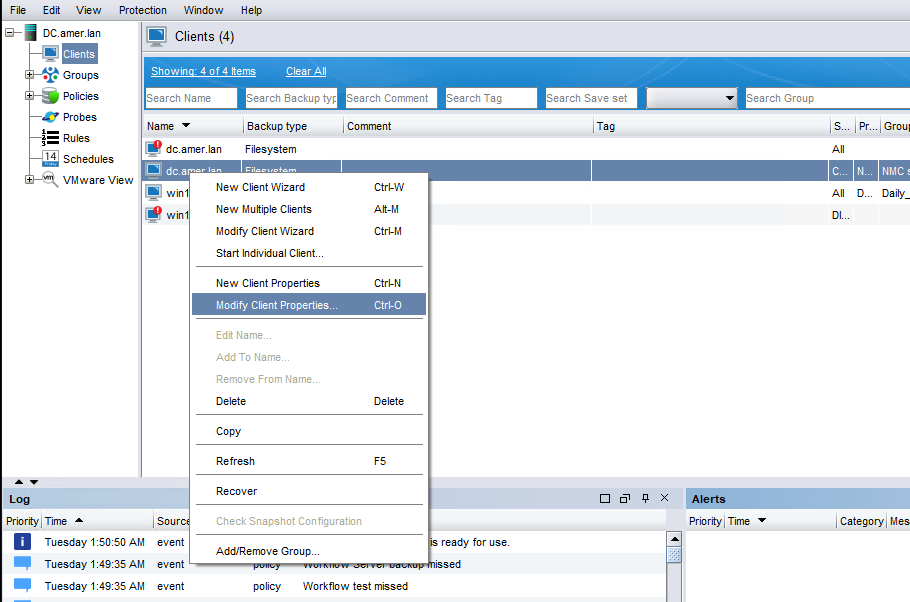
圖 1:NetWorker Management Console 中的「用戶端內容」標籤螢幕擷取畫面
NetWorker Management Console 中的「一般」標籤有備份重新命名目錄的核取方塊:
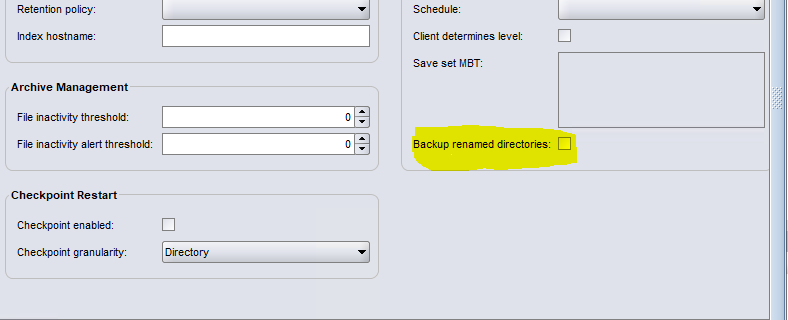
圖 2:NetWorker Management Console 的「一般」標籤中「備份重新命名的目錄」核取方塊的螢幕擷取畫面
修正用戶端和 Data Domain 之間的 Client Direct 連線。
在客戶和 PowerProtect DD 通常是可取的,因此我們應該確保用戶端和 PowerProtect DD 已解決:
更新主機解析度:
確定用戶端和 Data Domain 上的 /etc/hosts 檔案或網域名稱系統 (DNS) 項目已正確設定。
兩個系統必須準確地解析彼此的主機名。
驗證網路連線能力:
請聯絡您的網路團隊,以確保下列連接埠已開啟並可雙向存取:
111
2049
2051
2052
連線問題解決後,請執行用戶端備份,以確認備份成功完成,沒有發生錯誤。
您可以使用 NetWorker 系統上的 nsrports 命令:
nsrports -t HOSTNAME -p PORT在用戶端屬性中停用用戶端直接
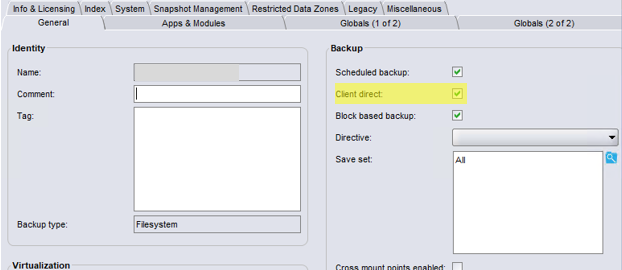
如果您無法從用戶端對 Data Domain 進行 Client Direct 備份,也無法修復直接連結,則可能需要在用戶端屬性的「一般」標籤中一起停用 Client Direct:
Affected Products
NetWorkerArticle Properties
Article Number: 000199928
Article Type: Solution
Last Modified: 20 Oct 2025
Version: 5
Find answers to your questions from other Dell users
Support Services
Check if your device is covered by Support Services.