NetWorker:无法获取文件索引,因为出现错误消息“无法对路径'path'执行索引查找。索引会话无效”
Summary: 增量备份失败,并显示错误:“由于以下原因无法获取文件索引。索引会话无效。
This article applies to
This article does not apply to
This article is not tied to any specific product.
Not all product versions are identified in this article.
Symptoms
完整备份成功完成,没有任何错误,而增量备份未完成,并显示以下错误:
174422:save: Step (5 of 6) for PID-13894010: Reading the save sets and writing to the target device.
100690:save:<path>: File index could not be obtained due to <Unable to do Index lookup of path 'path'. The Index session is invalid
这还可能包括类似于策略日志中的以下消息:
Saving in pool '<Pool_Name>'.
Server enabled for immediate mode
...
RPC Authentication: <Client> failed to obtain RPCSEC_GSS credentials: Authentication error; why = Server rejected credential. Could not get a session key for GSS authentication.  Perhaps this authentication method is not allowed/supported by both the local and remote machines.
Failed to create lgto_auth credential for RPCSEC_GSS: Could not get session key from <Client> for GSS authentication with <NWS>: Authentication error; why = Server rejected credential.
Unable to acquire the user credentials for direct save nsrmmd authentication: Could not get session key from <Client> for GSS authentication with <NWS>: Authentication error; why = Server rejected credential.
175297:save: Unable to set up the direct save with server '<NWS>': Could not get session key from <Client> for GSS authentication with <Client>: Authentication error; why = Server rejected credential.
98520:save: Falling back to agent-assisted indirect save
Cause
只有在客户端资源的存储集属性中明确列出目录名称并且启用了备份重命名目录时,NetWorker 才会备份包含未更改文件和子文件夹的重命名目录。
例如,如果存储集字段包含 E:\ ,并且您将 E:\test 目录重命名为 E:\test1,则 NetWorker 不会在未启用备份重命名目录的情况下备份 E:\test1 目录。
如果存储集字段包含 E:\test ,并且您将 E:\test 目录重命名为 E:\test1,则在启用备份重命名的目录时,NetWorker 将执行 E:\test1 目录的备份。
NetWorker 会对自上次完整以来的目录更改执行索引检查,但这可能取决于在我们进入此阶段之前 Client Direct 连接是否成功完成。
Resolution
选择备份重命名的目录。
默认情况下,如果目录的名称在完整备份后发生更改,但目录中的文件或子文件夹没有更改,NetWorker 不会在后续增量备份中包括重命名的目录。要在增量备份中包括重命名的目录,请在客户端资源中选择备份重命名的目录属性。
通过打开 Client Properties,从 NetWorker Management Console 更改此设置:

图 1:NetWorker Management Console 中的客户端属性选项卡的屏幕截图
NetWorker Management Console 中的“General”选项卡具有备份重命名目录的复选框:
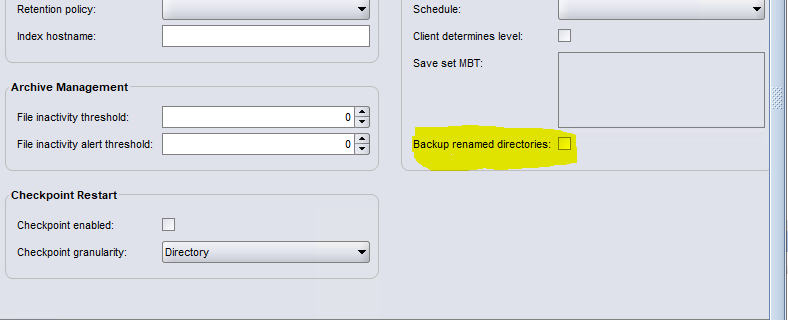
图 2:NetWorker Management Console 的“常规”选项卡中的备份重命名目录复选框的屏幕截图
修复客户端与 Data Domain 之间的 Client Direct 连接。
在客户和客户之间进行直接沟通 PowerProtect DD 通常更可取,因此我们应该确保客户端和 PowerProtect DD 已解决:
更新主机解决方案:
确保正确配置了客户端和 Data Domain 上的 /etc/hosts 文件或域名系统 (DNS) 条目。
两个系统都必须准确解析彼此的主机名。
验证网络连接:
联系您的网络团队,确保以下端口在两个方向均打开且可访问:
111
2049
2051
2052
解决连接问题后,为客户端运行备份,以验证备份是否成功完成,没有错误。
可以使用以下命令在 NetWorker 系统上验证端口和名称解析: nsrports 命令执行此操作:
nsrports -t HOSTNAME -p PORT在客户端属性中禁用 Client Direct
如果您无法执行从客户端到 Data Domain 的 Client Direct 备份,并且无法修复直接链接,则可能需要在客户端属性常规选项卡中同时禁用 Client Direct:

Affected Products
NetWorkerArticle Properties
Article Number: 000199928
Article Type: Solution
Last Modified: 20 Oct 2025
Version: 5
Find answers to your questions from other Dell users
Support Services
Check if your device is covered by Support Services.