Connectrix Brocade:交換器上的「aaaconfig」命令中缺少「starttls」參數
Summary: FOS v8.2.3 和 FOS v9.0.0x 中的「aaaconfig」命令中缺少「starttls」參數。
This article applies to
This article does not apply to
This article is not tied to any specific product.
Not all product versions are identified in this article.
Symptoms
STARTTLS 是一種替代方法,現在是加密 LDAP 連線的偏好方法。STARTTLS 會在連線程序之後或期間使用 SSL/TLS 包裝,以「升級」未加密的連線。
其運作方式是,在伺服器與 Web 服務進行交握協商之前,先建立與 LDAP 伺服器的一般 (未加密) 連線。
在這裡,伺服器會傳送其憑證,以在建立安全連線之前證明其身分。
如果安全連線的協商失敗,則可能會開啟標準 LDAP 連線。
是否會發生這種情況取決於 LDAP 伺服器及其組態。
其運作方式是,在伺服器與 Web 服務進行交握協商之前,先建立與 LDAP 伺服器的一般 (未加密) 連線。
在這裡,伺服器會傳送其憑證,以在建立安全連線之前證明其身分。
如果安全連線的協商失敗,則可能會開啟標準 LDAP 連線。
是否會發生這種情況取決於 LDAP 伺服器及其組態。
Cause
由於 Broadcom 不支援連接埠 #636 的 Secure LDAP,因此在使用「LDAP」配置 AAA 服務時,會嘗試啟用
「STARTTLS」參數來建立安全連線。
此選項在 FOS v8.2.3 和 FOS v9.0.0x 中均無法使用,因為它尚未經過測試。
供參考的螢幕擷取畫面:
FOS v9.0.0x:
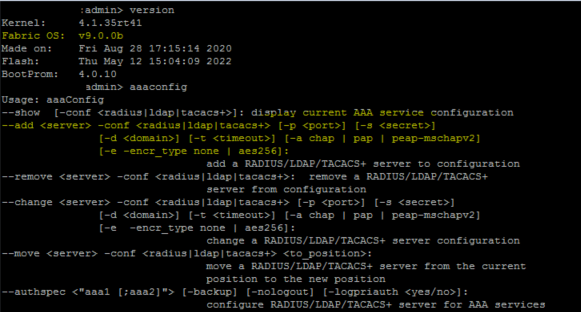
FOS v8.2.3:

Resolution
由於 FOS v8.2.3 和 v9.0.x 中尚未測試「starttls」選項,因此在交換器上配置「aaaconfig」命令時無法取得此參數。
FOSv9.0.x 發佈於 FOS v8.2.3a 及以上版本之前,因此「aaaconfig」命令中缺少「starttls」選項。
「starttls」選項僅適用於從 8.2.3a 及更新版本之後的 FOS。此資訊會更新在 FOS v8.2.3a 的版本資訊中。
在 FOS v9.1 中,配置「aaaconfig」時可使用「starttls」選項。
配置的命令:
aaaconfig --add | --change server -conf radius | ldap | tacacs+
 [-p port] [-d domain] [-t timeout] [-s secret]
 [-a chap | pap | peap-mschapv2] [-e -encr_type none | aes256]
 [-tls_mode starttls | ldaps]
在配置後,可使用此命令檢查相同項目:
switch:admin> aaaconfig --show -conf ldap

LDAP CONFIGURATIONS
===================

Position : 1
Server : 1.2.3.4
Port : 389
Domain : local
Timeout(s) : 3
LDAP TLS Mode : STARTTLS

Position : 2
Server : 5.6.7.8
Port : 389
Domain : local
Timeout(s) : 3
LDAP TLS Mode : STARTTLS

Primary AAA Service: LDAP
Secondary AAA Service: Switch database
Log Primary Authentication Status: Yes
Affected Products
Connectrix B-Series SoftwareProducts
Connectrix B-Series, Connectrix B-Series HardwareArticle Properties
Article Number: 000201898
Article Type: Solution
Last Modified: 14 Apr 2025
Version: 3
Find answers to your questions from other Dell users
Support Services
Check if your device is covered by Support Services.