How to Identify the Fans on Alienware X15 R1, R2, X16 R1, R2, and X17 R1, R2 Laptops
Summary: The following article provides information about how to identify the different fans that are reported in the enhanced Pre-Boot System Assessment (ePSA) tests. This article is applicable to the fans that are in the Alienware X15 R1, R2, X16 R1, R2, and X17 R1, R2 laptops. ...
Instructions
Alienware X15 R1, R2, X16 R1, R2, and X17 R1, R2 laptop fan identification
The Alienware X15 R1, R2, X16 R1, R2, and X17 R1, R2 laptops have four internal fans. The fans are used to control the operating temperature of the laptop.
These fans are:
- CPU Fan 1
- CPU Fan 2
- Video Fan 1
- Video Fan 2
The laptops onboard diagnostics reference each fan and report back that the fans are working as expected or a fault is discovered. (See Figure.1)
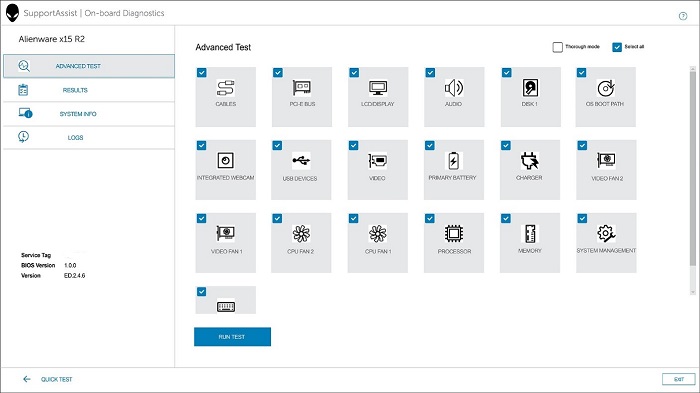
(Figure.1 The SupportAssist onboard Diagnostics Screenshot)
If one of the fans fails the onboard tests, the diagnostics report which of the fans has failed. If you are having trouble identifying which physical fan the tests are referencing, see the following guide. (See Figure.2)

(Figure.2 Labeled internal view of the fan location.)
Error Examples:
Fan - The Video Fan 2 failed to respond correctly
Error Code 2000-0XXX
Validation code XXXXX
Additional Information
Check out the following links to see the various fans listed in the service manuals:
-
Click the appropriate link for the laptop that you are dealing with:
-
Click the Service Manual link.
-
Browse to and open the Removing and Installing Components section.
-
Click Major Components.