什麼是個人電腦遊戲通行證以及如何獲得支援
Summary: 本文說明個人電腦 Game Pass 的支援範圍,以及 Dell 裝置上的 Xbox 應用程式。
This article applies to
This article does not apply to
This article is not tied to any specific product.
Not all product versions are identified in this article.
Instructions
什麼是 PC Game Pass?
PC Game Pass 是專為 PC 玩家所設計。玩高品質的PC遊戲,包括第一天的新遊戲,並獲得EA Play會員資格,拳頭遊戲福利,折扣和交易等。自 2025 年 6 月 1 日起,每台 Dell 裝置均包含 3 個月的 PC Game Pass 優惠。*
*PC Game Pass:除非取消,否則訂閱將以每月正常價格自動繼續。受 xbox.com/subscriptionterms 
PC Game Pass 促銷優惠:
Dell 客戶可在 Windows 11 立即可用體驗 (OOBE) 期間或透過 Microsoft Store 申請 3 個月的 PC Game Pass 訂用方案。
如何透過 Microsoft 商店領取 3 個月的 PC Game Pass 訂用方案:
- 選擇任務欄上的 Microsoft 商店圖示,或者在任務欄上的 搜索框中 鍵入“Microsoft商店”,然後從結果中選擇它。
- 使用Microsoft應用商店帳戶 (MSA) 登錄到 Microsoft 應用商店(如果尚未登錄)。
- 按兩下左下角的「庫」 按鈕。
- 選擇標籤「包含在設備中」。
- 按一下「PC Game Pass |3個月訂閱。
- 輸入有效的付款方式,然後按一下「訂閱」。
- 您可以隨時取消。只需轉到 account.microsoft.com
如何在 Windows 立即可用體驗 (OOBE) 期間領取 3 個月的 PC Game Pass 訂用方案:
您 3 個月的 PC Game Pass 訂用方案會在 Windows 立即可用體驗 (OOBE) 期間自動顯示。若要領取 3 個月的 PC Game Pass,您必須在 OOBE 期間登入您的Microsoft帳戶。
- 按一下「請領」以開始程序。

- 輸入付款方式,然後按一下「下一步」。
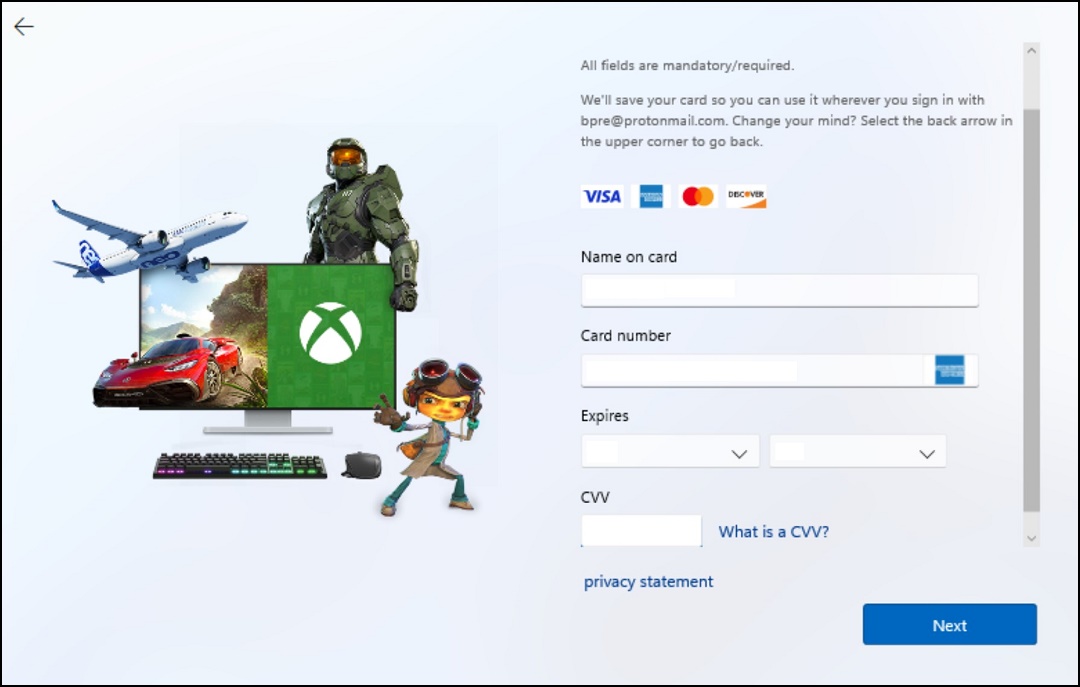
- 確認付款方式,然後按兩下立即購買。
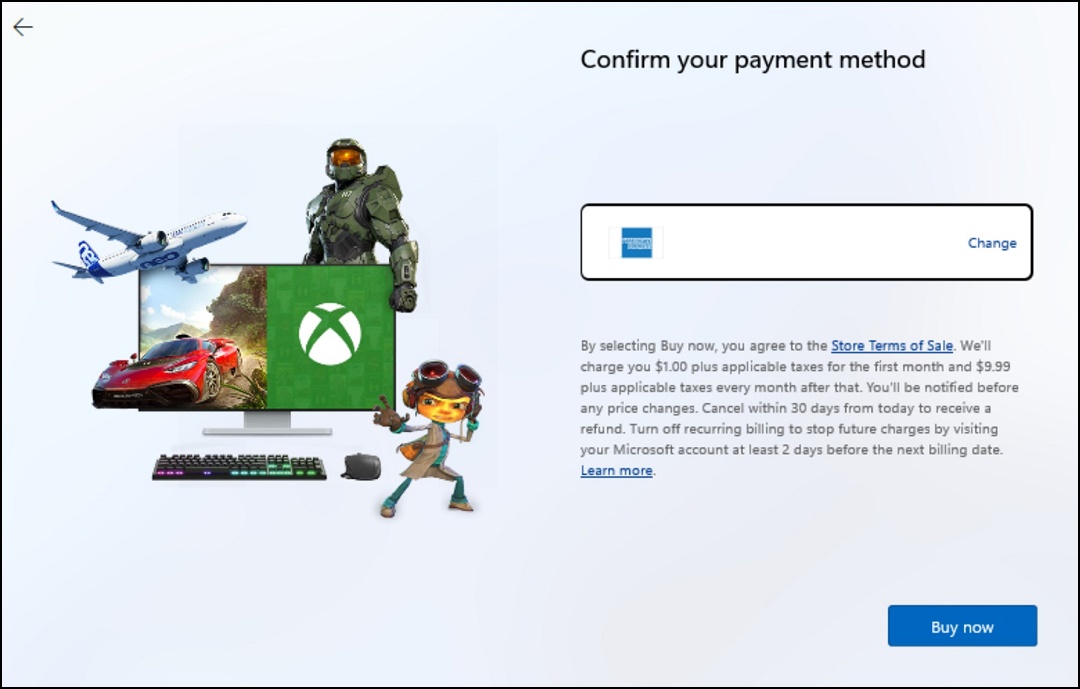
存取 PC Game Pass 遊戲:
按一下「開始」,然後按一下「Xbox」圖示。按一下「Game Pass」,使用 Game Pass 探索並下載新遊戲。
如果 Xbox 應用程式尚未安裝,您可以從 Microsoft Store
Affected Products
Alienware, Dell All-in-One, Dell Pro All-in-One, Dell Pro Max Micro, Dell Pro Max Slim, Dell Pro Max Tower, Dell Pro Micro, Dell Pro Slim, Dell Pro Tower, Dell Slim, Dell Tower, Inspiron, OptiPlex, Vostro, XPS, G Series, G Series, Alienware
, Dell Laptops, Dell Plus, Dell Pro, Dell Pro Max, Dell Pro Plus, Dell Pro Premium, Inspiron, Latitude, Dell Pro Rugged, Vostro, XPS, Fixed Workstations, Mobile Workstations, Dell Pro Max Micro XE FCM2250, Dell Pro Max Slim XE FCS1250, Dell Pro Max Tower T2 XE FCT2250, Dell Pro Max 16 XE MC16250, Dell Pro Micro Plus XE QBM1250, Dell Pro Slim Plus XE5 QBS1250, Dell Pro Tower Plus XE5 QBT1250
...
Article Properties
Article Number: 000207179
Article Type: How To
Last Modified: 16 Jul 2025
Version: 9
Find answers to your questions from other Dell users
Support Services
Check if your device is covered by Support Services.