VCF på VxRail: Konfigurasjon av sikkerhetskopiering mislykkes med ugyldig parameter
Summary: Konfigurasjon av sikkerhetskopiering mislykkes med ugyldig parameter: Validering mislyktes for katalogbane. Kontroller at sikkerhetskopikatalogen er intakt, og at SFTP-serveren har skrivetillatelser på sikkerhetskopibanen. ...
This article applies to
This article does not apply to
This article is not tied to any specific product.
Not all product versions are identified in this article.
Symptoms
Når en bruker bruker aktiverer konfigurasjonen for SFTP-sikkerhetskopiering, kan en bruker se at følgende feil returneres:
Invalid parameter: Validation failed for directory path /path/to/backup/location" on server sftp.domain.com. Please make sure backup directory is intact and sftp server has write permissions on backup path.
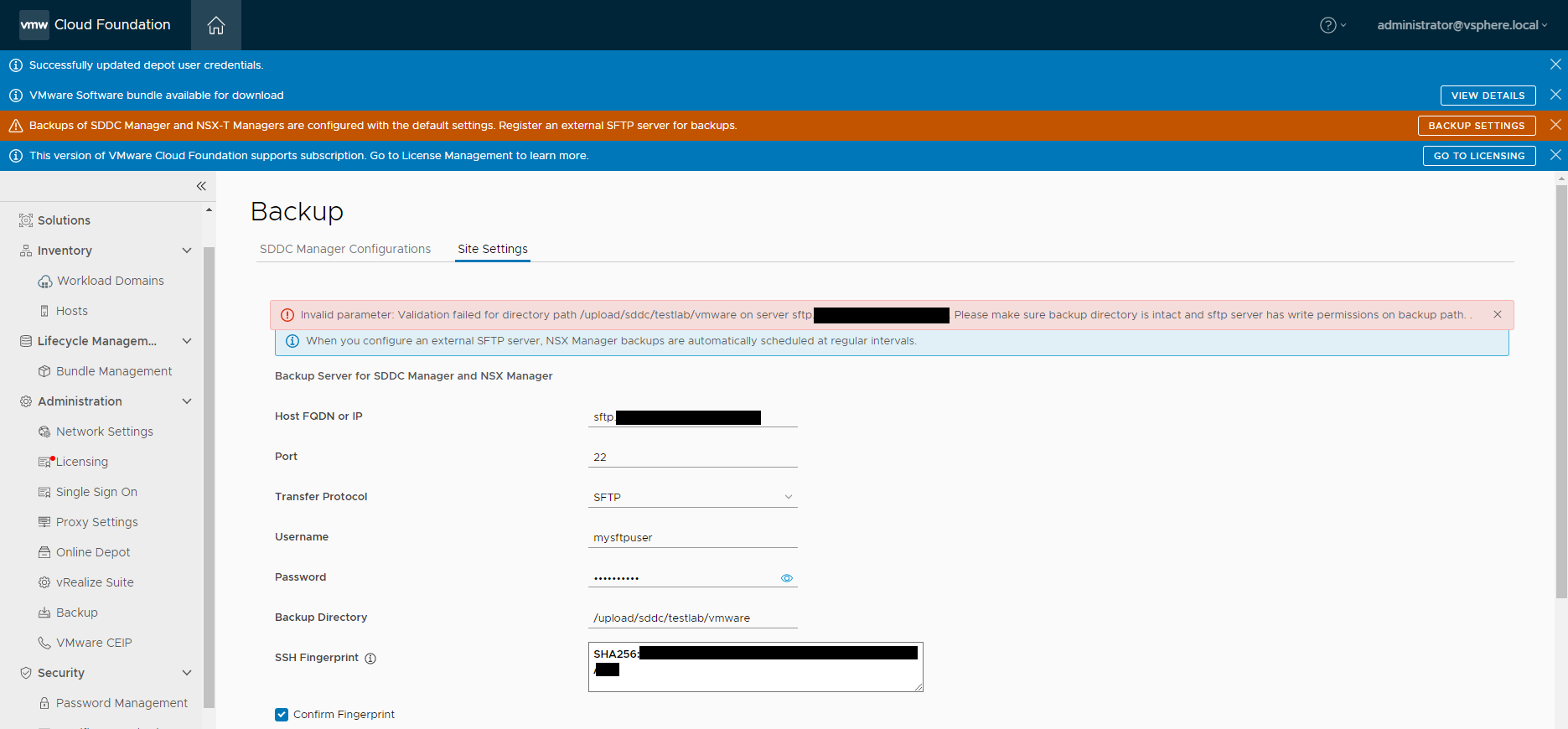
Domainmanager.log viser følgende feil:
2023-02-14T14:01:06.035+0000 DEBUG [vcf_om,8afed32d4e774023,5787] [c.v.e.s.c.u.InMemoryHostKeyRepository,http-nio-127.0.0.1-7300-exec-10] Key <hidden> of type ecdsa-sha2-nistp256 for host sftp.domain.com not found in [KeySpec(host=sftp.domain.com, port=Optional[22], keyType=ssh-rsa, key=<hidden>)]
Cause
Ved å sjekke signaturalgoritmene som støttes av SFTP-serveren, ser en bruker at SSH-RSA ikke støttes på grunn av sikkerhetspolicyen:
[centos-admin@CENTOS-9 ~]$ cat /etc/crypto-policies/back-ends/openssh.config
Ciphers aes256-gcm@openssh.com,chacha20-poly1305@openssh.com,aes256-ctr,aes256-cbc,aes128-gcm@openssh.com,aes128-ctr,aes128-cbc
MACs hmac-sha2-256-etm@openssh.com,hmac-sha1-etm@openssh.com,umac-128-etm@openssh.com,hmac-sha2-512-etm@openssh.com,hmac-sha2-256,hmac-sha1,umac-128@openssh.com,hmac-sha2-512
GSSAPIKexAlgorithms gss-curve25519-sha256-,gss-nistp256-sha256-,gss-group14-sha256-,gss-group16-sha512-,gss-gex-sha1-,gss-group14-sha1-
KexAlgorithms curve25519-sha256,curve25519-sha256@libssh.org,ecdh-sha2-nistp256,ecdh-sha2-nistp384,ecdh-sha2-nistp521,diffie-hellman-group-exchange-sha256,diffie-hellman-group14-sha256,diffie-hellman-group16-sha512,diffie-hellman-group18-sha512,diffie-hellman-group-exchange-sha1,diffie-hellman-group14-sha1
PubkeyAcceptedAlgorithms ecdsa-sha2-nistp256,ecdsa-sha2-nistp256-cert-v01@openssh.com,sk-ecdsa-sha2-nistp256@openssh.com,sk-ecdsa-sha2-nistp256-cert-v01@openssh.com,ecdsa-sha2-nistp384,ecdsa-sha2-nistp384-cert-v01@openssh.com,ecdsa-sha2-nistp521,ecdsa-sha2-nistp521-cert-v01@openssh.com,ssh-ed25519,ssh-ed25519-cert-v01@openssh.com,sk-ssh-ed25519@openssh.com,sk-ssh-ed25519-cert-v01@openssh.com,rsa-sha2-256,rsa-sha2-256-cert-v01@openssh.com,rsa-sha2-512,rsa-sha2-512-cert-v01@openssh.com,ssh-rsa,ssh-rsa-cert-v01@openssh.com
CASignatureAlgorithms ecdsa-sha2-nistp256,sk-ecdsa-sha2-nistp256@openssh.com,ecdsa-sha2-nistp384,ecdsa-sha2-nistp521,ssh-ed25519,sk-ssh-ed25519@openssh.com,rsa-sha2-256,rsa-sha2-512
RequiredRSASize 2048
[centos-admin@CENTOS-9 ~]$ update-crypto-policies --show
DEFAULT
Resolution
Hvis du vil løse dette problemet, legger du til ssh-rsa Til OpenSSH-konfigurasjonsfilen:
-
Angi ikonet
crypto-policiestil eldre modus.[centos-admin@CENTOS-9 ~]$ update-crypto-policies --set LEGACY -
Se
openssh.config(sikre atssh-rsaer lagt til).[centos-admin@CENTOS-9 ~]$ cat /etc/crypto-policies/back-ends/openssh.config Ciphers aes256-gcm@openssh.com,chacha20-poly1305@openssh.com,aes256-ctr,aes256-cbc,aes128-gcm@openssh.com,aes128-ctr,aes128-cbc MACs hmac-sha2-256-etm@openssh.com,hmac-sha1-etm@openssh.com,umac-128-etm@openssh.com,hmac-sha2-512-etm@openssh.com,hmac-sha2-256,hmac-sha1,umac-128@openssh.com,hmac-sha2-512 GSSAPIKexAlgorithms gss-curve25519-sha256-,gss-nistp256-sha256-,gss-group14-sha256-,gss-group16-sha512-,gss-gex-sha1-,gss-group14-sha1- KexAlgorithms curve25519-sha256,curve25519-sha256@libssh.org,ecdh-sha2-nistp256,ecdh-sha2-nistp384,ecdh-sha2-nistp521,diffie-hellman-group-exchange-sha256,diffie-hellman-group14-sha256,diffie-hellman-group16-sha512,diffie-hellman-group18-sha512,diffie-hellman-group-exchange-sha1,diffie-hellman-group14-sha1 PubkeyAcceptedAlgorithms ecdsa-sha2-nistp256,ecdsa-sha2-nistp256-cert-v01@openssh.com,sk-ecdsa-sha2-nistp256@openssh.com,sk-ecdsa-sha2-nistp256-cert-v01@openssh.com,ecdsa-sha2-nistp384,ecdsa-sha2-nistp384-cert-v01@openssh.com,ecdsa-sha2-nistp521,ecdsa-sha2-nistp521-cert-v01@openssh.com,ssh-ed25519,ssh-ed25519-cert-v01@openssh.com,sk-ssh-ed25519@openssh.com,sk-ssh-ed25519-cert-v01@openssh.com,rsa-sha2-256,rsa-sha2-256-cert-v01@openssh.com,rsa-sha2-512,rsa-sha2-512-cert-v01@openssh.com,ssh-rsa,ssh-rsa-cert-v01@openssh.com CASignatureAlgorithms ecdsa-sha2-nistp256,sk-ecdsa-sha2-nistp256@openssh.com,ecdsa-sha2-nistp384,ecdsa-sha2-nistp521,ssh-ed25519,sk-ssh-ed25519@openssh.com,rsa-sha2-256,rsa-sha2-512,ssh-rsa RequiredRSASize 2048 -
Prøv å konfigurere sikkerhetskopieringen på nytt i SDDC Manager.
Affected Products
VMWare Cloud on Dell EMC VxRail E560F, VMWare Cloud on Dell EMC VxRail E560N, VxRail E560 VCF, VxRail E560F VCF, VxRail E560N VCF, VxRail G560 VCF, VxRail G560F VCF, VxRail P570 VCF, VxRail P570F VCF, VxRail P580N VCF, VxRail S570 VCF
, VxRail V570 VCF, VxRail V570F VCF
...
Products
VxRail V570F VCFArticle Properties
Article Number: 000209752
Article Type: Solution
Last Modified: 17 Jul 2025
Version: 4
Find answers to your questions from other Dell users
Support Services
Check if your device is covered by Support Services.