VxRail 上的 VCF:備份組態失敗,並顯示無效參數
Summary: 備份組態失敗,並傳回無效參數:目錄路徑驗證失敗。請確保備份目錄完整,且 SFTP 伺服器在備份路徑上具有寫入權限。
This article applies to
This article does not apply to
This article is not tied to any specific product.
Not all product versions are identified in this article.
Symptoms
使用者套用 SFTP 備份組態後,使用者可能會看到傳回以下錯誤:
Invalid parameter: Validation failed for directory path /path/to/backup/location" on server sftp.domain.com. Please make sure backup directory is intact and sftp server has write permissions on backup path.
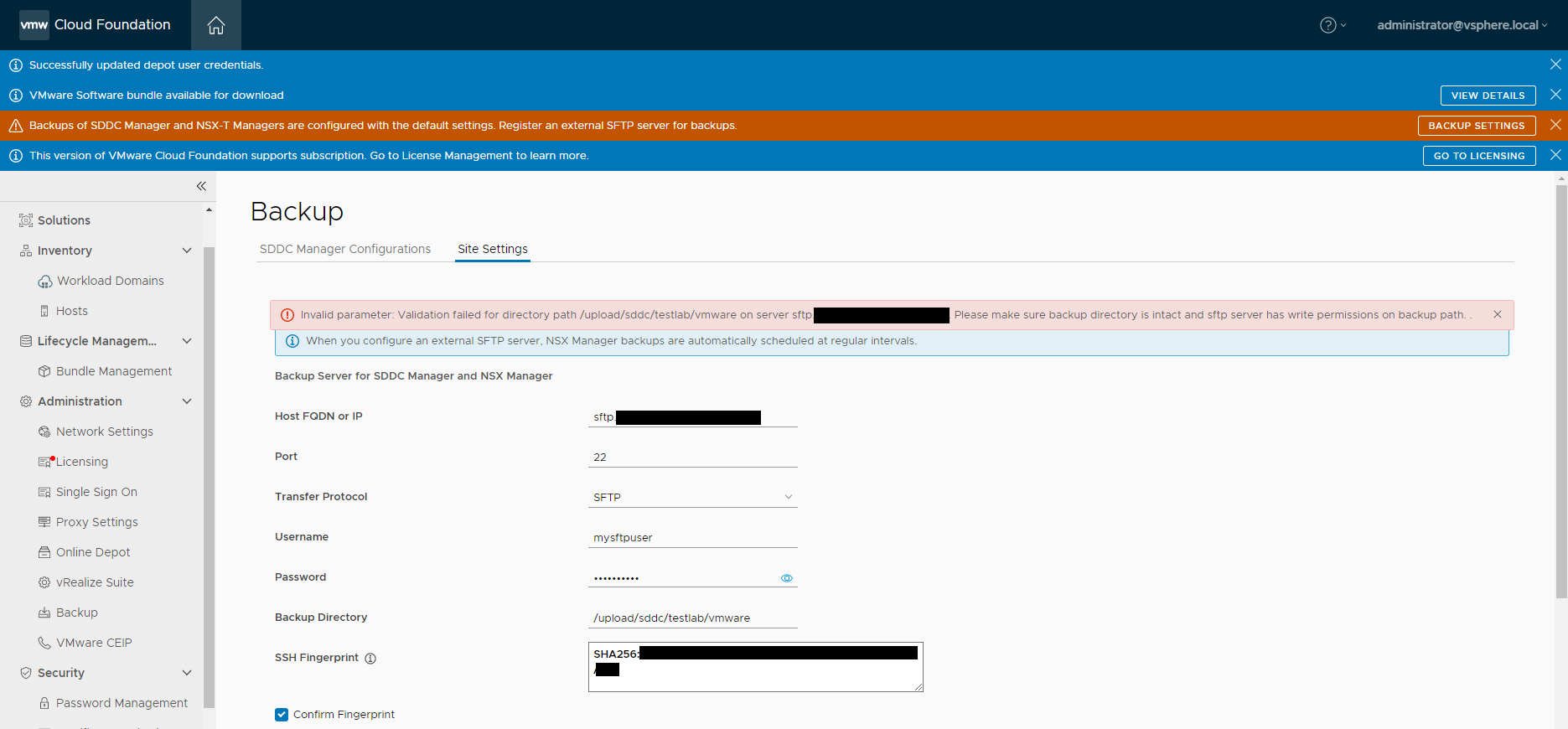
Domainmanager.log 顯示以下錯誤:
2023-02-14T14:01:06.035+0000 DEBUG [vcf_om,8afed32d4e774023,5787] [c.v.e.s.c.u.InMemoryHostKeyRepository,http-nio-127.0.0.1-7300-exec-10] Key <hidden> of type ecdsa-sha2-nistp256 for host sftp.domain.com not found in [KeySpec(host=sftp.domain.com, port=Optional[22], keyType=ssh-rsa, key=<hidden>)]
Cause
檢查 SFTP 伺服器支援的簽章演算法時,使用者發現由於設定的安全性原則,不支援 SSH-RSA:
[centos-admin@CENTOS-9 ~]$ cat /etc/crypto-policies/back-ends/openssh.config
Ciphers aes256-gcm@openssh.com,chacha20-poly1305@openssh.com,aes256-ctr,aes256-cbc,aes128-gcm@openssh.com,aes128-ctr,aes128-cbc
MACs hmac-sha2-256-etm@openssh.com,hmac-sha1-etm@openssh.com,umac-128-etm@openssh.com,hmac-sha2-512-etm@openssh.com,hmac-sha2-256,hmac-sha1,umac-128@openssh.com,hmac-sha2-512
GSSAPIKexAlgorithms gss-curve25519-sha256-,gss-nistp256-sha256-,gss-group14-sha256-,gss-group16-sha512-,gss-gex-sha1-,gss-group14-sha1-
KexAlgorithms curve25519-sha256,curve25519-sha256@libssh.org,ecdh-sha2-nistp256,ecdh-sha2-nistp384,ecdh-sha2-nistp521,diffie-hellman-group-exchange-sha256,diffie-hellman-group14-sha256,diffie-hellman-group16-sha512,diffie-hellman-group18-sha512,diffie-hellman-group-exchange-sha1,diffie-hellman-group14-sha1
PubkeyAcceptedAlgorithms ecdsa-sha2-nistp256,ecdsa-sha2-nistp256-cert-v01@openssh.com,sk-ecdsa-sha2-nistp256@openssh.com,sk-ecdsa-sha2-nistp256-cert-v01@openssh.com,ecdsa-sha2-nistp384,ecdsa-sha2-nistp384-cert-v01@openssh.com,ecdsa-sha2-nistp521,ecdsa-sha2-nistp521-cert-v01@openssh.com,ssh-ed25519,ssh-ed25519-cert-v01@openssh.com,sk-ssh-ed25519@openssh.com,sk-ssh-ed25519-cert-v01@openssh.com,rsa-sha2-256,rsa-sha2-256-cert-v01@openssh.com,rsa-sha2-512,rsa-sha2-512-cert-v01@openssh.com,ssh-rsa,ssh-rsa-cert-v01@openssh.com
CASignatureAlgorithms ecdsa-sha2-nistp256,sk-ecdsa-sha2-nistp256@openssh.com,ecdsa-sha2-nistp384,ecdsa-sha2-nistp521,ssh-ed25519,sk-ssh-ed25519@openssh.com,rsa-sha2-256,rsa-sha2-512
RequiredRSASize 2048
[centos-admin@CENTOS-9 ~]$ update-crypto-policies --show
DEFAULT
Resolution
若要解決此問題,請新增 ssh-rsa 至 OpenSSH 組態檔案:
-
設定
crypto-policies轉為傳統模式。[centos-admin@CENTOS-9 ~]$ update-crypto-policies --set LEGACY -
查
openssh.config(確保ssh-rsa已添加)。[centos-admin@CENTOS-9 ~]$ cat /etc/crypto-policies/back-ends/openssh.config Ciphers aes256-gcm@openssh.com,chacha20-poly1305@openssh.com,aes256-ctr,aes256-cbc,aes128-gcm@openssh.com,aes128-ctr,aes128-cbc MACs hmac-sha2-256-etm@openssh.com,hmac-sha1-etm@openssh.com,umac-128-etm@openssh.com,hmac-sha2-512-etm@openssh.com,hmac-sha2-256,hmac-sha1,umac-128@openssh.com,hmac-sha2-512 GSSAPIKexAlgorithms gss-curve25519-sha256-,gss-nistp256-sha256-,gss-group14-sha256-,gss-group16-sha512-,gss-gex-sha1-,gss-group14-sha1- KexAlgorithms curve25519-sha256,curve25519-sha256@libssh.org,ecdh-sha2-nistp256,ecdh-sha2-nistp384,ecdh-sha2-nistp521,diffie-hellman-group-exchange-sha256,diffie-hellman-group14-sha256,diffie-hellman-group16-sha512,diffie-hellman-group18-sha512,diffie-hellman-group-exchange-sha1,diffie-hellman-group14-sha1 PubkeyAcceptedAlgorithms ecdsa-sha2-nistp256,ecdsa-sha2-nistp256-cert-v01@openssh.com,sk-ecdsa-sha2-nistp256@openssh.com,sk-ecdsa-sha2-nistp256-cert-v01@openssh.com,ecdsa-sha2-nistp384,ecdsa-sha2-nistp384-cert-v01@openssh.com,ecdsa-sha2-nistp521,ecdsa-sha2-nistp521-cert-v01@openssh.com,ssh-ed25519,ssh-ed25519-cert-v01@openssh.com,sk-ssh-ed25519@openssh.com,sk-ssh-ed25519-cert-v01@openssh.com,rsa-sha2-256,rsa-sha2-256-cert-v01@openssh.com,rsa-sha2-512,rsa-sha2-512-cert-v01@openssh.com,ssh-rsa,ssh-rsa-cert-v01@openssh.com CASignatureAlgorithms ecdsa-sha2-nistp256,sk-ecdsa-sha2-nistp256@openssh.com,ecdsa-sha2-nistp384,ecdsa-sha2-nistp521,ssh-ed25519,sk-ssh-ed25519@openssh.com,rsa-sha2-256,rsa-sha2-512,ssh-rsa RequiredRSASize 2048 -
在 SDDC Manager 中重試備份組態。
Affected Products
VMWare Cloud on Dell EMC VxRail E560F, VMWare Cloud on Dell EMC VxRail E560N, VxRail E560 VCF, VxRail E560F VCF, VxRail E560N VCF, VxRail G560 VCF, VxRail G560F VCF, VxRail P570 VCF, VxRail P570F VCF, VxRail P580N VCF, VxRail S570 VCF
, VxRail V570 VCF, VxRail V570F VCF
...
Products
VxRail V570F VCFArticle Properties
Article Number: 000209752
Article Type: Solution
Last Modified: 17 Jul 2025
Version: 4
Find answers to your questions from other Dell users
Support Services
Check if your device is covered by Support Services.