Dell Networking - PVID Mismatch Reported on HP Switch connected to Dell PowerSwitch by a trunked port-channel
Summary: PVID Mismatch Reported on HP Switch Connected to Dell PowerSwitch models running OS9 or OS10 by a trunked port-channel.
This article applies to
This article does not apply to
This article is not tied to any specific product.
Not all product versions are identified in this article.
Symptoms
Affected Version
All Dell PowerSwitch models running OS9 or OS10Affected Platform
All OS9 & OS10 platformsDescription
HP Switch showed the following warning messages when it is connected to a Dell PowerSwitch by a trunked port.
Cause
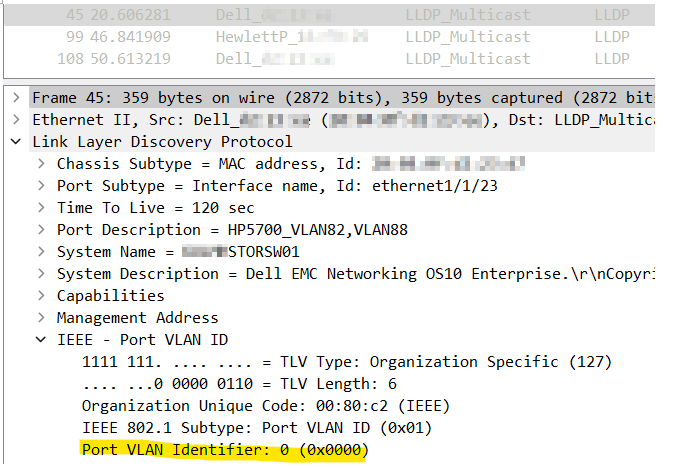
PVID (native VLAN) is reported as 0 on the Dell switch’s port-channel trunk link while reported as 1 on the HP switch.
It depends on the vendor what value is used in the LLDP PVID for a port-channel trunk link.
Here is the LLDP packet from the HP switch as shown in Wireshark.
PVID (native VLAN) is reported as 1 on the HP switch’s port-channel trunk link.

Here is the LLDP packet from the DELL (OS10) switch as shown in Wireshark.
PVID (native VLAN) is reported as 0 on the link between the Dell switch and the HP switch’s port-channel trunk link.
It depends on the vendor what value is used in the LLDP PVID for a port-channel trunk link.
Here is the LLDP packet from the HP switch as shown in Wireshark.
PVID (native VLAN) is reported as 1 on the HP switch’s port-channel trunk link.
Here is the LLDP packet from the DELL (OS10) switch as shown in Wireshark.
PVID (native VLAN) is reported as 0 on the link between the Dell switch and the HP switch’s port-channel trunk link.
Resolution
Workaround
Disable TLV PVID in LLDPOS9
no “advertise dot1-tlv port-vlan-id
OS10
no lldp tlv-select dot1tlv port-vlan-id
Fix
None - this is expected behavior.
Affected Products
S Series, OS9, PowerSwitch S3048-ON, PowerSwitch S4048-ON, PowerSwitch S4810P, PowerSwitch S4810-ON, PowerSwitch S4820T, PowerSwitch S5000, PowerSwitch S6000, PowerSwitch S6000 ON, C1048P Port Extender, C9000 Series Line Cards
, C9010 Modular Chassis Switch, Dell EMC Networking MX5108n, Dell EMC Networking MX9116n, PowerSwitch S4048T-ON, PowerSwitch S4112F-ON/S4112T-ON, PowerSwitch S4128F-ON/S4128T-ON, PowerSwitch S4148F-ON/S4148T-ON/S4148FE-ON, PowerSwitch S4148U-ON, PowerSwitch S4248FB-ON /S4248FBL-ON, PowerSwitch S5048F-ON, PowerSwitch S5148F-ON, PowerSwitch S5212F-ON, PowerSwitch S5224F-ON, PowerSwitch S5232F-ON, PowerSwitch S5248F-ON, PowerSwitch S5296F-ON, PowerSwitch S5448F-ON, PowerSwitch S6010-ON, PowerSwitch S6100-ON, PowerSwitch Z9100-ON, PowerSwitch Z9264F-ON, PowerSwitch Z9332F-ON, PowerSwitch Z9432F-ON, SmartFabric OS10 Software
...
Article Properties
Article Number: 000209775
Article Type: Solution
Last Modified: 19 Sept 2023
Version: 2
Find answers to your questions from other Dell users
Support Services
Check if your device is covered by Support Services.