화면 재생률 변경 후 외부 디스플레이가 30초 동안 블랙아웃됨
Summary: Latitude 또는 Precision 노트북에서 화면 재생률을 변경한 후 모니터가 USB Type-C MFDP(Multi-Function DisplayPort)를 사용하여 도크에 연결되어 있는 외부 모니터에 대해 알아봅니다.
This article applies to
This article does not apply to
This article is not tied to any specific product.
Not all product versions are identified in this article.
Symptoms
영향을 받는 제품:
- WD19
- WD19TB
- WD19DC
- WD22TB4
해당되는 플랫폼:
- Latitude 5340
- Latitude 5540
- Latitude 7340
- Precision 3580
- Precision 3581
MST(Multi-Stream Transport) 및 DSC(Display Stream Compression) 모니터를 WD19, WD19TB, WD19DC 또는 USB Type-C MFDP(Multi-Function DisplayPort)WD22TB4 연결합니다. 화면 재생률을 변경할 때 모니터에 30초 후에만 디스플레이가 표시될 수 있습니다.

Cause
Parade PS8469에는 8비트 및 10비트 상호 정렬 기능이 제한되어 있어 잘못된 FEC 프로토콜을 모니터로 전송하여 문제가 발생합니다.
Resolution
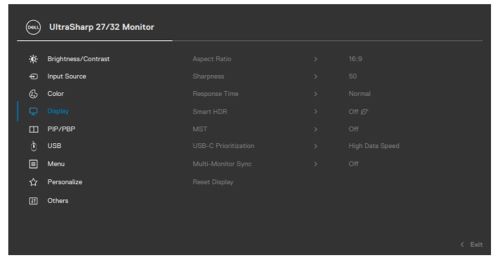
MST를 사용하는 모니터에는 전체 크기 DP1.4 포트 연결을 사용합니다. 또한 MST 기능이 있는 DSC 모니터를 USB Type-C MFDP에 연결하면 모니터 OSD(On-Screen Display) 메뉴 옵션에서 MST가 비활성화됩니다.
Affected Products
Dell Dock WD19, Dell Performance Dock - WD19DC, Dell Thunderbolt Dock - WD19TB, Latitude 5340, Latitude 7340, Latitude 5540, Precision 3580, Precision 3581, Dell Thunderbolt Dock – WD22TB4Article Properties
Article Number: 000210214
Article Type: Solution
Last Modified: 29 Jul 2025
Version: 5
Find answers to your questions from other Dell users
Support Services
Check if your device is covered by Support Services.