Dell Networking Force10 OS9 스위치를 FTP 서버로 구성하는 방법
Summary: 이 문서에서는 Dell OS9 스위치를 FTP 서버로 사용하여 로컬 플래시에서 파일을 업로드하거나 다운로드하는 방법에 대해 설명합니다.
This article applies to
This article does not apply to
This article is not tied to any specific product.
Not all product versions are identified in this article.
Instructions
Dell Networking OS9은 FTP 서버 기능을 지원합니다. 이는 스위치의 코어 덤프 또는 패킷 캡처와 같은 파일을 로컬 머신으로 전송하거나 다시 로컬 머신으로 전송하는 데 사용할 수 있습니다.
샘플 구성
구성 구문
FTP를 통해 스위치에 액세스하기 위해 winscp와 같은 유틸리티를 사용합니다.
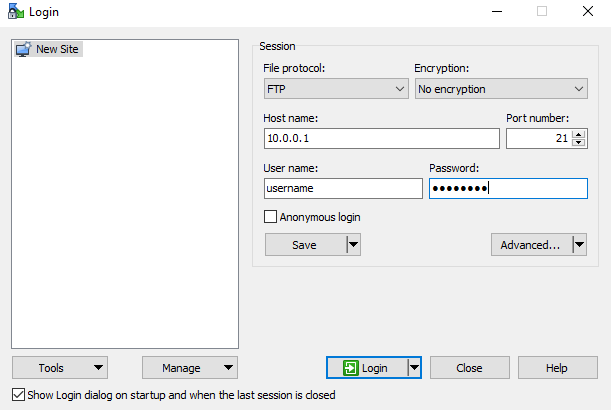
샘플 구성
DELLEMC#
DELLEMC#configure
DELLEMC(conf)#ftp-server topdir flash:
DELLEMC(conf)#ftp-server username <username> password <password>
DELLEMC(conf)#ftp-server enable
참고: FTP 사용자는 ftp-server topdir에 지정된 디렉토리에 대한 읽기 및 쓰기 권한을 모두 얻습니다. 파일을 스위치 안팎으로 복사할 수 있습니다.
구성 구문
| 명령 | 구문 |
|---|---|
DELLEMC#configure |
구성 모드로 들어갑니다. |
DELLEMC(conf)#ftp-server enable |
FTP 서버 기능을 활성화합니다. |
DELLEMC(conf)#ftp-server username <username> password <password> |
FTP 사용자 이름 및 암호를 구성합니다. 사용자 이름과 비밀번호는 40자까지 입력할 수 있습니다. |
DELLEMC(conf)#ftp-server username <username> password 7 <password> |
7 다음과 같이 HIDDEN 암호를 지정합니다. 암호는 구성에서 암호화됩니다(선택 사항). |
DELLEMC(conf)#ftp-server topdir flash: |
FTP가 액세스할 디렉토리를 지정합니다. 아무 것도 지정하지 않는 경우 |
DELLEMC(conf)# ftp-server vrf <any/management> |
(선택 사항) 모든 vrf에 대한 FTP 서버 액세스를 허용하려면 any를 지정합니다. FTP 서버 액세스가 관리 vrf로 제한될 때 관리가 사용됩니다. |
FTP를 통해 스위치에 액세스하기 위해 winscp와 같은 유틸리티를 사용합니다.
Affected Products
OS9Article Properties
Article Number: 000211113
Article Type: How To
Last Modified: 31 Jan 2024
Version: 2
Find answers to your questions from other Dell users
Support Services
Check if your device is covered by Support Services.