Dell Networking Force10 OS9でスイッチをFTPサーバーとして設定する方法
Summary: この記事では、ローカル フラッシュからファイルをアップロードまたはダウンロードするために、FTPサーバーとしてDELL OS9スイッチを使用する方法について説明します。
This article applies to
This article does not apply to
This article is not tied to any specific product.
Not all product versions are identified in this article.
Instructions
Dell Networking OS9は、FTPサーバー機能をサポートしています。これは、スイッチ内のコアダンプやパケットキャプチャなどのファイルをローカルマシンに転送したり、その逆に転送したりするために使用できます。
構成例
構成構文
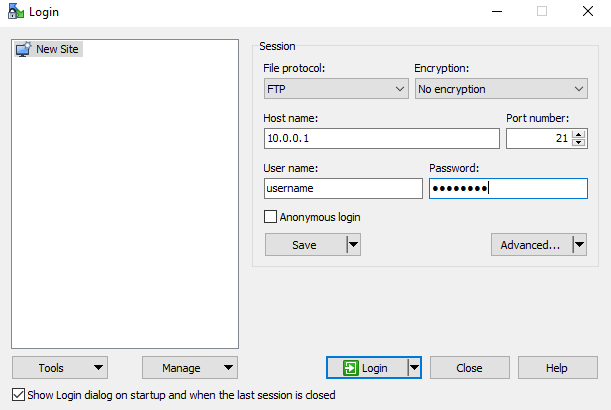
winscpなどのユーティリティーを使用し、FTPを使用してスイッチにアクセスします。
構成例
DELLEMC#
DELLEMC#configure
DELLEMC(conf)#ftp-server topdir flash:
DELLEMC(conf)#ftp-server username <username> password <password>
DELLEMC(conf)#ftp-server enable
メモ: FTP ユーザーは、ftp-server topdir で指定されたディレクトリに対する読み取りと書き込みの両方の許可を取得します。スイッチとの間でファイルをコピーできます。
構成構文
| コマンド | 構文 |
|---|---|
DELLEMC#configure |
設定モードに入ります。 |
DELLEMC(conf)#ftp-server enable |
FTPサーバー機能を有効にします。 |
DELLEMC(conf)#ftp-server username <username> password <password> |
FTPユーザー名とパスワードを設定します。 ユーザー名とパスワードの長さは40文字です。 |
DELLEMC(conf)#ftp-server username <username> password 7 <password> |
7 HIDDEN パスワードを次のように指定します。パスワードは設定で暗号化されます(オプション)。 |
DELLEMC(conf)#ftp-server topdir flash: |
FTPがアクセスするディレクトリーを指定します。何も指定しない場合 |
DELLEMC(conf)# ftp-server vrf <any/management> |
(オプション)任意のVRFへのFTPサーバ アクセスを許可するには、anyを指定します。 管理は、FTPサーバー アクセスが管理vrfに制限されている場合に使用されます。 |
winscpなどのユーティリティーを使用し、FTPを使用してスイッチにアクセスします。
Affected Products
OS9Article Properties
Article Number: 000211113
Article Type: How To
Last Modified: 31 Jan 2024
Version: 2
Find answers to your questions from other Dell users
Support Services
Check if your device is covered by Support Services.