M.2 NVMe SSD Sorting Issue with Intel VROC (Virtual RAID on CPU) Applications
Summary: This article provides workaround to identify the NVMe SSD ports location on Dell Precision 5860 Tower and Dell Precision 7960 Tower.
Symptoms
The NVMe SSD ports information shown in Intel Virtual RAID on CPU (Intel VROC) application does not include the Front or Rear information of SSD ports location (Figure 1).
This issue is seen when NVMe SSD is installed to Hot Swap Backplane (HSBP).
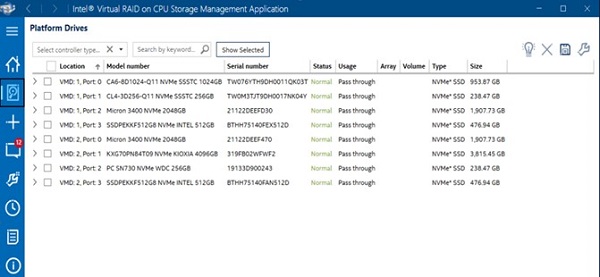
(Figure 1. Missing Front or Rear information of SSD ports location)
Affected Models:
- Precision 5860 Tower
- Precision 7960 Tower
Cause
Intel current VROC application has no NVMe SSD ports location.
Resolution
Workaround to identify SSD location on Precision 5860 Tower or Precision 7960 Tower
It is recommended to check SSD's port labels listed in the Intel-VROC Pre-OS or UEFI Human Interface Infrastructure (HII) which is built into system BIOS setup screen to identify SSD location.
It is not recommended to open the computer’s chassis to check the motherboard and HSBP labels of NVMe ports for SSD location.
See the following table for the ports label, mapping of motherboard, and HSBP silkscreen labels.
- Connect two M.2 SSDs through HSBP and Front NVME 0 and 1 port. The SSD port will show as Port 3:0 and Port 3:1 in Intel-VROC PreOS or UEFI HII.
- Connect two M.2 SSD through HSBP and Rear NVME 2-3 port. The SSD port will show as Port 2:2 and Port 2:3 in Intel-VROC PreOS or UEFI HII (Figure 2).
| Motherboard Silkscreen | PEG
port |
HSBP board Silkscreen | |
| HSBP 0/2 | HSBP 1/3 | ||
| FRONT NVME 2-3 | PE3 | Port 3:2 | Port 3:3 |
| FRONT NVME 0-1 | Port 3:0 | Port 3:1 | |
| FRONT NVME 2-3 | PE2 | Port 2:2 | Port 2:3 |
| FRONT NVME 0-1 | Port 2:0 | Port 2:1 | |
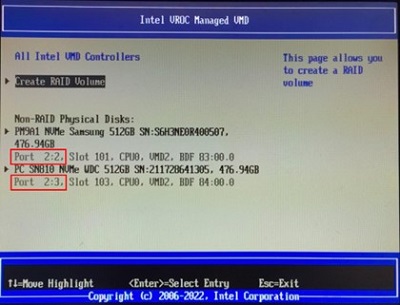
(Figure 2. The SSD port shown in Intel-VROC PreOS or UEFI HII)
Resolution
For a long-term resolution, Intel plans to add drives location customization features on the next generation of version 8.5 that will be released around the end of 2023.