NetWorker: 새 클라이언트 생성이 완료되지 않고 "is not a valid hostname as it cannot be resolved in DNS" 메시지가 표시됩니다.
Summary: NetWorker 19.7.0.3에서 새 클라이언트 속성을 통해 클라이언트를 추가해도 완료되지 않고 "Name is not a valid hostname is not a valid hostname as is not be resolved in DNS. DNS 또는 호스트 파일에 추가하고 NetWorker 서버의 DNS 캐시(dbgcommand -p FlushDnsCache)를 플러시하십시오." ...
This article applies to
This article does not apply to
This article is not tied to any specific product.
Not all product versions are identified in this article.
Symptoms
NetWorker 19.7.0.3에서 새 클라이언트 속성을 통해 클라이언트 를 추가해도 완료되지 않고 다음 오류가 표시됩니다.
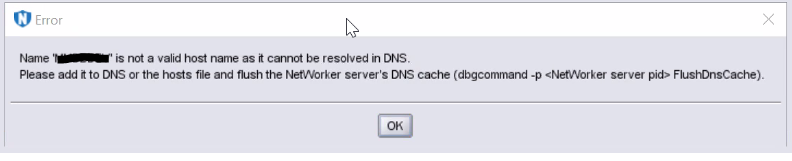
그림 1: 오류 메시지 스크린샷
Name  is not a valid host name as it cannot be resolved in DNS.
Please add it to DNS or the hosts file and flush the NetWorker server's DNS cache (dbgcommand -p  FlushDnsCache).
그림 1: 오류 메시지 스크린샷
Cause
호스트 이름이 DNS 또는 'hosts' 파일을 통해 이름 확인에 실패합니다.
호스트 이름이 해결되더라도 이 오류 메시지가 이전에 발생한 경우 NetWorker DNS Cache로 인해 클라이언트가 추가되지 않습니다.
Resolution
DNS(정방향 및 역방향 항목)에 클라이언트 호스트 이름을 추가하거나 형식을 사용하여 'hosts' 파일에 추가합니다.
IP Address [space/tab] FQDN [space/tab] Short Name
아래 단계에 따라 NetWorker DNS 캐시를 "플러시"합니다.
- 아래 명령을 사용하여 'nsrd' 및 'nsrexecd' 프로세스의 PID를 가져옵니다.
Windows:
tasklist | findstr nsrd.exe
tasklist | findstr nsrexecd.exe
Linux:
ps -e | grep nsrd
ps -e | grep nsrexecd
- 'nsrd' 및 'nsrexecd'의 PID에 대해 아래 명령을 실행하고 다음과 같이 스위치를 사용합니다.
dbgcommand -p FlushDnsCache
Article Properties
Article Number: 000212659
Article Type: Solution
Last Modified: 29 Jun 2023
Version: 3
Find answers to your questions from other Dell users
Support Services
Check if your device is covered by Support Services.