PowerEdge: Deleting a Redfish Subscription in iDRAC9 Using API in Postman
Summary: This article provides a step-by-step guide on deleting Redfish subscriptions (not disabling Redfish entirely) in iDRAC9 using API.
This article applies to
This article does not apply to
This article is not tied to any specific product.
Not all product versions are identified in this article.
Instructions
The steps provided below are to remove existing Redfish subscriptions in iDRAC9. Redfish remains enabled.
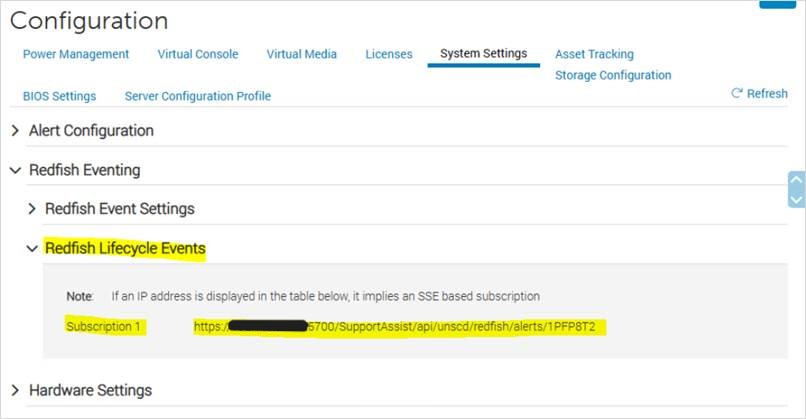
Figure 1: Configuration before removing Redfish subscriptions
Example:

Figure 3: Subscription ID is as indicated.

Figure 4: Use the DELETE function.

Figure 5: Specify the iDRAC username and password in the Authorization tab.
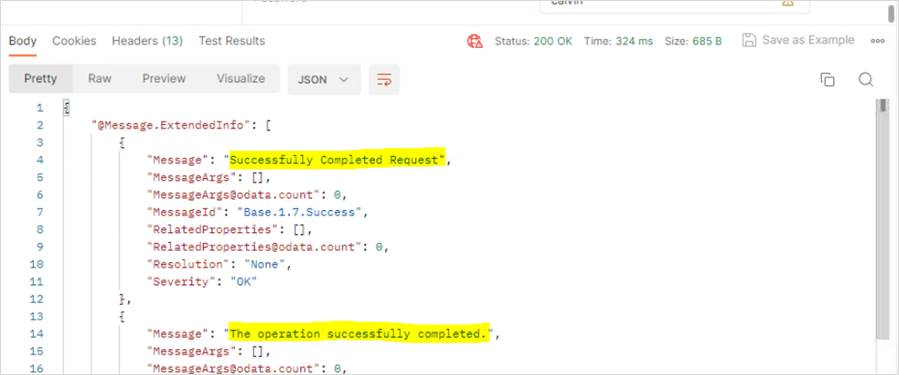
Figure 6: "Successfully Completed Request" and "The operation successfully completed" are seen in the output.

Figure 7: Configuration after removing Redfish subscriptions
INSTRUCTIONS:
Before performing the changes:
Figure 1: Configuration before removing Redfish subscriptions
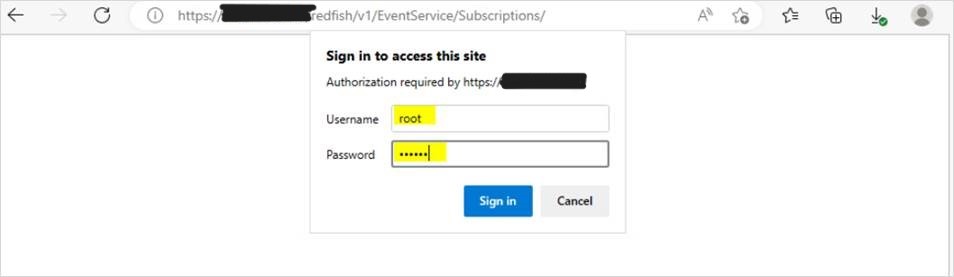
- Get the Subscription ID by typing the following in the browser:
https://<iDRAC IP>/redfish/v1/EventService/Subscriptions/
Specify the iDRAC credentials when prompted.
Figure 2: Add the iDRAC credentials at the prompt.
Example:
Subscription ID is as indicated:
Figure 3: Subscription ID is as indicated.
- Open the Postman Software:
-
- Use the DELETE function and type the following:
https://<iDRAC IP>/redfish/v1/EventService/Subscriptions/<subscription ID>
Figure 4: Use the DELETE function.
-
- Go to the Authorization tab, select Basic Auth as the Type, and specify the iDRAC username and password.
Figure 5: Specify the iDRAC username and password in the Authorization tab.
-
- Click Send, and "Successfully Completed Request" and "The operation successfully completed" are seen in the output.
Figure 6: "Successfully Completed Request" and "The operation successfully completed" are seen in the output.
- Logoff and log back in to iDRAC. Alternatively, you may also refresh the iDRAC page.
Figure 7: Configuration after removing Redfish subscriptions
Affected Products
iDRAC9Products
PowerEdge XR2, Poweredge C4140, PowerEdge C6420, PowerEdge C6520, PowerEdge C6525, PowerEdge C6615, PowerEdge C6620, PowerEdge R250, PowerEdge R260, PowerEdge R350, PowerEdge R360, PowerEdge R440, PowerEdge R450, PowerEdge R540, PowerEdge R550
, PowerEdge R640, PowerEdge R6415, PowerEdge R650, PowerEdge R650xs, PowerEdge R6515, PowerEdge R6525, PowerEdge R660, PowerEdge R660xs, PowerEdge R6615, PowerEdge R6625, PowerEdge R740, PowerEdge R740XD, PowerEdge R740XD2, PowerEdge R7415, PowerEdge R7425, PowerEdge R750, PowerEdge R750XA, PowerEdge R750xs, PowerEdge R7515, PowerEdge R7525, PowerEdge R760, PowerEdge R760XA, PowerEdge R760xd2, PowerEdge R760xs, PowerEdge R7615, PowerEdge R7625, PowerEdge R840, PowerEdge R860, PowerEdge R940, PowerEdge R940xa, PowerEdge R960, PowerEdge T150, PowerEdge T160, PowerEdge T340, PowerEdge T350, PowerEdge T360, PowerEdge T440, PowerEdge T550, PowerEdge T560, PowerEdge T640, PowerEdge XE2420, PowerEdge XE7420, PowerEdge XE7440, PowerEdge XE8545, PowerEdge XE8640, PowerEdge XE9640, PowerEdge XE9680, PowerEdge XR11, PowerEdge XR12, PowerEdge XR4510c, PowerEdge XR4520c, PowerEdge XR5610, PowerEdge XR7620, PowerEdge XR8610t, PowerEdge XR8620t
...
Article Properties
Article Number: 000215102
Article Type: How To
Last Modified: 02 Jan 2025
Version: 3
Find answers to your questions from other Dell users
Support Services
Check if your device is covered by Support Services.