NetWorker: REST API talepleri hata mesajıyla başarısız oluyor: HTTP durum 404 - Not Found "The Requested Resource is Not Available" (İstenen Kaynak Kullanılamıyor)
Summary: NetWorker REST API sorguları hata mesajıyla başarısız oluyor: HTTP durum 404 - Not Found "The Requested Resource is Not Available. (İstenen Kaynak Kullanılamıyor. Kaynak sunucu, hedef kaynak için geçerli bir temsil bulmadi veya mevcut olan kaynağı açıklamaya hazır değil." ...
This article applies to
This article does not apply to
This article is not tied to any specific product.
Not all product versions are identified in this article.
Symptoms
NetWorker REST API talepleri hata mesajıyla başarısız oluyor: HTTP durum 404 - Not Found "The Requested Resource is Not Available" (İstenen Kaynak Kullanılamıyor)
[root@NETWORKER_SERVER]:~# curl -ik GET -u **userid**:'***Password***' -H "Content-Type: application/json" 'https://NETWORKER_SERVER:9090/nwrestapi/v3/global/clients'
curl: (6) Could not resolve host: GET; Name or service not known
HTTP/1.1 404
Content-Type: text/html;charset=utf-8
Content-Language: en
Content-Length: 790
Date: Tue, 04 Jul 2023 12:11:41 GMT
Server: NSR SERVICES for Authentication
HTTP Status 404 – Not Foundbody {font-family:Tahoma,Arial,sans-serif;} h1, h2, h3, b {color:white;background-color:#525D76;} h1 {font-size:22px;} h2 {font-size:16px;} h3 {font-size:14px;} p {font-size:12px;} a {color:black;} .line {height:1px;background-color:#525D76;border:none;}
HTTP Status 404 – Not Found
Type Status Report
Message The requested resource [/nwrestapi/v3/global/clients] is not available
Description The origin server did not find a current representation for the target resource or is not willing to disclose that one exists.
Apache Tomcat/9.0.52 NetWorker sunucu yüklemesi için nwrestapi dizini eksik.
Linux: /nsr/authc/webapps/nwrestapi/

Windows: C:\Program Files\EMC NetWorker\nsr\authc-server\tomcat\webapps\nwrestapi
restapi.log mevcut değil veya güncellenmiyor:
Linux: /nsr/logs/restapi/restapi.log

Windows: C:\Program Files\EMC NetWorker\nsr\logs\restapi\restapi.log
Cause
nwrestapi yolu mevcut değil. REST API sorguları uç noktalardan herhangi birini bulamıyor veya diğer NetWorker veritabanlarından verinin nasıl görüntü oluşturması gerektiğiyle ilişkili değildir.
Resolution
nwrestapi, Java Runtime Environment kullanan NetWorker'ın kimlik doğrulama hizmetiyle birlikte yapılandırılmıştır. Kimlik doğrulamayı yapılandırırken Java ile ilgili olası sorunları önlemek için NetWorker Runtime Environment'ın (NRE) kullanılması önerilir. En son NRE paketleri , Dell Support NetWorker Drivers & Downloads (Dell Support NetWorker Sürücüleri ve İndirmeleri) sayfasından indirilebilir .
Linux:
Windows:
NOT: Birden fazla Java örneği yüklü olabilir. Örneğin, bir sunucuya hem NRE hem de Oracle JRE yüklenmiş olabilir. Yukarıdaki adım NetWorker'ın hangi Java yüklemesi olduğunu onaylar.
Linux:
- NetWorker sunucuda oturum açın ve köke geçiş:
sudo su -
- NRE'nin yüklü olduğunu ve NetWorker'ın hangi Java örneğini kullanmak üzere yapılandırıldığından emin olun:
rpm -qa | grep nre
cat /nsr/authc/conf/installrc

[root@networker-mc]:~# rpm -qa | grep nre
nre-8.0.15-1.x86_64
[root@networker-mc]:~#
[root@networker-mc]:~# cat /nsr/authc/conf/installrc
JAVA_HOME=/opt/nre/java/latest
NOT: Birden fazla Java örneği yüklü olabilir. Örneğin, bir sunucuya hem NRE hem de Oracle JRE yüklenmiş olabilir. Yukarıdaki adımlar NetWorker'ın hangi Java yüklemesi olduğunu onaylar.
- NetWorker authc sunucusunu yeniden yapılandırmak için aşağıdaki komut dosyasını çalıştırın.
/opt/nsr/authc-server/scripts/authc_configure.sh

[root@networker-mc]:~# /opt/nsr/authc-server/scripts/authc_configure.sh

Specify the directory where the Java Standard Edition Runtime Environment (JRE) software is installed [/opt/nre/java/latest]:

The installation process will install an Apache Tomcat instance. For optimum security, EMC NetWorker Authentication Service will use a non-root user (nsrtomcat) to start the Apache Tomcat instance.
If your system has special user security requirements, ensure that proper operational permissions are granted to this non-root user (nsrtomcat).
Please refer to NetWorker Installation Guide.

WARNING: Port 9090 is already in use.

Do you wish to specify a different port number [y]? n

The Apache Tomcat will use "networker-mc.emclab.local" as the host name.
The Apache Tomcat will use "9090" as the port number.

The NetWorker Authentication Service requires a keystore file to configure encryption and to provide SSL support.

EMC recommends that you specify a keystore password that has a minimum of six characters.

Do you want to use the existing keystore /nsr/authc/conf/authc.keystore [y]?

Specify password for the existing keystore:
The install will use the existing certificate "emcauthctomcat" for Apache Tomcat.
The install will use the existing certificate "emcauthcsaml" for Authentication Service.

Creating the installation log in /opt/nsr/authc-server/logs/install.log.

Performing initialization. Please wait...

The installation completed successfully.
NOT: Authc'u yeniden yüklemesi için NetWorker hizmetinin yeniden başlatılması gerekir. Bu, aşağıdaki systemctl komutlarıyla yapılabilir:
systemctl stop networker
and
systemctl start networker.
- Aşağıdaki klasörün oluşturulduğundan emin olun:
/nsr/authc/webapps/nwrestapi

[root@networker-mc]:~# ls -l /nsr/authc/webapps/nwrestapi/
total 0
drwx------. 2 nsrtomcat nsrtomcat  44 Jul  6 12:22 META-INF
drwx------. 3 nsrtomcat nsrtomcat  21 Jul  6 12:22 v1
drwx------. 3 nsrtomcat nsrtomcat  21 Jul  6 12:22 v2
drwx------. 3 nsrtomcat nsrtomcat  21 Jul  6 12:22 v3
drwx------. 6 nsrtomcat nsrtomcat 107 Jul  6 12:22 WEB-INF
- nwrestapi dizini oluşturulduysa REST API sorgularını çalıştırın.
Windows:
- NRE'nin yüklü olduğunu ve NetWorker'ın hangi Java örneğini kullanmak üzere yapılandırıldığından emin olun:
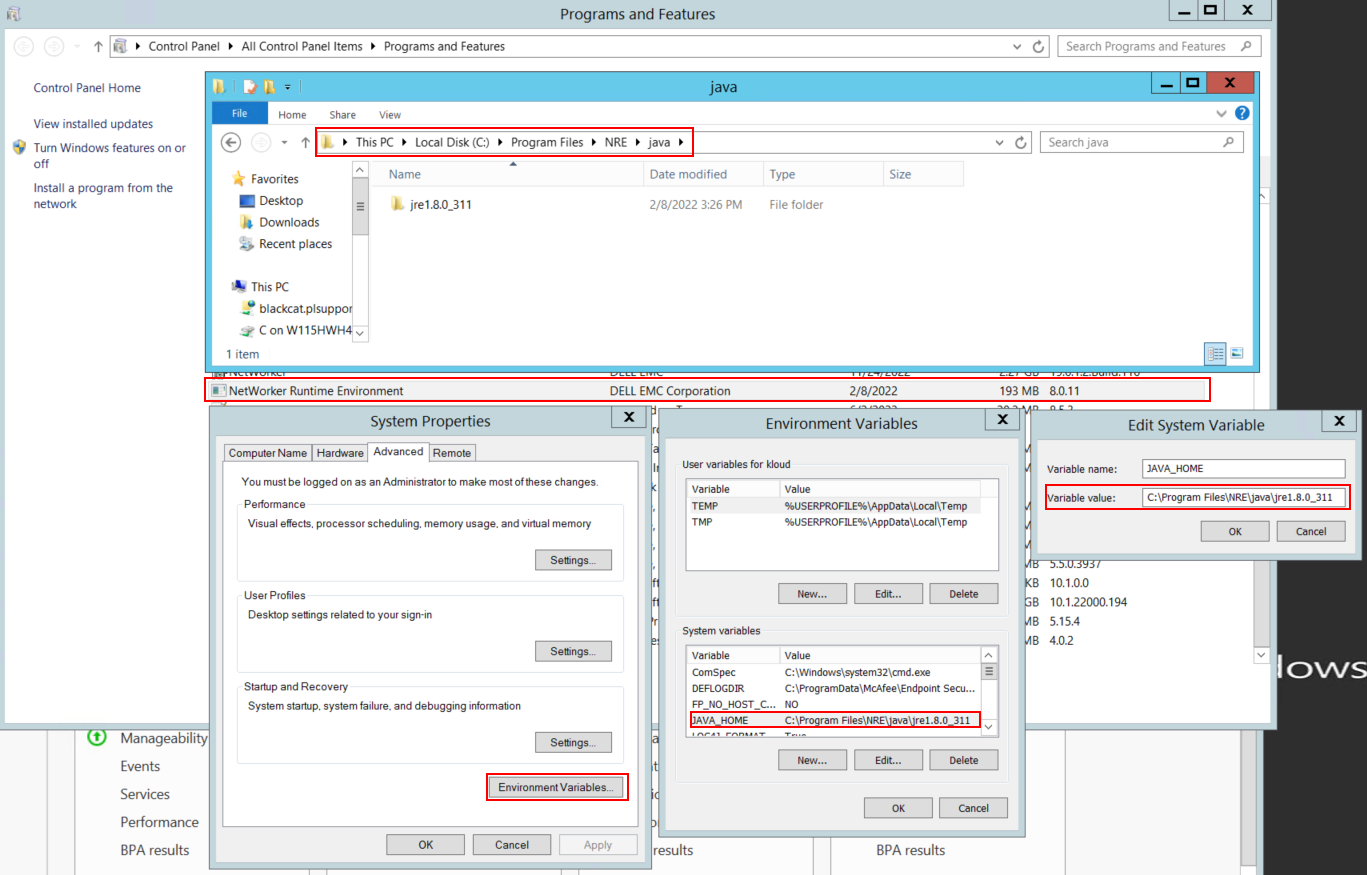
Şekil 1: NetWorker Java Örneği'nin hangilerini kullanıyor olduğunu onaylayın.
NOT: Birden fazla Java örneği yüklü olabilir. Örneğin, bir sunucuya hem NRE hem de Oracle JRE yüklenmiş olabilir. Yukarıdaki adım NetWorker'ın hangi Java yüklemesi olduğunu onaylar.
- NetWorker paketini kaldırma. Bu, NetWorker veritabanlarından veya yapılandırma kaynaklardan herhangi birini kaldırmaz.
- NetWorker'ı mevcut yükleme yolu üzerine yeniden yükleyin. NetWorker'ın yeniden yüklenmesi, NetWorker'ın kimlik doğrulama hizmetini yeniden yapılandırır.
- Aşağıdaki yolu doğrulayın:
C:\Program Files\EMC NetWorker\nsr\authc-server\tomcat\webapps\nwrestapi

Şekil 2: NetWorker kimlik doğrulama yolunun mevcut olduğunu onaylayın.
- nwrestapi dizini oluşturulduysa REST API sorgularını çalıştırın.
Affected Products
NetWorkerProducts
NetWorker Family, NetWorker SeriesArticle Properties
Article Number: 000215602
Article Type: Solution
Last Modified: 27 Mar 2025
Version: 7
Find answers to your questions from other Dell users
Support Services
Check if your device is covered by Support Services.