Dell Unity: 덤프 파일을 생성하지 않고 SP(Storage Processor)가 자주 재부팅됨(사용자 수정 가능)
Summary: Unity SP(Storage Processor)가 덤프 파일을 생성하지 않고 자주 재부팅됩니다.
This article applies to
This article does not apply to
This article is not tied to any specific product.
Not all product versions are identified in this article.
Symptoms
- Unity 어레이는 SupportAssist가 활성화된 운영 체제 5.3을 실행하고 있습니다.
- Unity SP(Storage Processor)가 덤프 파일을 생성하지 않고 자주(2시간 또는 3시간마다) 재부팅됩니다.
- start_c4.log은 ESE(Embedded Service Enabler) 장애로 인해 SP가 재부팅되었음을 보여 줍니다.
- SP 로그에 SupportAssist 서비스가 작동을 멈췄다는 오류 메시지가 자주 표시됩니다.
- ese_startup.log에는 ESE 컨테이너가 자주 다시 시작되는 것이 표시됩니다.
실시간 분석: /EMC/C4Core/log/start_c4.log
DC 분석: \spx\EMC\C4Core\log\start_c4.log
A       08/09/23 15:10:50 ha_policy.pl              requested to reboot spa with hint because of ese failure
B       08/09/23 16:22:04 ha_policy.pl              requested to reboot spb with hint because of ese failure
A       08/09/23 17:39:14 ha_policy.pl              requested to reboot spa with hint because of ese failure
B       08/09/23 18:55:40 ha_policy.pl              requested to reboot spb with hint because of ese failure
A       08/09/23 20:07:35 ha_policy.pl              requested to reboot spa with hint because of ese failure
B       08/09/23 22:20:21 ha_policy.pl              requested to reboot spb with hint because of ese failure
A       08/10/23 02:57:41 ha_policy.pl              requested to reboot spa with hint because of ese failure
B       08/10/23 04:09:59 ha_policy.pl              requested to reboot spb with hint because of ese failure
SP_LOG
A       08/10/23 02:06:01.321 mlu               12d0004 [INFO] System: Operation Evacuate Slices: Completed 1, Failed 0 completed on 20000004b. [ALU 36360]
--
A       08/10/23 02:39:41.283 mlu               12d0004 [INFO] System: Operation Evacuate Slices: Completed 59, Failed 0 completed on 200000054. [ALU 32903]
A       08/10/23 02:39:51.306 EmcSupportSvcs     380057 [ERROR] User: SupportAssist service has stopped working. Repair it using svc_supportassist service command.
A       08/10/23 02:41:13.581 mlu               12d0004 [INFO] System: Operation Evacuate Slices: Completed 1, Failed 0 completed on 200000054. [ALU 32903]
--
B       08/10/23 03:12:40.818 CASAuth            560001 [INFO] Audit: Authentication successful.Username: p985_cb2153784@fspa.myntet.se ClientIP: 10.99.104.138.
B       08/10/23 03:13:14.081 EmcSupportSvcs     380057 [ERROR] User: SupportAssist service has stopped working. Repair it using svc_supportassist service command.
A       08/10/23 03:13:20.044 mlu               12d0004 [INFO] System: Operation freeze_file_system_ufs64 completed on 2800033134.
--
A       08/10/23 03:33:07.710 mlu               12d0004 [INFO] System: Operation Evacuate Slices: Completed 1, Failed 0 completed on 200000043. [ALU 36228]
B       08/10/23 03:34:21.402 EmcSupportSvcs     380057 [ERROR] User: SupportAssist service has stopped working. Repair it using svc_supportassist service command.
A       08/10/23 03:34:24.984 mlu               12d0004 [INFO] System: Operation Truncate File completed on 9000effcb.
--
A       08/10/23 04:08:33.303 mlu               16d0020 [INFO] System: Destroy of snapshot Destroying_20230810040736.870+00-000 completed.
B       08/10/23 04:08:53.910 EmcSupportSvcs     380057 [ERROR] User: SupportAssist service has stopped working. Repair it using svc_supportassist service command.
B       08/10/23 04:09:07.162 PEService         1660402 [INFO] System: Relocation is stopped for Storage Pool 0.
--
A       08/10/23 05:39:40.278 mlu               12d0004 [INFO] System: Operation Evacuate Slices: Completed 1, Failed 0 completed on 200000046. [ALU 35864]
A       08/10/23 05:42:16.903 EmcSupportSvcs     380057 [ERROR] User: SupportAssist service has stopped working. Repair it using svc_supportassist service command.
A       08/10/23 05:42:39.223 MnsvcServer           7d8 [INFO] Authentication: Authentication session Session_61_1691640760: User p985_cb2153784 successfully authenticated in authority LDAP/fspa.myntet.se
실시간 분석: /EMC/CEM/log/ese/ese_startup.log
DC 분석: SPA:/spa/EMC/CEM/log/ese/ ese_startup.log
251707:Thu Aug 10 04:10:35 2023 ready(22517): Container is not running
251771-Thu Aug 10 04:10:35 2023 start(22513): Running: /usr/bin/sudo /usr/bin/setfacl -m u:ecom:rwx /EMC/backend/CEM/ese
251885-Thu Aug 10 04:10:35 2023 start(22513): Command success
251940-Thu Aug 10 04:10:35 2023 start(22513): Mounting container host mount directory
252019-Thu Aug 10 04:10:35 2023 start(22513): Running: /EMC/Platform/bin/ese/ese_mount.sh --mount
--
254071-Thu Aug 10 04:10:37 2023 start(22513): Container has been successfully created
254150-Thu Aug 10 04:10:37 2023 start(22513): Running: /usr/bin/sudo /usr/bin/docker ps -f name=ese -f status=running --no-trunc
254272-Thu Aug 10 04:10:37 2023 start(22513): Result is: CONTAINER ID   IMAGE     COMMAND   CREATED   STATUS    PORTS     NAMES
254393-(0)
254397:Thu Aug 10 04:10:37 2023 start(22513): Container is not running
254461-Thu Aug 10 04:10:37 2023 start(22513): Starting container
254519-Thu Aug 10 04:10:37 2023 start(22513): Running: /usr/bin/sudo /usr/bin/docker start ese
254607-Thu Aug 10 04:10:38 2023 start(22513): Command success: ese
254667-
--
292902-Thu Aug 10 05:44:39 2023 ready(13520): Running: /usr/bin/sudo /usr/bin/docker ps -f name=ese -f status=running --no-trunc
293024-Thu Aug 10 05:44:39 2023 start(13517): Running: /usr/bin/sudo /usr/bin/docker images dell-ese:latest
293125-Thu Aug 10 05:44:39 2023 ready(13520): Result is: CONTAINER ID   IMAGE     COMMAND   CREATED   STATUS    PORTS     NAMES
293246-(0)
293250:Thu Aug 10 05:44:39 2023 ready(13520): Container is not running
293314-Thu Aug 10 05:44:39 2023 start(13517): Result is: REPOSITORY   TAG       IMAGE ID       CREATED        SIZE
293422-dell-ese     latest    97771f418a09   7 months ago   249MB
293481-(0)
293485-Thu Aug 10 05:44:39 2023 start(13517): Image is loaded
--
295840-Thu Aug 10 05:44:40 2023 start(13517): Container has been successfully created
295919-Thu Aug 10 05:44:40 2023 start(13517): Running: /usr/bin/sudo /usr/bin/docker ps -f name=ese -f status=running --no-trunc
296041-Thu Aug 10 05:44:41 2023 start(13517): Result is: CONTAINER ID   IMAGE     COMMAND   CREATED   STATUS    PORTS     NAMES
296162-(0)
296166:Thu Aug 10 05:44:41 2023 start(13517): Container is not running
296230-Thu Aug 10 05:44:41 2023 start(13517): Starting container
296288-Thu Aug 10 05:44:41 2023 start(13517): Running: /usr/bin/sudo /usr/bin/docker start ese
296376-Thu Aug 10 05:44:41 2023
실시간 분석: 실시간 분석: /EMC/CEM/log/ese/ese_startup.log
DC 분석: SPB:/spb/EMC/CEM/log/ese/ese_startup.log
949027:Thu Aug 10 03:34:14 2023 ready(14205): Container is not running
949091-Thu Aug 10 03:34:14 2023 start(14202): Command success
949146-Thu Aug 10 03:34:14 2023 start(14202): Mounting container host mount directory
949225-Thu Aug 10 03:34:14 2023 start(14202): Running: /EMC/Platform/bin/ese/ese_mount.sh --mount
949316-Thu Aug 10 03:34:14 2023 start(14202): Command success: Start to mount.
--
951277-Thu Aug 10 03:34:16 2023 start(14202): Container has been successfully created
951356-Thu Aug 10 03:34:16 2023 start(14202): Running: /usr/bin/sudo /usr/bin/docker ps -f name=ese -f status=running --no-trunc
951478-Thu Aug 10 03:34:16 2023 start(14202): Result is: CONTAINER ID   IMAGE     COMMAND   CREATED   STATUS    PORTS     NAMES
951599-(0)
951603:Thu Aug 10 03:34:16 2023 start(14202): Container is not running
951667-Thu Aug 10 03:34:16 2023 start(14202): Starting container
951725-Thu Aug 10 03:34:16 2023 start(14202): Running: /usr/bin/sudo /usr/bin/docker start ese
951813-Thu Aug 10 03:34:16 2023 start(14202): Command success: ese
951873-
--
973168-Thu Aug 10 03:51:55 2023 start(3243): Image is loaded
973222-Thu Aug 10 03:51:55 2023 start(3243): Running: /usr/bin/sudo /usr/bin/setfacl -m u:ecom:rwx /EMC/backend/CEM/ese
973335-Thu Aug 10 03:51:55 2023 ready(3246): Result is: CONTAINER ID   IMAGE     COMMAND   CREATED   STATUS    PORTS     NAMES
973455-(0)
973459:Thu Aug 10 03:51:55 2023 ready(3246): Container is not running
973522-Thu Aug 10 03:51:55 2023 start(3243): Command success
973576-Thu Aug 10 03:51:55 2023 start(3243): Mounting container host mount directory
973654-Thu Aug 10 03:51:55 2023 start(3243): Running: /EMC/Platform/bin/ese/ese_mount.sh --mount
973744-Thu Aug 10 03:51:55 2023 start(3243): Command success: Start to mount.
--
975689-Thu Aug 10 03:51:57 2023 start(3243): Container has been successfully created
975767-Thu Aug 10 03:51:57 2023 start(3243): Running: /usr/bin/sudo /usr/bin/docker ps -f name=ese -f status=running --no-trunc
975888-Thu Aug 10 03:51:57 2023 start(3243): Result is: CONTAINER ID   IMAGE     COMMAND   CREATED   STATUS    PORTS     NAMES
976008-(0)
976012:Thu Aug 10 03:51:57 2023 start(3243): Container is not running
976075-Thu Aug 10 03:51:57 2023 start(3243): Starting container
976132-Thu Aug 10 03:51:57 2023 start(3243): Running: /usr/bin/sudo /usr/bin/docker start ese
976219-Thu Aug 10 03:51:57 2023 start(3243): Command success: ese
976278-
Cause
드문 경우지만 서로 다른 형식의 여러 ESE 스레드는 API 요청을 수신 대기하는 스레드를 포함하여 교착 상태가 되는 조건을 보여 줍니다. 교착 상태로 인해 결국 ESE가 API 요청에 응답하지 않아 SP가 재부팅됩니다.
Resolution
수리하다:
이 문제는 Unity 운영 체제 5.3.1.0.5.008에서 해결되었습니다.
해결 방법:
이 문제에 사용할 수 있는 두 가지 해결 방법이 있습니다. 자세한 내용은 추가 정보 섹션을 참조하십시오.
Additional Information
자세한 내용은 Dell Unity 제품군 릴리스 노트 5.3.1.0.5.008을 참조하십시오.
해결 방법 옵션 #1:
ESE 교착 상태 문제가 발생하여 SP가 자주 재부팅되는 경우 아래에 설명된 단계를 사용하여 ESE 교착 상태를 지우고 SP 재부팅을 중지하고 SupportAssist 연결을 다시 설정할 수 있습니다.
1. SupportAssist 구성을 백업하고 기존 SupportAssist 환경에 사용되는 IP 주소 또는 FQDN을 기록해 둡니다. 이는 예방 조치입니다.
svc_supportassist --backup /home/service/user/
2. SupportAssist 구성 정리:
svc_supportassist -c
3. 사용자 인터페이스에서 새 구성으로 SupportAssist를 수동으로 재구성합니다. 다음을 사용하여 구성을 복원하지 마십시오.
svc_supportasist --restore
이 명령은 교착 상태인 이벤트도 복원합니다.
고객은 다시 활성화하기 위해 제품 지원 포털에서 액세스 키를 가져와야 할 수 있습니다.
SupportAssist를 구성하는 단계별 정보는 Dell Unity 제품군 SupportAssist 구성 문서를 참조하십시오 https://dl.dell.com/content/manual40912271-dell-unity-family-configuring-supportassist.pdf?language=en-us
해결 방법 옵션 #2:
새 UDoctor 패키지(udoctor_update_supportassist)가 개발되었으며 연결된 Unity 어레이에서 시차 롤아웃으로 사용할 수 있습니다. UDoctor 패키지는 전체 소프트웨어 OE 업그레이드와 관계없이 Unity 어레이에 대상 업데이트, 해결 방법 및 구성 변경 사항을 적용하는 데 사용됩니다.
UDoctor 스크립트는 callhome이 활성화되어 있고 Call Home이 있는 시스템에 자동으로 푸시되며 버전 5.3.0이 설치되었음을 나타냅니다. 패키지가 시스템에 푸시되면 여기에 표시된 것과 유사한 알림이 나타납니다.
새 UDoctor 스크립트를 수락하고 설치하면 ESE 교착 상태 문제가 발생하여 SupportAssist 서비스가 중지될 경우 SP가 재부팅되지 않습니다. 대신 SupportAssist 서비스가 작동을 중지했으며 수동 개입이 필요하다는 알림이 생성됩니다.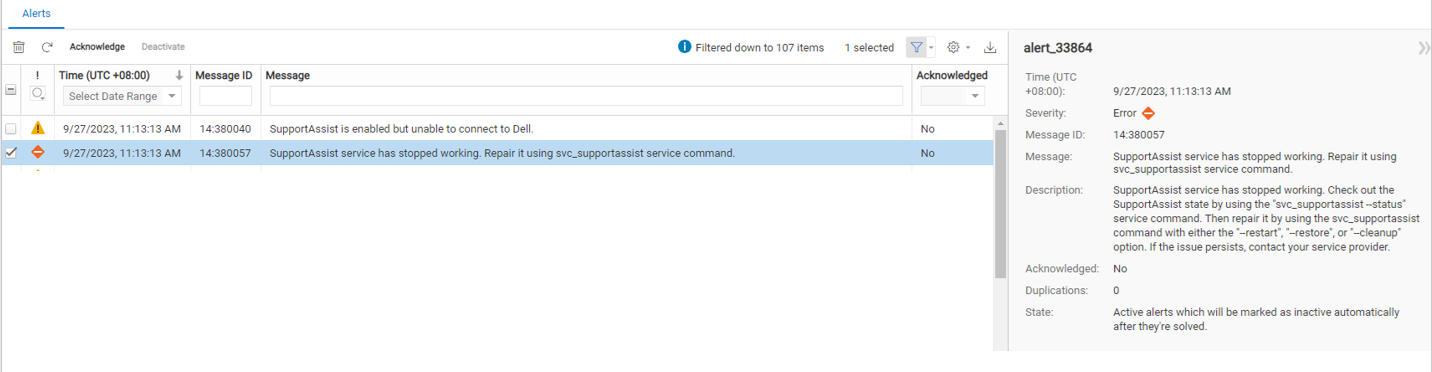
Unity 메시지 ID 14:380057 "SupportAssist service has stopped working" 가 수신되면 해결 방법 옵션 #1에 설명된 단계를 따라 ESE 교착 상태를 지우고 SupportAssist 연결을 다시 설정해야 합니다.
KB 문서 Dell Unity: 이제 UDoctor 패키지(xxxxxx)를 설치할 수 있습니다. (사용자 수정 가능) 에서 새 UDoctor 패키지를 사용할 수 있는지 확인하는 방법과 새 UDoctor 패키지를 수락하고 설치하는 방법을 참조하십시오.
메모:
Unity OE NDU(Non-Disruptive Upgrade)가 실행되면 UDoctor 패키지의 모든 변경 사항을 덮어씁니다. 즉, 새로운 Unity OE 릴리스에서 소프트웨어 수정을 사용할 수 있게 되면 표준 NDU를 실행할 수 있으며 추가 단계가 필요하지 않습니다.
Unity OE NDU(Non-Disruptive Upgrade)가 실행되면 UDoctor 패키지의 모든 변경 사항을 덮어씁니다. 즉, 새로운 Unity OE 릴리스에서 소프트웨어 수정을 사용할 수 있게 되면 표준 NDU를 실행할 수 있으며 추가 단계가 필요하지 않습니다.
메모:
인벤토리를 재정의하거나 프로세스를 푸시하고 UDoctor 패키지를 특정 Unity 시스템에 강제로 푸시할 수 있는 방법은 없습니다. 인벤토리 및/또는 푸시 프로세스는 매주 발생합니다. 더 빠른 수정을 원하는 고객의 경우 Unity OE 버전 5.3.1.0.5.008(5.3 SP1)로 업그레이드하는 것이 올바른 해결책입니다. 또는 위에 나열된 다른 해결 방법을 사용할 수 있습니다.
인벤토리를 재정의하거나 프로세스를 푸시하고 UDoctor 패키지를 특정 Unity 시스템에 강제로 푸시할 수 있는 방법은 없습니다. 인벤토리 및/또는 푸시 프로세스는 매주 발생합니다. 더 빠른 수정을 원하는 고객의 경우 Unity OE 버전 5.3.1.0.5.008(5.3 SP1)로 업그레이드하는 것이 올바른 해결책입니다. 또는 위에 나열된 다른 해결 방법을 사용할 수 있습니다.
Affected Products
Dell EMC Unity FamilyArticle Properties
Article Number: 000216860
Article Type: Solution
Last Modified: 30 Oct 2025
Version: 14
Find answers to your questions from other Dell users
Support Services
Check if your device is covered by Support Services.