VxRail:加密復原金鑰 在 VxRail 4.7.x、7.0.x 和 8.0.x 上與精靈通訊時發生錯誤
Summary: 執行命令「esxcli system settings encryption recovery list」時,會看到錯誤訊息:「與精靈通訊時發生錯誤。」
This article applies to
This article does not apply to
This article is not tied to any specific product.
Not all product versions are identified in this article.
Symptoms
執行以下命令時,出現錯誤:
[root@esxserver:~] esxcli system settings encryption recovery list
Error while communicating with daemon.
Cause
當加密模式設定為「無」時,就會發生這種情況。儘管在安裝 ESXi 節點時已安裝可信賴平台模組 (TPM),但仍會發生這種情況。
執行以下命令以檢查:
執行以下命令以檢查:
[root@server:~] esxcli system settings encryption get
   Mode: NONE
   Require Executables Only From Installed VIBs: false
   Require Secure Boot: false
如果在 BIOS 中停用 TPM,也可能發生此錯誤。
Resolution
要解決此問題:
執行以下命令,將模式變更為 TPM:
esxcli system settings encryption set --mode=TPM
這將初始化守護程式。
若要收集復原金鑰:
[root@server:~] esxcli system settings encryption get
注意:如果您收到下列錯誤:
[root@server:~] esxcli system settings encryption set --mode=TPM
Unable to change the encryption mode and policy. Verify that the current host configuration can satisfy the new requirement.
請依照以下步驟操作:
- 前往 叢集層級 > 監控 >安全性
-
如果您看到 TXT 已停用,您必須啟用它。
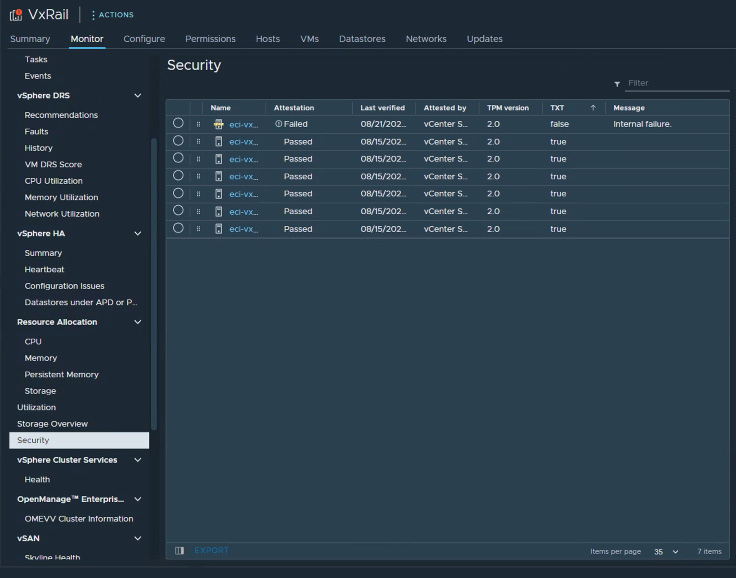
-
若要這麼做,請使用「確保存取功能」,在 vCenter 中讓受影響的節點進入維護模式 (MM)。
-
使用 iDRAC,將節點重新開機,然後按下 F2 進入 BIOS,以進行系統設定>系統 BIOS。
-
前往系統安全性。
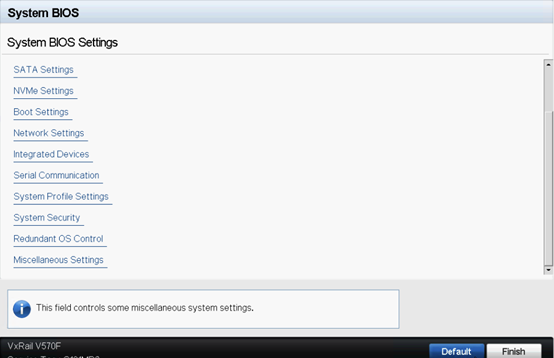
-
「TPM 安全性」應為「開啟」,而且您可能會看到 TXT 選項已停用,若要啟用,請按一下 「TPM 進階設定」。

-
將「TPM2 演算法選擇」變更為「SHA256」。
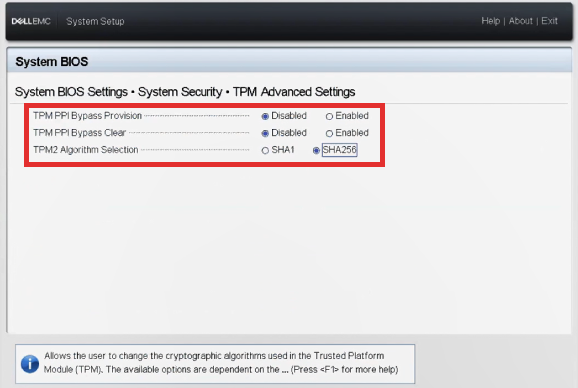
-
確認 Secure Boot (安全開機) 設為 Enabled (啟用)。
-
套用變更。節點將重新開機。
-
節點完全啟動後,在節點上按一下滑鼠右鍵,並將其從 vCenter 中斷連線。
-
重新連接。
-
將節點取出 MM。
-
SSH 至節點,然後再次將加密模式變更為 TPM:
esxcli system settings encryption set --mode=TPM -
下列命令應會執行,您可以收集復原金鑰。
esxcli system settings encryption recovery list
Additional Information
請參閱 TPM 裝置,但無法連線 ,以取得更多資訊。
Products
VxRail Appliance Family, VxRail SoftwareArticle Properties
Article Number: 000217354
Article Type: Solution
Last Modified: 05 Sept 2025
Version: 3
Find answers to your questions from other Dell users
Support Services
Check if your device is covered by Support Services.