VCF on VxRail: NSX Upgrade Failure due to Host not being able to enter Maintenance Mode
Summary: This article explains a situation when an NSX Upgrade Failure due to Host not being able to enter Maintenance Mode. The Source detected that the destination failed to resume.
This article applies to
This article does not apply to
This article is not tied to any specific product.
Not all product versions are identified in this article.
Symptoms
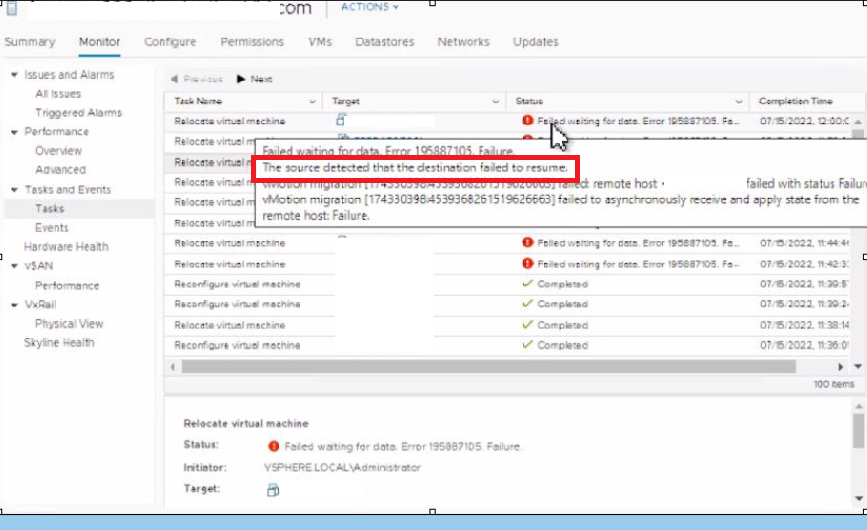
During NSX Upgrade, the host was unable to enter MM Mode as some of the VMs could not be VMotioned. The below error can be seen when trying to manually VMotion the Virtual Machines. The error is:
This is how VMotion works:
The Source detected that the destination failed to resume
This is how VMotion works:
• vMotion request is sent to the vCenter Server: During this stage, a call is sent to vCenter Server requesting the live migration of a virtual machine to another host.
• vCenter Server sends the vMotion request to the destination ESXi host.
• vCenter Server computes the specifications of the virtual machine to migrate.
• vCenter Server sends the vMotion request to the source ESXi host to prepare the virtual machine for migration.
• vCenter Server initiates the destination virtual machine.
• vCenter Server initiates the source virtual machine.
• vCenter Server switches the virtual machine's ESXi host from the source to the destination.
• vCenter Server completes the vMotion task.
• vCenter Server sends the vMotion request to the destination ESXi host.
• vCenter Server computes the specifications of the virtual machine to migrate.
• vCenter Server sends the vMotion request to the source ESXi host to prepare the virtual machine for migration.
• vCenter Server initiates the destination virtual machine.
• vCenter Server initiates the source virtual machine.
• vCenter Server switches the virtual machine's ESXi host from the source to the destination.
• vCenter Server completes the vMotion task.
In vmware.log for the affected Virtual machine and found the below error:
2022-07-15T12:56:41.108Z| vmx| I125: Vigor_ClientRequestCb: failed to do op=3 on unregistered device 'GuestPeriodic' (cmd=queryFields)
2022-07-15T12:56:41.108Z| vmx| I125: Vigor_ClientRequestCb: failed to do op=3 on unregistered device 'GuestAppMonitor' (cmd=queryFields)
2022-07-15T12:56:41.108Z| vmx| I125: Vigor_ClientRequestCb: failed to do op=3 on unregistered device 'CrashDetector' (cmd=queryFields)
2022-07-15T12:56:41.129Z| vmx| I125: MigrateRPC_RetrieveMessages: Informed of a new user message, but can't handle messages in state 4. Leaving the message queued.
2022-07-15T12:56:41.129Z| vmx| I125: Migrate_RPCsReady: Wait for PrepareDestRPC from source to preallocate BusMem.
2022-07-15T12:56:41.130Z| worker-2871193| I125: MigrateBusMemPrealloc: BusMem preallocation begins.
2022-07-15T12:56:41.133Z| worker-2871193| I125: MigrateBusMemPrealloc: BusMem preallocation completes.
2022-07-15T12:56:41.133Z| worker-2871193| I125: MigratePlatformSharedSwapInitGlobal: Initialization of Global Swap File Begins
2022-07-15T12:56:41.133Z| worker-2871193| I125: MigratePlatformSharedSwapInitGlobal: Initialization of Global Swap File Completes.
2022-07-15T12:56:41.152Z| vmx| I125: MigrateSetState: Transitioning from state 9 to 10.
2022-07-15T12:56:44.954Z| vmx| I125: Vigor_ClientRequestCb: failed to do op=3 on unregistered device 'Tools' (cmd=queryFields)
2022-07-15T12:56:44.954Z| vmx| I125: Vigor_ClientRequestCb: failed to do op=3 on unregistered device 'GuestInfo' (cmd=queryFields)
2022-07-15T12:56:44.954Z| vmx| I125: Vigor_ClientRequestCb: failed to do op=3 on unregistered device 'GuestPeriodic' (cmd=queryFields)
2022-07-15T12:56:44.954Z| vmx| I125: Vigor_ClientRequestCb: failed to do op=3 on unregistered device 'GuestAppMonitor' (cmd=queryFields)
2022-07-15T12:56:44.954Z| vmx| I125: Vigor_ClientRequestCb: failed to do op=3 on unregistered device 'CrashDetector' (cmd=queryFields)
2022-07-15T12:56:47.339Z| vmx| I125: MigrateSetStateFinished: type=2 new state=12
2022-07-15T12:56:47.339Z| vmx| I125: MigrateSetState: Transitioning from state 10 to 12.
2022-07-15T12:56:47.339Z| vmx| I125: Migrate: Caching migration error message list:
2022-07-15T12:56:47.339Z| vmx| I125: [msg.migrate.waitdata.platform] Failed waiting for data. Error bad0001. Failure.
2022-07-15T12:56:47.339Z| vmx| I125: [vob.vmotion.send.async.restore.failed] vMotion migration [a64121e:4539368272151926082] failed to asynchronously receive and apply state from the remote host: Failure.
2022-07-15T12:56:47.339Z| vmx| I125: [vob.vmotion.net.inval.msg.status] vMotion migration [a64121e:4539368272151926082] failed: remote host <10.100.18.30> failed with status Failure.

Below Errors can be seen in the hostd logs on the ESXi Host /var/log/hostd.log
2022-07-15T12:56:47.508Z info hostd[2106483] [Originator@6876 sub=Vmsvc.vm:/vmfs/volumes/vsan:524e0c3643da2994-91331b63c96a11a7/57b83f5f-3e8f-7671-1311-bc97e16a3150/FREQAFOR001.vmx] VigorMigrateNotifyCb:: hostlog state changed from emigrating to failure
2022-07-15T12:56:47.508Z info hostd[2107315] [Originator@6876 sub=Vimsvc.ha-eventmgr] Event 6025 : The dvPort 21760 was unblocked in the vSphere Distributed Switch in ha-datacenter. It was in Unknown state before.
2022-07-15T12:56:47.508Z info hostd[2106483] [Originator@6876 sub=Vcsvc.VMotionSrc.4539368272151926082] ResolveCb: VMX reports needsUnregister = false for migrateType MIGRATE_TYPE_VMOTION
2022-07-15T12:56:47.508Z info hostd[2106483] [Originator@6876 sub=Vcsvc.VMotionSrc.4539368272151926082] ResolveCb: Failed with fault: (vim.fault.GenericVmConfigFault) {
--> faultCause = (vmodl.MethodFault) null,
--> faultMessage = (vmodl.LocalizableMessage) [
--> (vmodl.LocalizableMessage) {
--> key = "msg.migrate.fail.dst",
--> arg = <unset>,
--> message = "The source detected that the destination failed to resume."
--> }
--> ],
--> reason = "The source detected that the destination failed to resume."
--> msg = "The source detected that the destination failed to resume.
vmkernel.log would be filled with below messages /var/log/vmkernel.log
2022-07-15T12:49:02.571Z cpu72:2098995)WARNING: VMCIVMK: 1562: Failed to map host page
2022-07-15T12:49:02.571Z cpu72:2098995)DVFilter: 311: Retry on 30 bytes long message. Trying again later
2022-07-15T12:49:02.571Z cpu72:2098995)WARNING: VMCIVMK: 1562: Failed to map host page
2022-07-15T12:49:02.571Z cpu72:2098995)DVFilter: 311: Retry on 30 bytes long message. Trying again later
2022-07-15T12:49:02.571Z cpu72:2098995)WARNING: VMCIVMK: 1562: Failed to map host page
2022-07-15T12:49:02.571Z cpu72:2098995)DVFilter: 311: Retry on 30 bytes long message. Trying again later
Cause
This Issue usually occurs because of the Memory Pressure. The Memory reservation should be set to 100% for heavily Subscribed Systems (E.G. VM's running Security applications).
Right-click the VM→Edit Settings→ checkmark "Reserve all guest memory"
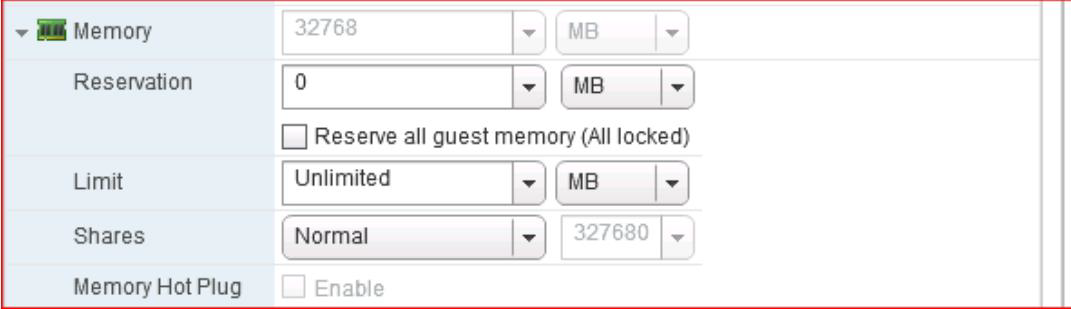
Right-click the VM→Edit Settings→ checkmark "Reserve all guest memory"
Resolution
Try to Manually VMotion the VM and it should work.
Note: Check Physical Host Memory Usage. If the Host does not have enough Memory available, then this would not work.
Perform the following steps to create a real-time graph for a host's memory usage:
1. Connect to a vCenter Server instance with the vSphere Client.
2. Navigate to the Hosts And Clusters inventory view.
3. In the inventory tree, click an ESX/ESXi host. This shows the Summary tab.
4. Click the Performance tab, and switch to Advanced view.
5. Click the Chart Options link.
6. In the Customize Performance Chart dialog box, select the Memory resource type and the Real-Time display interval.
7. Select Line Graph as the chart type. The host is selected as the only available object.
8. In the Counters area, select the Memory Usage (Average), Memory Overhead (Average), Memory Active (Average), Memory Consumed (Average), Memory Used by VMkernel, and Memory Swap Used (Average). This should give you a fairly clear picture of how memory is being used by the ESX/ESXi host.
9. Click OK to apply the chart options and return to the Performance tab. These counters, in particular the Memory Swap Used (Average) counter, will give you an idea of whether the ESX/ESXi host is under memory pressure.
You can also run below command on ESXi to get the details
Note: Check Physical Host Memory Usage. If the Host does not have enough Memory available, then this would not work.
Perform the following steps to create a real-time graph for a host's memory usage:
1. Connect to a vCenter Server instance with the vSphere Client.
2. Navigate to the Hosts And Clusters inventory view.
3. In the inventory tree, click an ESX/ESXi host. This shows the Summary tab.
4. Click the Performance tab, and switch to Advanced view.
5. Click the Chart Options link.
6. In the Customize Performance Chart dialog box, select the Memory resource type and the Real-Time display interval.
7. Select Line Graph as the chart type. The host is selected as the only available object.
8. In the Counters area, select the Memory Usage (Average), Memory Overhead (Average), Memory Active (Average), Memory Consumed (Average), Memory Used by VMkernel, and Memory Swap Used (Average). This should give you a fairly clear picture of how memory is being used by the ESX/ESXi host.
9. Click OK to apply the chart options and return to the Performance tab. These counters, in particular the Memory Swap Used (Average) counter, will give you an idea of whether the ESX/ESXi host is under memory pressure.
You can also run below command on ESXi to get the details
>vsish -e get /memory/comprehensive
Comprehensive {
Physical memory estimate:12454784 KB
Given to VMKernel:12454784 KB
Reliable memory:0 KB
Discarded by VMKernel:1580 KB
Mmap critical space:0 KB
Mmap buddy overhead:3084 KB
Kernel code region:18432 KB
Kernel data and heap:14336 KB
Other kernel:1421360 KB
Non-kernel:120036 KB
Reserved memory at low addresses:59900 KB
Free:10875956 KB
}
Additional Information
Also, see below articles from VMware site for more information:
Understanding & Troubleshooting VMotion Workflow:
https://kb.vmware.com/s/article/1003734
Understanding the Memory Active and Memory Usage indicators on the Performance tab
https://kb.vmware.com/s/article/1002604
Understanding & Troubleshooting VMotion Workflow:
https://kb.vmware.com/s/article/1003734
Understanding the Memory Active and Memory Usage indicators on the Performance tab
https://kb.vmware.com/s/article/1002604
Affected Products
VxRail SoftwareArticle Properties
Article Number: 000218393
Article Type: Solution
Last Modified: 26 Aug 2025
Version: 4
Find answers to your questions from other Dell users
Support Services
Check if your device is covered by Support Services.