PowerEdge: Hyper-V ortamından geçirilen VM'ler için VM görüntüsü düzeyinde anlık görüntü oluşturma hatası
Summary: Bu makalede, Hyper-V ortamından VMware'e geçirilen sanal makineler için geçici bir çözüm sunulmaktadır
This article applies to
This article does not apply to
This article is not tied to any specific product.
Not all product versions are identified in this article.
Symptoms
VMware görüntü düzeyindeki yedeklemeler, aşağıdakine benzer anlık görüntü oluşturma hatalarıyla zaman zaman başarısız olabilir:
2023-09-28 19:18:39 avvcbimage Error <44034>: vSphere Task failed (snapshot error=45): 'An error occurred while saving the snapshot: One of the parameters supplied is invalid.'.
2023-09-28 19:18:39 avvcbimage Error <44020>: Snapshot 'Avamar-1695928695ba0dce79647e23fcd987d6c9faec3592aded6f1f' creation for VM '[U3524_DELLAVM] naa.6006016089404b00d729e8f7531342d0/DELLAVM.vmx' task creation encountered a problem
2023-09-28 19:18:39 avvcbimage Info <19680>: vmAction runBackupScript: ()
2023-09-28 19:18:39 avvcbimage Info <19681>: vmAction runBackupScript: script is skipped because it is null
2023-09-28 19:18:39 avvcbimage Info <0000>: [IMG0009] Post-snapshot script:  completed successfully
2023-09-28 19:18:39 avvcbimage FATAL <0000>: [IMG0003] The VMX '[U3524_EMCESXCLUS00] naa.6006016089404b00d729e8f7531342d0/DELLAVM.vmx' could not be snapshot.
2023-09-28 19:18:39 avvcbimage Info <9772>: Starting graceful (staged) termination, Create Snapshot failure. (wrap-up stage)
2023-09-28 19:18:39 avvcbimage Error <0000>: [IMG0009] Create Snapshot: snapshot creation or pre/post snapshot script failed.
2023-09-28 19:18:39 avvcbimage Error <0000>: [IMG0009] Create Snapshot: snapshot creation/pre-script/post-script failed
Olay Görüntüleyicisi'nde, uygulama günlüğü aşağıdaki Birim ShadowCopy Hizmeti (VSS) hatalarını gösterebilir:
Cause
Hyper-V'den VMware'e geçirilen Windows VM'leri, Hyper-V VSS sağlayıcısını sanal makinenin Windows işletim sisteminde bırakır: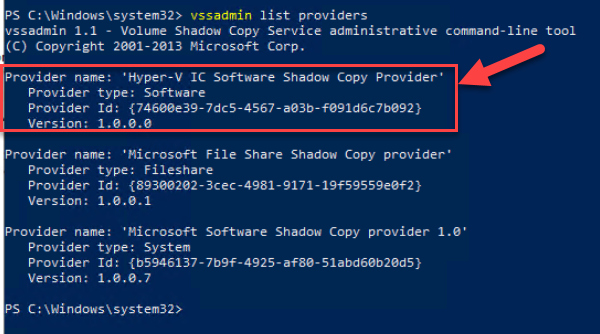
VMware eklentisi, uygulamayla tutarlı bir anlık görüntü için Windows sanal makinesini (VM) yavaşça çevrimdışına geçirmeye çalıştığında Hyper-V sağlayıcısını kullanabilir. Microsoft Software Shadow Copy sağlayıcısı, varsayılan sağlayıcı olmalıdır.
Resolution
Hyper-V VSS sağlayıcısının Windows VM'de hala mevcut olup olmadığını kontrol etmek için PowerShell istemini açın ve aşağıdaki komutu çalıştırın:
vssadmin list providers
Çıktıda "Hyper-V IC Software Shadow Copy Provider" varsa VSS ile ilgili sorunlara neden olabilir.
Windows VM de "regedit" adını arayarak kayıt defterini açın. Hyper-V sağlayıcısına başvuran kayıt defteri anahtarını silin:
[HKEY_LOCAL_MACHINE\SYSTEM\CurrentControlSet\Services\VSS\Providers\{74600e39-7dc5-4567-a03b-f091d6c7b092}]
@="Hyper-V IC Software Shadow Copy Provider"
"Type"=dword:00000002
"Version"="1.0.0.0"
"VersionId"="{c797fff9-2c3e-453c-a3e9-cc7673a6c732}"
Kayıt defteri anahtarı silindikten sonra Windows VM yi yeniden başlatın ve PowerShell komutunu yeniden çalıştırın. Sonuçta elde edilen çıktı, Hyper-V VSS sağlayıcısının artık gittiğini göstermelidir.
Affected Products
Microsoft Windows Server 2016, Microsoft Windows Server 2019, Microsoft Windows Server 2022, Microsoft Windows Server 2025, VMware ESXi 7.x, VMware ESXi 8.xProducts
C Series, Modular Infrastructure, Rack Servers, Tower Servers, XR Servers, Avamar Client for VMware, Avamar ServerArticle Properties
Article Number: 000218679
Article Type: Solution
Last Modified: 16 May 2025
Version: 2
Find answers to your questions from other Dell users
Support Services
Check if your device is covered by Support Services.