PowerEdge:从 Hyper-V 环境迁移的虚拟机的虚拟机映像级快照创建失败
Summary: 本文提供了从 Hyper-V 环境迁移到 VMware 的虚拟机的解决方法
This article applies to
This article does not apply to
This article is not tied to any specific product.
Not all product versions are identified in this article.
Symptoms
VMware 映像级备份可能会间歇性失败,并显示类似于以下内容的快照创建错误:
2023-09-28 19:18:39 avvcbimage Error <44034>: vSphere Task failed (snapshot error=45): 'An error occurred while saving the snapshot: One of the parameters supplied is invalid.'.
2023-09-28 19:18:39 avvcbimage Error <44020>: Snapshot 'Avamar-1695928695ba0dce79647e23fcd987d6c9faec3592aded6f1f' creation for VM '[U3524_DELLAVM] naa.6006016089404b00d729e8f7531342d0/DELLAVM.vmx' task creation encountered a problem
2023-09-28 19:18:39 avvcbimage Info <19680>: vmAction runBackupScript: ()
2023-09-28 19:18:39 avvcbimage Info <19681>: vmAction runBackupScript: script is skipped because it is null
2023-09-28 19:18:39 avvcbimage Info <0000>: [IMG0009] Post-snapshot script:  completed successfully
2023-09-28 19:18:39 avvcbimage FATAL <0000>: [IMG0003] The VMX '[U3524_EMCESXCLUS00] naa.6006016089404b00d729e8f7531342d0/DELLAVM.vmx' could not be snapshot.
2023-09-28 19:18:39 avvcbimage Info <9772>: Starting graceful (staged) termination, Create Snapshot failure. (wrap-up stage)
2023-09-28 19:18:39 avvcbimage Error <0000>: [IMG0009] Create Snapshot: snapshot creation or pre/post snapshot script failed.
2023-09-28 19:18:39 avvcbimage Error <0000>: [IMG0009] Create Snapshot: snapshot creation/pre-script/post-script failed
在事件查看器中,应用程序日志可能会显示以下卷影复制服务 (VSS) 错误:
Cause
从 Hyper-V 迁移到 VMware 的 Windows 虚拟机离开虚拟机的 Windows作系统中的 Hyper-V VSS 提供程序: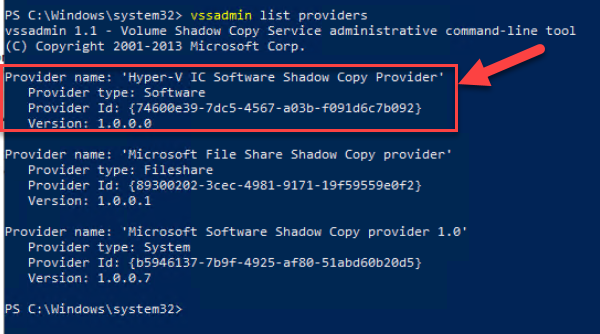
当 VMware 插件尝试停顿 Windows 虚拟机 (VM) 以获得应用程序一致性快照时,它可能会使用 Hyper-V 提供程序。Microsoft 软件卷影拷贝提供程序应为默认提供程序。
Resolution
若要检查 Hyper-V VSS 提供程序是否仍存在于 Windows 虚拟机上,请打开 PowerShell 提示符并运行以下命令:
vssadmin list providers
如果输出中存在“Hyper-V IC 软件卷影复制提供程序”,则可能会导致 VSS 出现问题。
在 Windows 虚拟机上搜索名称“regedit”以打开注册表。删除引用 Hyper-V 提供程序的注册表项:
[HKEY_LOCAL_MACHINE\SYSTEM\CurrentControlSet\Services\VSS\Providers\{74600e39-7dc5-4567-a03b-f091d6c7b092}]
@="Hyper-V IC Software Shadow Copy Provider"
"Type"=dword:00000002
"Version"="1.0.0.0"
"VersionId"="{c797fff9-2c3e-453c-a3e9-cc7673a6c732}"
删除注册表项后,重新启动 Windows VM 并重新运行 PowerShell 命令。生成的输出应显示 Hyper-V VSS 提供程序现已消失。
Affected Products
Microsoft Windows Server 2016, Microsoft Windows Server 2019, Microsoft Windows Server 2022, Microsoft Windows Server 2025, VMware ESXi 7.x, VMware ESXi 8.xProducts
C Series, Modular Infrastructure, Rack Servers, Tower Servers, XR Servers, Avamar Client for VMware, Avamar ServerArticle Properties
Article Number: 000218679
Article Type: Solution
Last Modified: 16 May 2025
Version: 2
Find answers to your questions from other Dell users
Support Services
Check if your device is covered by Support Services.