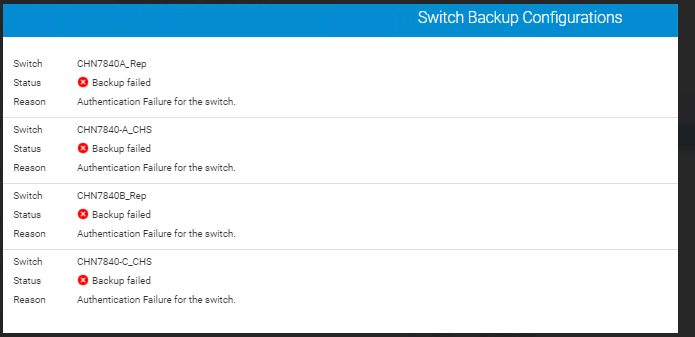
Connectrix B 系列,San Navigator:交换机备份失败并显示错误“Authentication Failure for the switch”
Summary: 在 San Navigator 结构中添加或成功发现交换机后更改用户凭据时,会出现交换机备份失败问题。
This article applies to
This article does not apply to
This article is not tied to any specific product.
Not all product versions are identified in this article.
Symptoms
从交换机备份配置屏幕中看到的错误消息示例:
Cause
此问题是由于以下原因造成的:
- 成功发现交换机后,会更改交换机凭据
- 在结构中未发现交换机
Resolution
解决办法:
- 确保 San Navigator 服务器 IP 地址在交换机 SNMP 访问控制列表中列出。使用以下命令进行检查:
snmpconfig --show snmpv3
- 使用以下命令设置访问控制:
snmpconfig --set accesscontrol
- 验证 San Navigator 服务器 IP 地址和交换机 SNMP 配置后,从 “发现 ”选项卡中删除交换机,然后使用最新更改的凭据重新添加出现身份验证错误的交换机:圣纳夫>SAN 监视 >结构发现>选择结构 >选择交换机 >删除。
- 通过选择San Nav>Monitoring>Fabric Discovery选项卡来验证交换机发现状态是否成功,此后 San Navigator 将成功备份交换机。
Article Properties
Article Number: 000219641
Article Type: Solution
Last Modified: 03 Jun 2025
Version: 3
Find answers to your questions from other Dell users
Support Services
Check if your device is covered by Support Services.