Windows Server: Server Reboots Automatically Instead of Manually Rebooting
Summary: If "Automatically restart" under System Failure is disabled inside Windows Server 2019 and 2022, a manual reboot is needed after a bug check or crash, but the system is rebooting automatically. ...
This article applies to
This article does not apply to
This article is not tied to any specific product.
Not all product versions are identified in this article.
Symptoms
Located under System Properties, on the Advanced tab, then Startup and Recovery Settings is the "Automatically restart" option. If the "Automatically restart" is cleared, the system may still reboot after a bug check or crash on Windows Server 2019 or 2022 on R and XR-series PowerEdge Servers.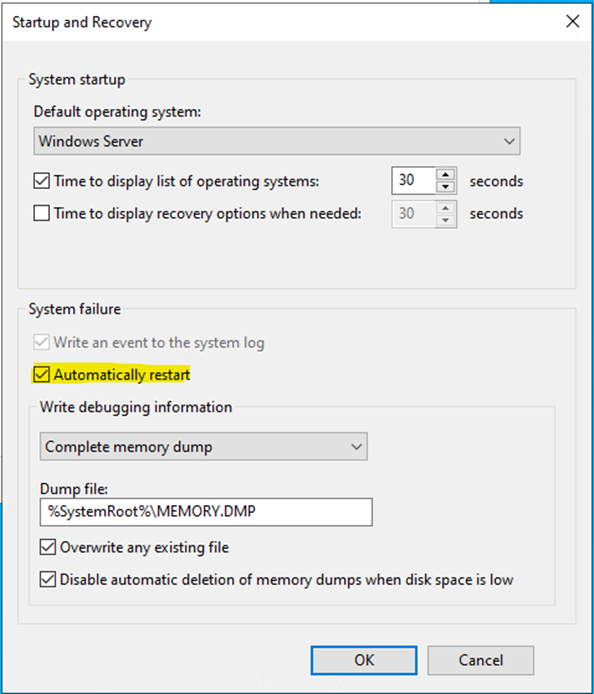
On AX and MC solution nodes running Azure Stack Hyper-Converged Infrastructure (HCI), Windows Server 2019 or 2022, this option is working as expected.
Cause
Cause is not available.
Resolution
This is considered as a corner case and a slight deviation from behavior. No functionality loss is happening.
Affected Products
Rack Servers, XR ServersArticle Properties
Article Number: 000220429
Article Type: Solution
Last Modified: 01 May 2025
Version: 2
Find answers to your questions from other Dell users
Support Services
Check if your device is covered by Support Services.