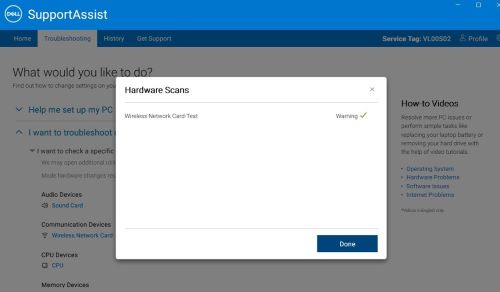
SupportAssist Kablosuz Ağ Kartı Testi Yeşil Onay İşaretiyle Bir Uyarı Görüntülüyor
Summary: Bu makalede, tanılama testleri tamamlandıktan sonra SupportAssist'in kablosuz ağ kartı testinde yeşil onay işaretli bir uyarı görüntülemesi anlatılmaktadır.
This article applies to
This article does not apply to
This article is not tied to any specific product.
Not all product versions are identified in this article.
Symptoms
Etkilenen Platformlar:
- OptiPlex Tower 7020
- OptiPlex Küçük Form Faktörü 7020
- OptiPlex Micro Plus 7020
- OptiPlex Micro 7020
- Inspiron 3030 Küçük Masaüstü Bilgisayar
- Vostro 3030 Küçük Masaüstü Bilgisayar
- Precision 3280 Compact
- Precision 3280 XE Compact
Etkilenen Ürünler:
- SupportAssist
Etkilenen Sürümler:
- v3.14.1.14
SupportAssist test sonuçları, RTL8851BE ve BE200 WLAN kartı takılıyken tanılama işlemleri tamamlandıktan sonra kablosuz ağ kartı testinde yeşil onay işaretli bir uyarı gösterir.
Cause
Bu, bir kablosuz ağ tanılama sorunudur.
Resolution
Sorunu çözmek için SupportAssist'iv4.0.x sürümüne güncelleştirin.
Affected Products
SupportAssist, Inspiron 3030 Small Desktop, OptiPlex Micro 7020, OptiPlex Micro Plus 7020, OptiPlex Small Form Factor 7020, OptiPlex Tower 7020, Precision 3280 XE Compact, Precision 3280 Compact, Vostro 3030 Small DesktopArticle Properties
Article Number: 000223197
Article Type: Solution
Last Modified: 10 Sept 2025
Version: 6
Find answers to your questions from other Dell users
Support Services
Check if your device is covered by Support Services.