NetWorker: SQL 백업 실패 - nsrsqlsv: SSL 공급자: 신뢰할 수 없는 기관에서 인증서 체인을 발급했습니다
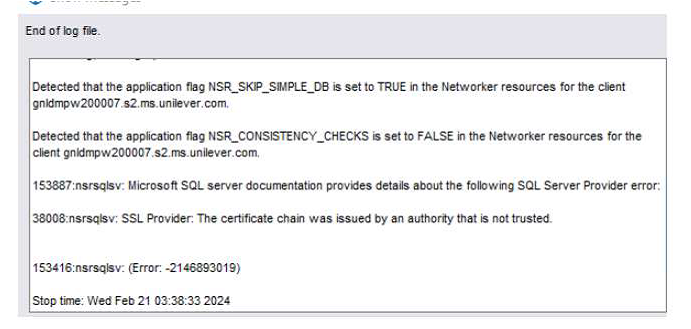
Summary: NMM(NetWorker Module for Microsoft) SQL Server 데이터베이스 백업이 실패합니다. 보고된 오류는 "nsrsqlsv: SSL 공급자: 신뢰할 수 없는 기관에서 인증서 체인을 발급했습니다."
This article applies to
This article does not apply to
This article is not tied to any specific product.
Not all product versions are identified in this article.
Symptoms
이 문제의 증상은 다음과 같습니다.
- NMM(NetWorker Module for Microsoft) SQL Server 데이터베이스 백업이 실패합니다.
- 보고된 오류는 다음과 같습니다.
"nsrsqlsv: SSL provider: The certificate chain was issued by an authority that is not trusted." - SQL Server의 시스템 이벤트 로그에 다음 오류 중 하나 이상이 포함되어 있습니다.
Log Name:      System
Source:        Schannel
Date:          <DATE>
Event ID:      36882
Task Category: None
Level:         Error
Keywords:
User:          SYSTEM
Computer:      <SQL Server Name>
Description:
The certificate received from the remote server was issued by an untrusted certificate authority.
Because of this, none of the data contained in the certificate can be validated.
The SSL connection request has failed. The attached data contains the server certificate.


Log Name:      System
Source:        Schannel
Date:          <DATE>
Event ID:      36884
Task Category: None
Level:         Error
Keywords:
User:          SYSTEM
Computer:      <SQL Server Name>
Description:
The certificate received from the remote server does not contain the expected name.
It is therefore not possible to determine whether we are connecting to the correct server.
The server name we were expecting is <servername>.
The TLS connection request has failed. The attached data contains the server certificate.


Log Name:      System
Source:        Schannel
Date:          <DATE>
Event ID:      36888
Task Category: None
Level:         Error
Keywords:
User:          SYSTEM
Computer:      <SQL Server Name>
Description:
A fatal alert was generated and sent to the remote endpoint.
This may result in termination of the connection.
The TLS protocol defined fatal error code is 48. The Windows SChannel error state is 552.
Cause
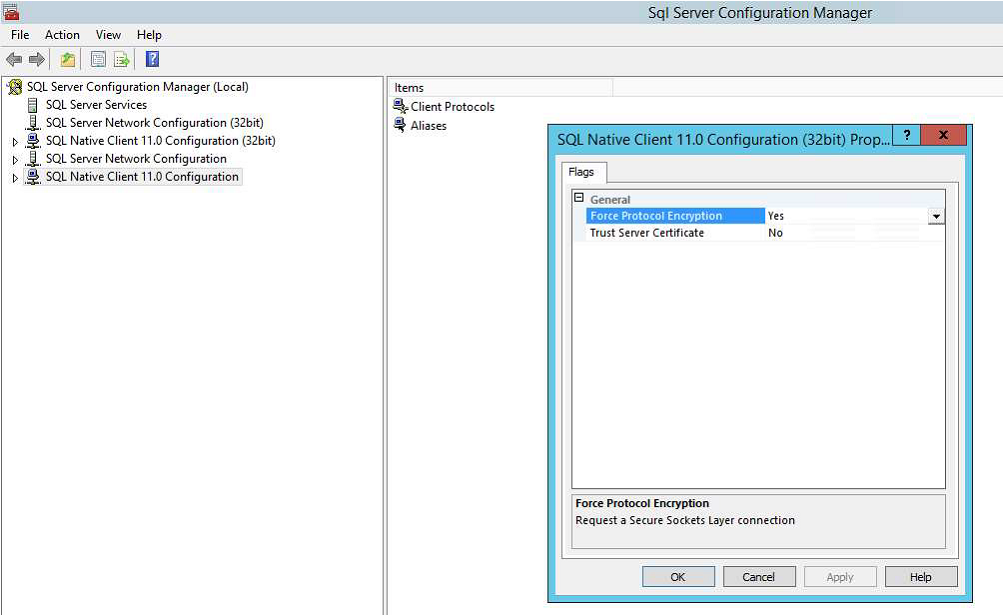
이 문제의 근본 원인은 SQL Server 구성 관리자의 SQL Native Client 구성에서 사용하도록 설정된 "프로토콜 암호화 강제 적용" 기능 때문입니다.
SQL Server의 "강제 프로토콜 암호화" 설정은 SSL 암호화를 사용하도록 강제합니다.
SSL 암호화를 사용하려면 신뢰할 수 있는 인증 기관(CA)에서 발급한 교환 인증서를 이 기기에서 사용할 수 있어야 합니다.
이 인증서가 없으면 연결이 실패합니다.
Resolution
이 문제를 해결하려면 다음 단계를 수행합니다.
- SQL Server 구성 관리자를 엽니다.
- QL Native Client 11.0 구성을 마우스 오른쪽 버튼으로 클릭하고 속성을 선택합니다.
- Force Protocol Encryption 값을 No로 설정하고 OK를 선택합니다.
- SQL Native Client 11.0 구성(32비트) 구성에 대해 동일한 단계를 수행합니다
- SQL Server 재부팅
- SQL Server가 실행되면 문제가 해결되었는지 확인합니다.
Article Properties
Article Number: 000223807
Article Type: Solution
Last Modified: 20 Jan 2026
Version: 2
Find answers to your questions from other Dell users
Support Services
Check if your device is covered by Support Services.