NetWorker:SQL 備份失敗 - nsrsqlsv:SSL 提供者:憑證鏈結是由不受信任的授權單位所簽發
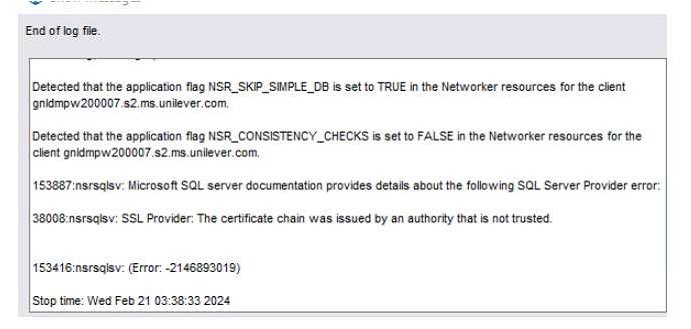
Summary: 適用於 Microsoft 的 NetWorker 模組 (NMM) SQL Server 資料庫備份失敗。 報告的錯誤為「nsrsqlsv:SSL 提供者:憑證鏈結是由不受信任的授權單位所發出。」
This article applies to
This article does not apply to
This article is not tied to any specific product.
Not all product versions are identified in this article.
Symptoms
此問題的症狀為:
- 適用於 Microsoft 的 NetWorker 模組 (NMM) SQL Server 資料庫備份失敗。
- 回報的錯誤為
"nsrsqlsv: SSL provider: The certificate chain was issued by an authority that is not trusted." - SQL 伺服器上的系統事件日誌包含以下一個或多個錯誤:
Log Name:      System
Source:        Schannel
Date:          <DATE>
Event ID:      36882
Task Category: None
Level:         Error
Keywords:
User:          SYSTEM
Computer:      <SQL Server Name>
Description:
The certificate received from the remote server was issued by an untrusted certificate authority.
Because of this, none of the data contained in the certificate can be validated.
The SSL connection request has failed. The attached data contains the server certificate.


Log Name:      System
Source:        Schannel
Date:          <DATE>
Event ID:      36884
Task Category: None
Level:         Error
Keywords:
User:          SYSTEM
Computer:      <SQL Server Name>
Description:
The certificate received from the remote server does not contain the expected name.
It is therefore not possible to determine whether we are connecting to the correct server.
The server name we were expecting is <servername>.
The TLS connection request has failed. The attached data contains the server certificate.


Log Name:      System
Source:        Schannel
Date:          <DATE>
Event ID:      36888
Task Category: None
Level:         Error
Keywords:
User:          SYSTEM
Computer:      <SQL Server Name>
Description:
A fatal alert was generated and sent to the remote endpoint.
This may result in termination of the connection.
The TLS protocol defined fatal error code is 48. The Windows SChannel error state is 552.
Cause
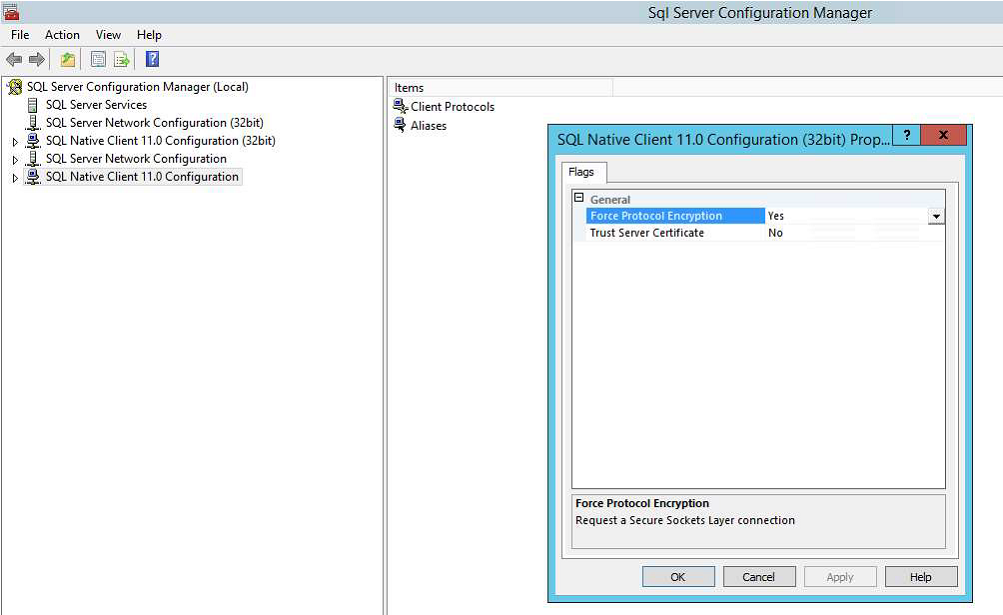
此問題的根本原因是 SQL Server Configuration Manager 底下的 SQL 原生用戶端組態啟用了「強制通訊協定加密」功能。
SQL Server 上的「強制協定加密」設定強制使用 SSL 加密。
SSL 加密要求此電腦上提供由受信任的證書頒發機構 (CA) 頒發的交換證書。
如果沒有此證書,連接將失敗。
Resolution
若要解決此問題,請執行下列步驟:
- 開啟 SQL Server Configuration Manager
- 以滑鼠右鍵按一下 SQL Native Client 11.0 組態 ,然後選取 內容。
- 將 強制協定加密值 設置為 “否 ”,然後選擇 “確定”。
- 對 SQL Native Client 11.0 組態(32 位元)組態執行相同的步驟
- 將 SQL Server 重新開機
- SQL 伺服器啟動並運行后,請檢查問題是否已解決。
Article Properties
Article Number: 000223807
Article Type: Solution
Last Modified: 20 Jan 2026
Version: 2
Find answers to your questions from other Dell users
Support Services
Check if your device is covered by Support Services.