Dell Unity: Il test del malware Eicar sul NAS Unity genera un errore di rete
Summary: Testato dall'utente con test malware Eicar nel server NAS Unity che mostra l'errore di rete "There is a problem accessing \\172.xx.xx.xx\abc (NasIP \testfolder)". Questo errore può essere corretto dall'utente. ...
This article applies to
This article does not apply to
This article is not tied to any specific product.
Not all product versions are identified in this article.
Symptoms
Il file di test EICAR Anti-Virus o file di test EICAR è un file informatico sviluppato dall'Istituto europeo per la ricerca anti-virus (EICAR) e dall'organizzazione di ricerca anti-virus per computer (CARO) per testare la risposta dei programmi antivirus per computer (AV).
L'utente è un motore AV di terze parti che è Sophos Central Intercept X.
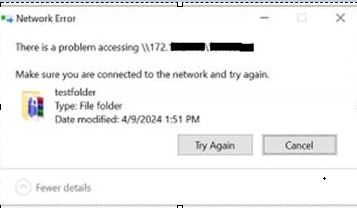
L'utente è un motore AV di terze parti che è Sophos Central Intercept X.
There is a problem accessing \\172.xx.xx.xx\abc  (NasIP \testfolder )
You have received this message because an event that has occurred on your Unity system requires your attention. The alert is:
"The virus checker server 172.xx.xx.xx has encountered an error and is no longer operational.(Error: OFFLINE, httpStatus: 1006 Connection Disconnected)"
The virus checker server 172.xx.xx.xx has encountered an error and is no longer operational.(Error: ERROR_AVINTERFACE)"
"No virus checker server is available."
Cause
Questo errore indica chiaramente che il Windows Server che esegue il software AV di terze parti e l'agent CAVA non era disponibile per fornire servizi durante l'intervallo di tempo dell'avviso. Se Unity Appliance è altrimenti integro, il problema potrebbe essere correlato a un'interruzione dell'alimentazione di rete, a un problema di Windows Server o eventualmente a un problema correlato ai servizi AV. L'utente o un amministratore di Windows deve esaminare il "registro avvisi di Windows" per trovare una chiara root cause.
Resolution
Procedura di risoluzione dei problemi di Unity:
- Cercare nel percorso del registro Unity:
EMCSystemBackup.log  - cd /EMC/C4core/log/
grep -i infect EMCSystemBackup.log
grep -i blocked EMCSystemBackup.log

c4_safe_ktrace.log – cd /EMC/C4core/log/
grep -i "virus checker" c4_safe_ktrace.log
zgrep -i "virus checker" /EMC/C4core/log/c4_safe_ktrace.log*
Uemcli svc_cava Lo script di servizio con il nome del server NAS fornisce la versione CAVA e il nome dell'engine antivirus.
Nas server name/IP : OV-xx-x-xxx-xx-001/ 172.xx.xx.xx
AV server IP address: 172.xx.xx.xx
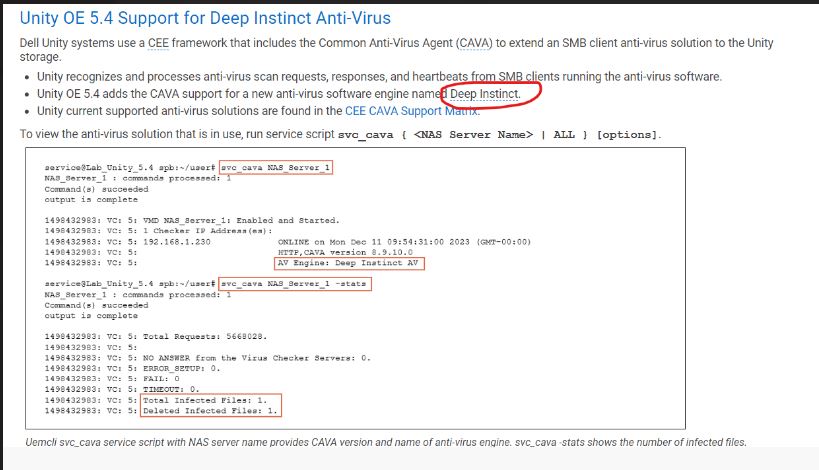
Elenco dei comandi:
Command Usage: svc_cava
svc_cava { <NAS_Server_Name> | ALL }
 [-h | --help]
 | <no option>
 | -stats
 | [ -set accesstime={ now | none | [[[[yy]mm]dd]hh]mm[.ss] }]
 | [ -fsscan [<fs_mountpath> { -list | -create | -delete } ]
Example : svc_cava -stats
svc_cava nas1 -stats
svc_cava nas1
Utilizzo dei comandi:
08:38:39 root@DE4142343780xx spa:/EMC/C4Core/log# svc_cava OV-xxx-x-xxx-xx-001 -stats
OV-xxx-x-xxx-xx-001 : commands processed: 1
command(s) succeeded
output is complete
1712653384: VC: 5: Total Requests: 0.
1712653384: VC: 5:
1712653384: VC: 5: NO ANSWER from the Virus Checker Servers: 0.
1712653384: VC: 5: ERROR_SETUP: 0.
1712653384: VC: 5: FAIL: 0.
1712653384: VC: 5: TIMEOUT: 0.
1712653384: VC: 5:
1712653384: VC: 5: 0 files in the collector queue.
1712653384: VC: 5: 0 files processed by the AV threads.
Command succeeded
- Scaricare il file viruschecker.config e verificare se viene visualizzato shutdown=no o shutdown=viruschecking:
Aprire l'interfaccia utente> di Unity Storage > NAS server >Security>Antivirus >Retrieve Current Configuration (visualizzare il file)
- Aggiornare il valore viruschecker.conf (Caricare nuova configurazione) e applicare le modifiche:
# Example: OV-xxx-x-xxx-xx-001
#
masks=*.EXE:*.COM:*.DOC:*.DOT:*.XL?:*.MD?:*.VXD:*.386:*.SYS:*.BIN:*.ppt:*docx:*.rar:*.zip:*.txt
excl=pagefile.sys:*.tmp
# masks=*.RTF:*.OBD:*.DLL:*.SCR:*.OBT:*.PP?:*.POT:*.OLE:*.SHS:*.MPP
# masks=*.MPT:*.XTP:*.XLB:*.CMD:*.OVL:*.DEV
# masks=*.ZIP:*.TAR:*.ARJ:*.ARC:*.Z
addr=172.xx.xx.xx >> AV Server IP address
shutdown=no (update the value to shutdown=viruschecking and upload the viruschecker.conf file to unity GUI)
# Stops SMB/CIFS if no AV machine available.(No Windows clients can access any Unity share)
08:18:51 root@DE414234378xxx spa:/cores/service/user# svc_cava OV-xxx-x-xxx-xx-001
OV-xxx-x-xxx-xx-001: commands processed: 1
command(s) succeeded
output is complete
1712650760: VC: 5: OV-xxx-x-xxx-xx-001: Enabled and Started.
1712650760: VC: 5: 1 Checker IP Address(es):
1712650760: VC: 5: 172.xx.xx.xx                                   ONLINE at Tue Apr  9 08:19:14 2024 (GMT-00:00)
1712650760: VC: 5:                                                HTTP, CAVA version: 8.9.10.0
1712650760: VC: 5:                                                AV Engine: Microsoft Antivirus ( Third party AV Engine )
1712650760: VC: 5:                                                Remediation Window: 30 seconds
1712650760: VC: 5:                                                Server Name: 172.xx.xx.xx
1712650760: VC: 5:                                                Last time signature updated: Tue Apr  9 05:29:36 2024 (GMT-00:00)
1712650760: VC: 5:
1712650760: VC: 5: 15 File Mask(s):
1712650760: VC: 5: *.EXE *.COM *.DOC *.DOT *.XL? *.MD? *.VXD *.386 *.SYS *.BIN *.PPT *DOCX *.RAR
1712650760: VC: 5: *.ZIP *.TXT
1712650760: VC: 5: 2 Excluded File(s):
1712650760: VC: 5: PAGEFILE.SYS *.TMP
1712650760: VC: 5: Share \\ov-yml-p-ser-fs-001.yoma.com.mm\CHECK$.
1712650760: VC: 5: RPC request timeout=25000 milliseconds.
1712650760: VC: 5: RPC retry timeout=5000 milliseconds.
1712650760: VC: 5: High water mark=200.
1712650760: VC: 5: Low water mark=50.
1712650760: VC: 5: Scan all virus checkers every 10 seconds.
1712650760: VC: 5: When all virus checkers are offline:
1712650760: VC: 5: Continue to work with Virus Checking and CIFS.
1712650760: VC: 5: Scan on read disable.
1712650760: VC: 5: MS-RPC User: OV-xxx-x-xxx-xx-001-FS$
1712650760: VC: 5: MS-RPC ClientName: ov-xxx-x-xxx-xx-001.abc
 Command succeeded
Il problema è stato risolto e CAVA ha iniziato a funzionare correttamente dopo aver modificato l'IP di rete.
Risoluzione dei problemi consigliata:
- Confermare le impostazioni del file viruschecker.conf. (shutdown=viruschecking)
- Verificare che il servizio CAVA sia in esecuzione con l'account utente AV.
- Verificare che il servizio antivirus installato (Sophos, TrendMicro, McAfee e così via) sia in esecuzione con l'account di sistema locale.
-
Verificare che l'utente AV sia membro del gruppo admin locale su ciascun server AV.
-
Verificare che l'antivirus e CEE siano installati utilizzando l'ordine corretto, prima CEE, quindi l'antivirus
-
Riavvio dei servizi CAVA
-
Riavviare il server AV una volta
-
Verificare che i server CAVA dispongano di una sola interfaccia di rete.
-
Confermare con l'utente se al computer client sono assegnati IP di rete dei server NAS uguali o diversi (si consiglia sempre che si trovi nella stessa rete)
1712650760: VC: 5:                                                HTTP, CAVA version: 8.9.10.0
1712650760: VC: 5:                                                AV Engine: Microsoft Antivirus ( Third party AV Engine )
Best practice:
- Non impostare la policy VirusChecking=No in quanto ciò potrebbe causare thread bloccati e non è considerata una best practice.
- Non utilizzare un singolo server AV in quanto non è consigliato.
- Non utilizzare un singolo server AV per più piattaforme, in quanto questa operazione non è consigliata e deve essere considerata non supportata.
Se il problema persiste, l'utente deve contattare il supporto del fornitore di antivirus di terze parti per ulteriore assistenza.
Additional Information
Per ulteriori informazioni, consultare i documenti seguenti:

Affected Products
Dell EMC Unity Family |Dell EMC Unity All Flash, Dell EMC Unity FamilyArticle Properties
Article Number: 000224432
Article Type: Solution
Last Modified: 16 Oct 2025
Version: 3
Find answers to your questions from other Dell users
Support Services
Check if your device is covered by Support Services.