NSRLAのNameフィールドには、AIXクライアントのハッシュ文字が含まれています。
Summary: NSRLAのNameフィールドには、AIXクライアントのハッシュ文字が含まれています。ウィザードを使用したクライアントのバックアップまたは変更が失敗し、「Unable to authenticate with nsrserver: クライアント認証情報が弱すぎます」
This article applies to
This article does not apply to
This article is not tied to any specific product.
Not all product versions are identified in this article.
Symptoms
NSRLAのnameフィールドには、AIXクライアントのハッシュ文字が含まれています。
ウィザードを使用したクライアントのバックアップまたは変更が、
バックアップで見られるその他のエラーには、次のようなものがあります。
クライアントのnsrlaを表示すると、[名前]フィールドが空白になるか、ハッシュ文字を含むフィールドが表示されます。
NetWorkerを再インストールしたり、nsrladbの名前を変更して再作成したりしても、問題は解決しません。
ウィザードを使用したクライアントのバックアップまたは変更が、
Unable to authenticate with nsrserver: Client credential too weak
バックアップで見られるその他のエラーには、次のようなものがあります。
Authentication error; why = Client credential too weak
Unable to set up the direct save with server... client is not properly configured
Unable to connect to the target media device through the nsrmmd process for the save set.
クライアントのnsrlaを表示すると、[名前]フィールドが空白になるか、ハッシュ文字を含むフィールドが表示されます。
nsradmin> p type: nsrla
                        type: NSRLA;
                        name:  ;
              nsrmmd version: #.#.#.#.Build.##;
             nsrsnmd version: #.#.#.#.Build.##;
          Multi-subnet state: Disabled;
NetWorkerを再インストールしたり、nsrladbの名前を変更して再作成したりしても、問題は解決しません。
Cause
Hostsファイルには、改行なしスペース(NBSP)文字など、印刷されない文字が表示されます。
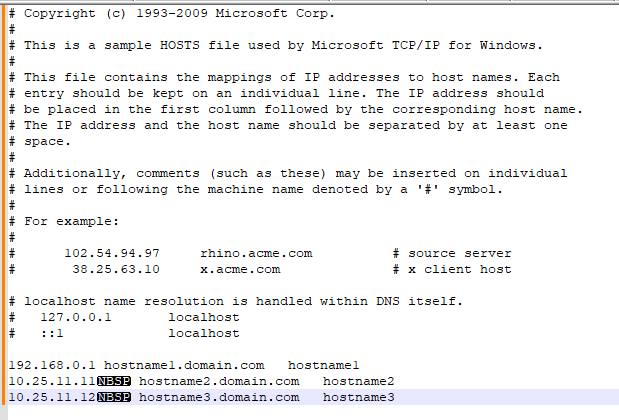
Resolution
Notepad++でHostsファイルを確認し、印刷されない文字を表示するようにビューを設定します。
標準以外の文字は削除してください。
hostsファイルがクリーンになったら、NetWorkerサービスを停止します。
nsrladbの名前の変更
nsrlaに名前が正しく入力されていることを確認します。
(表示 -> 記号を表示 -> 印刷されない文字を表示します。
標準以外の文字は削除してください。
hostsファイルがクリーンになったら、NetWorkerサービスを停止します。
nsrladbの名前の変更
- Windowsの場合:C:\Program Files\EMC Networker\nsr\res\nsrladb
- Linuxの場合/nsr/res/nsrladb
nsradmin -p nsrexec
nsradmin> p type: nsrla
Affected Products
NetWorkerArticle Properties
Article Number: 000225354
Article Type: Solution
Last Modified: 23 May 2024
Version: 1
Find answers to your questions from other Dell users
Support Services
Check if your device is covered by Support Services.