NSRLA 中的名稱欄位具有 AIX 用戶端的雜湊字元。
Summary: NSRLA 中的名稱欄位具有 AIX 用戶端的雜湊字元。使用精靈進行用戶端備份或修改失敗,並顯示「無法使用 nsrserver 驗證:用戶端登入資料太弱」
This article applies to
This article does not apply to
This article is not tied to any specific product.
Not all product versions are identified in this article.
Symptoms
NSRLA 中的名稱欄位具有 AIX 用戶端的雜湊字元。
使用精靈進行用戶端備份或修改失敗,並顯示
備份中出現的其他錯誤可能包括:
檢視用戶端的 nsrla,名稱欄位會顯示空白或包含雜湊字元。
重新安裝 NetWorker 或重新命名 nsrladb 並重新建立無法解決問題。
使用精靈進行用戶端備份或修改失敗,並顯示
Unable to authenticate with nsrserver: Client credential too weak
備份中出現的其他錯誤可能包括:
Authentication error; why = Client credential too weak
Unable to set up the direct save with server... client is not properly configured
Unable to connect to the target media device through the nsrmmd process for the save set.
檢視用戶端的 nsrla,名稱欄位會顯示空白或包含雜湊字元。
nsradmin> p type: nsrla
                        type: NSRLA;
                        name:  ;
              nsrmmd version: #.#.#.#.Build.##;
             nsrsnmd version: #.#.#.#.Build.##;
          Multi-subnet state: Disabled;
重新安裝 NetWorker 或重新命名 nsrladb 並重新建立無法解決問題。
Cause
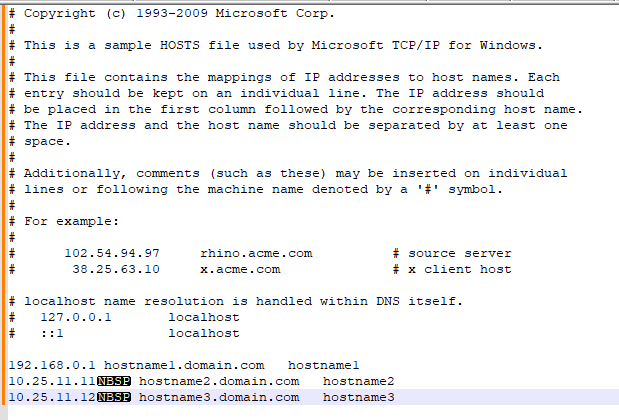
主機文件顯示一些非列印字元,如不間斷空格 (NBSP) 字元。
Resolution
在 Notepad++ 中查看主機檔,並將檢視設置為顯示非列印字元。
移除任何非標準字元。
清除主機檔案後,請停止 NetWorker 服務。
重新命名 nsrladb
確認名稱已正確填入 nsrla。
(檢視 -> 顯示符號 -> 顯示非列印字元。)
移除任何非標準字元。
清除主機檔案後,請停止 NetWorker 服務。
重新命名 nsrladb
- Windows:C:\Program Files\EMC Networker\nsr\res\nsrladb
- Linux:/nsr/res/nsrladb
nsradmin -p nsrexec
nsradmin> p type: nsrla
Affected Products
NetWorkerArticle Properties
Article Number: 000225354
Article Type: Solution
Last Modified: 23 May 2024
Version: 1
Find answers to your questions from other Dell users
Support Services
Check if your device is covered by Support Services.