NSRLA의 Name 필드에 AIX 클라이언트에 대한 해시 문자가 있습니다.
Summary: NSRLA의 Name 필드에 AIX 클라이언트에 대한 해시 문자가 있습니다. 마법사를 사용한 클라이언트 백업 또는 수정이 실패하고 "nsrserver로 인증할 수 없음: 클라이언트 자격 증명이 너무 부족합니다."
This article applies to
This article does not apply to
This article is not tied to any specific product.
Not all product versions are identified in this article.
Symptoms
NSRLA의 이름 필드에는 AIX 클라이언트에 대한 해시 문자가 있습니다.
마법사를 사용한 클라이언트 백업 또는 수정이 실패하고
백업에 표시되는 다른 오류는 다음과 같습니다.
클라이언트의 nsrla를 보면 Name 필드가 비어 있거나 해시 문자가 포함되어 있습니다.
NetWorker를 재설치하거나 nsrladb의 이름을 바꾼 후 다시 생성해도 문제가 해결되지 않습니다.
마법사를 사용한 클라이언트 백업 또는 수정이 실패하고
Unable to authenticate with nsrserver: Client credential too weak
백업에 표시되는 다른 오류는 다음과 같습니다.
Authentication error; why = Client credential too weak
Unable to set up the direct save with server... client is not properly configured
Unable to connect to the target media device through the nsrmmd process for the save set.
클라이언트의 nsrla를 보면 Name 필드가 비어 있거나 해시 문자가 포함되어 있습니다.
nsradmin> p type: nsrla
                        type: NSRLA;
                        name:  ;
              nsrmmd version: #.#.#.#.Build.##;
             nsrsnmd version: #.#.#.#.Build.##;
          Multi-subnet state: Disabled;
NetWorker를 재설치하거나 nsrladb의 이름을 바꾼 후 다시 생성해도 문제가 해결되지 않습니다.
Cause
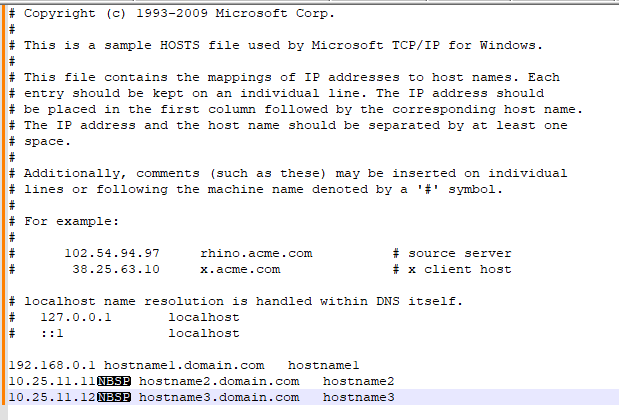
호스트 파일에 NBSP(줄 바꿈하지 않는 공백) 문자와 같은 일부 인쇄되지 않는 문자가 표시됩니다.
Resolution
인쇄되지 않는 문자를 표시하도록 보기가 설정된 Notepad++에서 호스트 파일을 검토합니다.
비표준 문자를 제거합니다.
hosts 파일이 정리되면 NetWorker 서비스를 중지합니다.
nsrladb 이름 변경
nsrla에 이름이 올바르게 입력되었는지 확인합니다.
(보기 -> 기호 표시 -> 인쇄되지 않는 문자를 표시합니다.)
비표준 문자를 제거합니다.
hosts 파일이 정리되면 NetWorker 서비스를 중지합니다.
nsrladb 이름 변경
- Windows: C:\Program Files\EMC Networker\nsr\res\nsrladb
- Linux: /nsr/res/nsrladb
nsradmin -p nsrexec
nsradmin> p type: nsrla
Affected Products
NetWorkerArticle Properties
Article Number: 000225354
Article Type: Solution
Last Modified: 23 May 2024
Version: 1
Find answers to your questions from other Dell users
Support Services
Check if your device is covered by Support Services.