NSRLA 中的名称字段具有 AIX 客户端的哈希字符。
Summary: NSRLA 中的名称字段具有 AIX 客户端的哈希字符。使用向导执行的客户端备份或修改失败,并显示 “无法使用 nsrserver 进行身份验证:Client credential too weak”
This article applies to
This article does not apply to
This article is not tied to any specific product.
Not all product versions are identified in this article.
Symptoms
NSRLA 中的名称字段具有 AIX 客户端的哈希字符。
使用向导执行客户端备份或修改失败,并显示
备份中出现的其他错误可能包括:
查看客户端的 nsrla 时,显示 Name 字段为空或包含哈希字符。
重新安装 NetWorker 或重命名 nsrladb 并重新创建无法解决此问题。
使用向导执行客户端备份或修改失败,并显示
Unable to authenticate with nsrserver: Client credential too weak
备份中出现的其他错误可能包括:
Authentication error; why = Client credential too weak
Unable to set up the direct save with server... client is not properly configured
Unable to connect to the target media device through the nsrmmd process for the save set.
查看客户端的 nsrla 时,显示 Name 字段为空或包含哈希字符。
nsradmin> p type: nsrla
                        type: NSRLA;
                        name:  ;
              nsrmmd version: #.#.#.#.Build.##;
             nsrsnmd version: #.#.#.#.Build.##;
          Multi-subnet state: Disabled;
重新安装 NetWorker 或重命名 nsrladb 并重新创建无法解决此问题。
Cause
主机文件显示一些非打印字符,例如不间断空格 (NBSP) 字符。
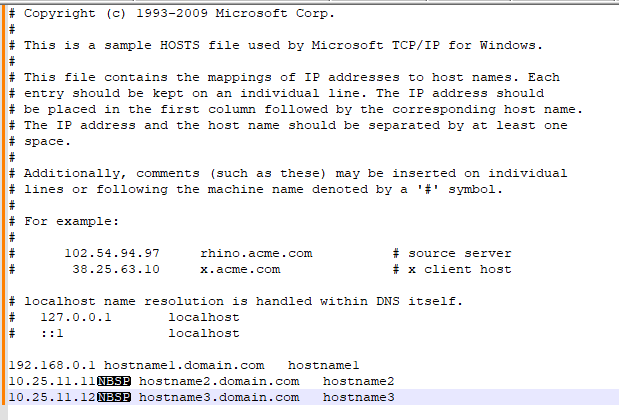
Resolution
在 Notepad++ 中查看 Hosts 文件,并将视图设置为显示非打印字符。
删除所有非标准字符。
清理主机文件后,停止 NetWorker 服务。
重命名 nsrladb
验证 nsrla 中是否正确填充了名称。
(查看 -> 显示符号 —> 显示非打印字符。)
删除所有非标准字符。
清理主机文件后,停止 NetWorker 服务。
重命名 nsrladb
- Windows:C:\Program Files\EMC Networker\nsr\res\nsrladb
- Linux:/nsr/res/nsrladb
nsradmin -p nsrexec
nsradmin> p type: nsrla
Affected Products
NetWorkerArticle Properties
Article Number: 000225354
Article Type: Solution
Last Modified: 23 May 2024
Version: 1
Find answers to your questions from other Dell users
Support Services
Check if your device is covered by Support Services.