IDPA:無法同步 ACM 儀表板中的 DDBoost 使用者密碼。
Summary: Integrated Data Protection Appliance (IDPA) 當密碼有效並與一般密碼相符時,Data Domain 面板中的 ACM 儀表板會旗標 DDBoost 使用者密碼未同步。
This article applies to
This article does not apply to
This article is not tied to any specific product.
Not all product versions are identified in this article.
Symptoms
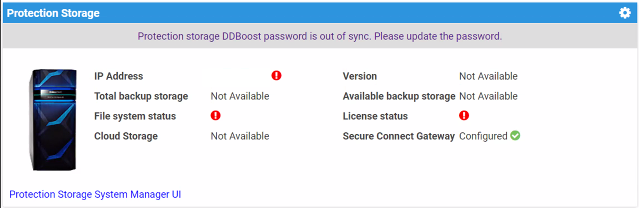
- Data Domain 顯示 ACM 儀表板中的 DDBoost 使用者密碼不同步。
- DDboost 密碼可正常運作,且符合 ACM 一般密碼。
- Data Domain 中沒有 Avamar 備份失敗
- Avamar 並沒有抱怨與 Data Domain 沒有通訊。
Cause
DDBoost 使用者名稱並非稱為「DDboostUser」,因為它是在 ACM 中預先定義。
比如:
DDBoost_User ACM 使用「DDBoostUser」 驗證至 Data Domain。由於在客戶的 Data Domain 上建立的使用者名稱與預期不同,因此會失敗,並將 DDBoost 使用者標記為不同步。
ACM server.log顯示下列錯誤:
16042:2024-04-23 19:34:18,098 INFO  [Thread-88485]-util.SSHUtil: Creating session using SSH parameters:          Host     : [x.x.x.x]       User     : [DDBoostUser]        Password : [**********]
17537:2024-04-23 19:34:23,230 ERROR [Thread-88485]-dashboard.DataDomainDashboard: Auth failed to DDBoost user, so marking DDBoost user as OOS.
17538:2024-04-23 19:34:23,230 ERROR [Thread-88485]-dashboard.DataDomainDashboard: Exception occurred while connecting to DDBoost using sshUtil. 17539:com.emc.vcedpa.common.exception.ApplianceException: Protection storage DDBoost password is out of sync. Please update the password.
Resolution
更新或建立與 ACM 預期使用者名稱相符的 DDBoost 使用者名稱。
Additional Information
如果 ddboost 使用者經過修改,請編輯 Avamar 上的「DDBoost 使用者」,以符合從 Data Domain
擷取的「DDBoost 使用者」。一個。登入 Avamar Administrator UI。
b.伺服器 -->伺服器管理標籤 --> 選取 Data Domain 主機名稱
c. 動作 -->編輯 Data Domain 系統
d. 在使用者名稱欄位中輸入正確的「DDBoost 使用者」。
Affected Products
Integrated Data Protection Appliance FamilyArticle Properties
Article Number: 000225369
Article Type: Solution
Last Modified: 28 Jan 2025
Version: 1
Find answers to your questions from other Dell users
Support Services
Check if your device is covered by Support Services.