Dell Unity: Unable to receive meaningful SNMP traps on Splunk
Summary: After configuring the Simple Network Management Protocol (SNMP) alerting, it appears that there are no meaningful traps received when sending test traps.
This article applies to
This article does not apply to
This article is not tied to any specific product.
Not all product versions are identified in this article.
Symptoms
This is an example of how the traps are listed in the monitoring tool:
- Trap #1 is from NetApp. It has a short description as disk failure with system name.
- Trap #2 is from Unity for a full quota issue. There is no full and proper issue description unless the trap message is opened.
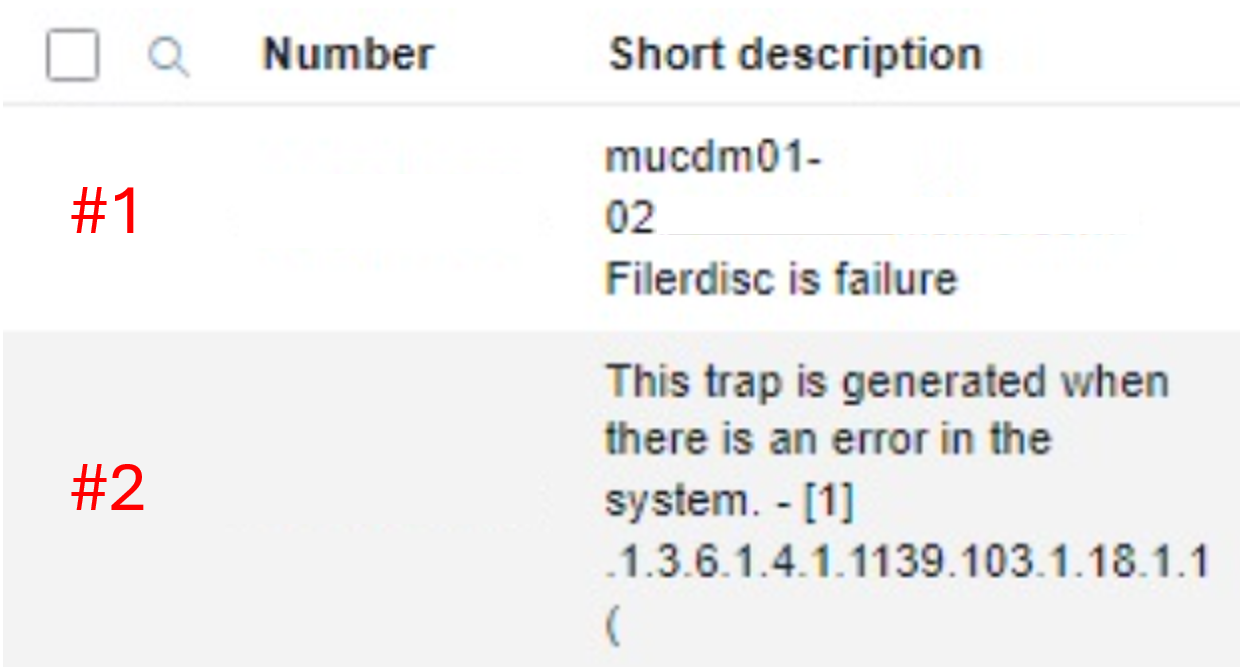
Below is an example of how SNMP traps look like on Splunk or any third-party alert monitoring tool:

Cause
There is no issue with the messages received.
Resolution
This is working as designed on the Dell Unity array. There is no option to customize the description. The full alert description can be seen when the trap message is opened.
Affected Products
Dell EMC Unity, Dell EMC Unity Family |Dell EMC Unity All Flash, Dell EMC Unity HybridArticle Properties
Article Number: 000225491
Article Type: Solution
Last Modified: 28 Oct 2025
Version: 4
Find answers to your questions from other Dell users
Support Services
Check if your device is covered by Support Services.