Data Protection Central: RabbitMQ falha ao iniciar
Summary: Este artigo apresenta um procedimento para o Data Protection Central (DPC) quando o RabbitMQ não inicia após uma atualização do software.
This article applies to
This article does not apply to
This article is not tied to any specific product.
Not all product versions are identified in this article.
Symptoms
Quando o RabbitMQ não é iniciado após uma atualização de software do DPC, o status mostra o serviço RabbitMQ (
rabbitmq-server) está ativando, mas nunca é concluída:
# /usr/local/dpc/bin/dpc status
Version: 19.9.0-13
msm-ui-main: active
msm-monitor: inactive
msm-elg: active
mongod: active
rabbitmq-server: activating
nginx: active
dp-iam: active
FIPS: disabled
#
O log do RabbitMQ mostra erros ao acessar o armazenamento de mensagens durante a inicialização. Por exemplo, no /var/log/dpc/rabbitmq/rabbit@<DPC Hostname>.log, ele mostra que o RabbitMQ falha ao tentar reconstruir o índice:
2024-05-07 23:56:25.408992-04:00 [info] <0.230.0> Running boot step recovery defined by app rabbit
2024-05-07 23:56:25.410137-04:00 [info] <0.423.0> Making sure data directory '/var/lib/dpc/rabbitmq/mnesia/rabbit@<DPC Hostname>/msg_stores/vhosts/628WB79CIFDYO9LJI6DKMI09L' for vhost '/' exists
2024-05-07 23:56:25.412199-04:00 [info] <0.423.0> Starting message stores for vhost '/'
2024-05-07 23:56:25.412425-04:00 [info] <0.428.0> Message store "628WB79CIFDYO9LJI6DKMI09L/msg_store_transient": using rabbit_msg_store_ets_index to provide index
2024-05-07 23:56:25.413720-04:00 [info] <0.423.0> Started message store of type transient for vhost '/'
2024-05-07 23:56:25.413970-04:00 [info] <0.432.0> Message store "628WB79CIFDYO9LJI6DKMI09L/msg_store_persistent": using rabbit_msg_store_ets_index to provide index
2024-05-07 23:56:25.414552-04:00 [warning] <0.432.0> Message store "628WB79CIFDYO9LJI6DKMI09L/msg_store_persistent": rebuilding indices from scratch
2024-05-07 23:56:25.495894-04:00 [error] <0.369.0> ** Generic server <0.369.0> terminating
2024-05-07 23:56:25.495894-04:00 [error] <0.369.0> ** Last message in was {'$gen_cast',
2024-05-07 23:56:25.495894-04:00 [error] <0.369.0>                            {submit_async,
2024-05-07 23:56:25.495894-04:00 [error] <0.369.0>                                #Fun<rabbit_classic_queue_index_v2.11.72031207>,
2024-05-07 23:56:25.495894-04:00 [error] <0.369.0>                                <0.367.0>}}
2024-05-07 23:56:25.495894-04:00 [error] <0.369.0> ** When Server state == undefined
2024-05-07 23:56:25.495894-04:00 [error] <0.369.0> ** Reason for termination ==
2024-05-07 23:56:25.495894-04:00 [error] <0.369.0> ** {function_clause,
2024-05-07 23:56:25.495894-04:00 [error] <0.369.0>        [{rabbit_queue_index,journal_minus_segment1,
2024-05-07 23:56:25.495894-04:00 [error] <0.369.0>             [{no_pub,no_del,ack},
2024-05-07 23:56:25.495894-04:00 [error] <0.369.0>              {{true,
2024-05-07 23:56:25.495894-04:00 [error] <0.369.0>                   <<136,59,154,30,244,191,111,192,154,235,124,189,92,104,1,207,
Cause
O RabbitMQ falha ao iniciar devido a um alto volume de mensagens presas na fila.
Neste exemplo, há mais de 800 MB de dados na fila:
Neste exemplo, há mais de 800 MB de dados na fila:
<DPC Hostname>:/var/lib/dpc/rabbitmq/mnesia # du -h .
20K     ./rabbit@<DPC Hostname>/quorum/rabbit@<DPC Hostname>
20K     ./rabbit@<DPC Hostname>/quorum
58M     ./rabbit@<DPC Hostname>/msg_stores/vhosts/628WB79CIFDYO9LJI6DKMI09L/msg_store_persistent
824M    ./rabbit@<DPC Hostname>/msg_stores/vhosts/628WB79CIFDYO9LJI6DKMI09L/queues/BV3H25N6AGWF7TDIN2L5RE0DA
824M    ./rabbit@<DPC Hostname>/msg_stores/vhosts/628WB79CIFDYO9LJI6DKMI09L/queues
0       ./rabbit@<DPC Hostname>/msg_stores/vhosts/628WB79CIFDYO9LJI6DKMI09L/msg_store_transient
881M    ./rabbit@<DPC Hostname>/msg_stores/vhosts/628WB79CIFDYO9LJI6DKMI09L
881M    ./rabbit@<DPC Hostname>/msg_stores/vhosts
881M    ./rabbit@<DPC Hostname>/msg_stores
20K     ./rabbit@<DPC Hostname>/coordination/rabbit@<DPC Hostname>
20K     ./rabbit@<DPC Hostname>/coordination
881M    ./rabbit@<DPC Hostname>
0       ./rabbit@<DPC Hostname>-plugins-expand
881M    .
<DPC Hostname>:/var/lib/dpc/rabbitmq/mnesia #
Resolution
Para resolver o problema, use o procedimento abaixo para recriar os recursos do RabbitMQ:
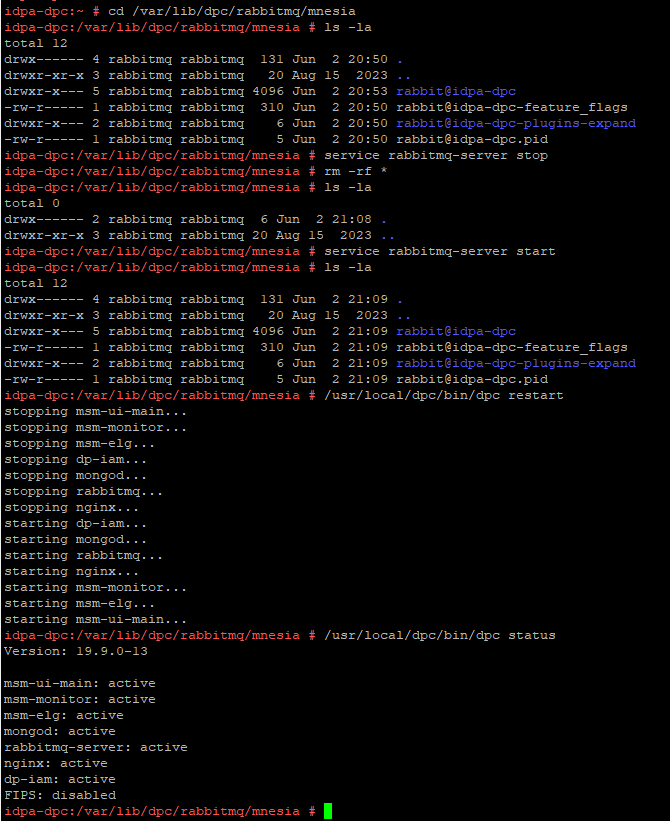
Um exemplo de resultado de um ambiente de laboratório:
- Faça um snapshot da máquina virtual do DPC ou faça um backup completo do servidor DPC.
- SSH para o DPC e faça log-in como "admin" e, em seguida, altere o usuário para root:
su -
- Interrompa o serviço RabbitMQ (
rabbitmq-server) com o seguinte comando:
service rabbitmq-server stop
- Altere o diretório para
/var/lib/dpc/rabbitmq/mnesia:
cd /var/lib/dpc/rabbitmq/mnesia
- Se houver espaço livre suficiente no
/tmp, copie os dados para/tmp(opcional):
cp -rp * /tmp
- Remova os dados em
/var/lib/dpc/rabbitmq/mnesiacom o seguinte comando:
rm -rf *
- Reinicie o serviço RabbitMQ, arquivos em
/var/lib/dpc/rabbitmq/mnesiadeve ser regenerado:
service rabbitmq-server start
- Reinicie os serviços do DPC:
/usr/local/dpc/bin/dpc restart
Um exemplo de resultado de um ambiente de laboratório:
Figura 1: Um exemplo mostrando o RabbitMQ regenerando a estrutura de dados em
/var/lib/dpc/rabbitmq/mnesia Durante o arranque
- Faça login na interface do usuário do DPC para verificar se o DPC está funcionando conforme o esperado.
- Exclua as subpastas movidas anteriormente para
/tmpse os dados tiverem sido copiados na etapa 5. - Quando o serviço voltar ao normal, exclua o snapshot da máquina virtual do DPC , se ele tiver sido obtido.
Affected Products
Data Protection Central, PowerProtect DP4400, PowerProtect DP5300, PowerProtect DP5800, PowerProtect DP8300, PowerProtect DP8800, PowerProtect Data Protection Software, Integrated Data Protection Appliance Family
, Integrated Data Protection Appliance Software, PowerProtect DP5900, PowerProtect DP8400, PowerProtect DP8900
...
Article Properties
Article Number: 000225640
Article Type: Solution
Last Modified: 27 Jun 2025
Version: 3
Find answers to your questions from other Dell users
Support Services
Check if your device is covered by Support Services.