Data Protection Central:RabbitMQ 無法啟動
Summary: 本文提供軟體更新後 RabbitMQ 無法啟動時的 Data Protection Central (DPC) 程序。
This article applies to
This article does not apply to
This article is not tied to any specific product.
Not all product versions are identified in this article.
Symptoms
當 RabbitMQ 在 DPC 軟體更新後無法啟動時,狀態會顯示 RabbitMQ 服務 (
rabbitmq-server) 正在啟動,但仍未完成:
# /usr/local/dpc/bin/dpc status
Version: 19.9.0-13
msm-ui-main: active
msm-monitor: inactive
msm-elg: active
mongod: active
rabbitmq-server: activating
nginx: active
dp-iam: active
FIPS: disabled
#
RabbitMQ 記錄顯示在啟動期間存取訊息存放區時發生錯誤。例如,在 /var/log/dpc/rabbitmq/rabbit@<DPC Hostname>.log,在嘗試重建索引時顯示 RabbitMQ 失敗:
2024-05-07 23:56:25.408992-04:00 [info] <0.230.0> Running boot step recovery defined by app rabbit
2024-05-07 23:56:25.410137-04:00 [info] <0.423.0> Making sure data directory '/var/lib/dpc/rabbitmq/mnesia/rabbit@<DPC Hostname>/msg_stores/vhosts/628WB79CIFDYO9LJI6DKMI09L' for vhost '/' exists
2024-05-07 23:56:25.412199-04:00 [info] <0.423.0> Starting message stores for vhost '/'
2024-05-07 23:56:25.412425-04:00 [info] <0.428.0> Message store "628WB79CIFDYO9LJI6DKMI09L/msg_store_transient": using rabbit_msg_store_ets_index to provide index
2024-05-07 23:56:25.413720-04:00 [info] <0.423.0> Started message store of type transient for vhost '/'
2024-05-07 23:56:25.413970-04:00 [info] <0.432.0> Message store "628WB79CIFDYO9LJI6DKMI09L/msg_store_persistent": using rabbit_msg_store_ets_index to provide index
2024-05-07 23:56:25.414552-04:00 [warning] <0.432.0> Message store "628WB79CIFDYO9LJI6DKMI09L/msg_store_persistent": rebuilding indices from scratch
2024-05-07 23:56:25.495894-04:00 [error] <0.369.0> ** Generic server <0.369.0> terminating
2024-05-07 23:56:25.495894-04:00 [error] <0.369.0> ** Last message in was {'$gen_cast',
2024-05-07 23:56:25.495894-04:00 [error] <0.369.0>                            {submit_async,
2024-05-07 23:56:25.495894-04:00 [error] <0.369.0>                                #Fun<rabbit_classic_queue_index_v2.11.72031207>,
2024-05-07 23:56:25.495894-04:00 [error] <0.369.0>                                <0.367.0>}}
2024-05-07 23:56:25.495894-04:00 [error] <0.369.0> ** When Server state == undefined
2024-05-07 23:56:25.495894-04:00 [error] <0.369.0> ** Reason for termination ==
2024-05-07 23:56:25.495894-04:00 [error] <0.369.0> ** {function_clause,
2024-05-07 23:56:25.495894-04:00 [error] <0.369.0>        [{rabbit_queue_index,journal_minus_segment1,
2024-05-07 23:56:25.495894-04:00 [error] <0.369.0>             [{no_pub,no_del,ack},
2024-05-07 23:56:25.495894-04:00 [error] <0.369.0>              {{true,
2024-05-07 23:56:25.495894-04:00 [error] <0.369.0>                   <<136,59,154,30,244,191,111,192,154,235,124,189,92,104,1,207,
Cause
由於佇列中有大量卡住訊息,因此 RabbitMQ 無法啟動。
在此範例中,佇列中有超過 800 MB 的數據:
在此範例中,佇列中有超過 800 MB 的數據:
<DPC Hostname>:/var/lib/dpc/rabbitmq/mnesia # du -h .
20K     ./rabbit@<DPC Hostname>/quorum/rabbit@<DPC Hostname>
20K     ./rabbit@<DPC Hostname>/quorum
58M     ./rabbit@<DPC Hostname>/msg_stores/vhosts/628WB79CIFDYO9LJI6DKMI09L/msg_store_persistent
824M    ./rabbit@<DPC Hostname>/msg_stores/vhosts/628WB79CIFDYO9LJI6DKMI09L/queues/BV3H25N6AGWF7TDIN2L5RE0DA
824M    ./rabbit@<DPC Hostname>/msg_stores/vhosts/628WB79CIFDYO9LJI6DKMI09L/queues
0       ./rabbit@<DPC Hostname>/msg_stores/vhosts/628WB79CIFDYO9LJI6DKMI09L/msg_store_transient
881M    ./rabbit@<DPC Hostname>/msg_stores/vhosts/628WB79CIFDYO9LJI6DKMI09L
881M    ./rabbit@<DPC Hostname>/msg_stores/vhosts
881M    ./rabbit@<DPC Hostname>/msg_stores
20K     ./rabbit@<DPC Hostname>/coordination/rabbit@<DPC Hostname>
20K     ./rabbit@<DPC Hostname>/coordination
881M    ./rabbit@<DPC Hostname>
0       ./rabbit@<DPC Hostname>-plugins-expand
881M    .
<DPC Hostname>:/var/lib/dpc/rabbitmq/mnesia #
Resolution
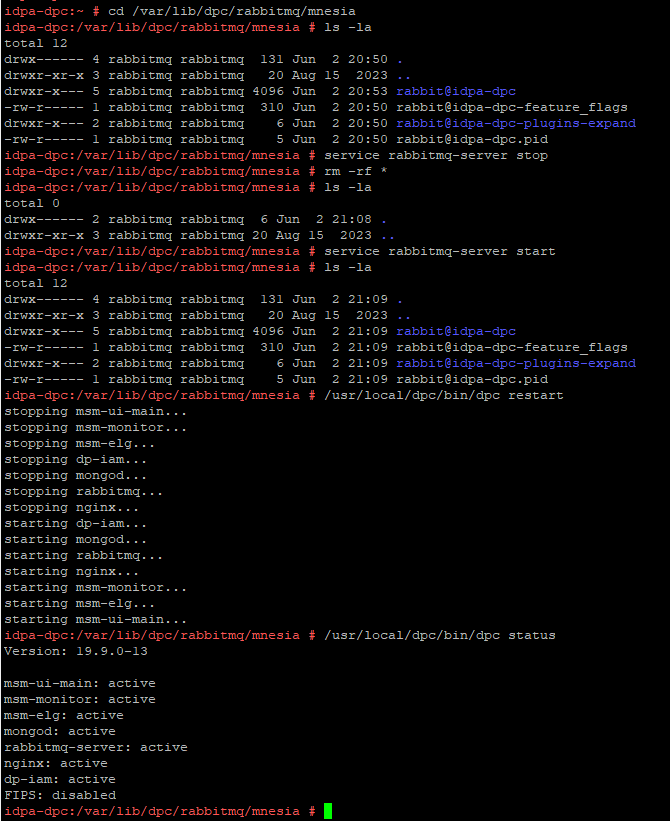
若要解決此問題,請使用以下程序重建 RabbitMQ 資源:
實驗室環境的輸出範例:
- 拍攝 DPC 虛擬機器的快照 ,或執行 DPC 伺服器的完整備份。
- SSH 至 DPC ,並以「admin」身分登入,然後將使用者變更為 root:
su -
- 停止 RabbitMQ 服務 (
rabbitmq-server) 中的新增命令:
service rabbitmq-server stop
- 將目錄變更 為
/var/lib/dpc/rabbitmq/mnesia:
cd /var/lib/dpc/rabbitmq/mnesia
- 如果有足夠的可用空間
/tmp,將資料複製到/tmp(選配):
cp -rp * /tmp
- 移除以下項目的資料
/var/lib/dpc/rabbitmq/mnesia使用以下命令:
rm -rf *
- 重新啟動 RabbitMQ 服務,檔案位於
/var/lib/dpc/rabbitmq/mnesia應重新產生:
service rabbitmq-server start
- 重新啟動 DPC 服務:
/usr/local/dpc/bin/dpc restart
實驗室環境的輸出範例:
圖 1:顯示 RabbitMQ 在以下位置重新產生資料結構的範例:
/var/lib/dpc/rabbitmq/mnesia 在啟動期間
- 登入 DPC UI ,確認 DPC 是否如預期運作。
- 刪除先前移至的子資料夾
/tmp如果數據已在步驟 5 中複製。 - 服務恢復正常時,請刪除已拍攝的 DPC 虛擬機快照 。
Affected Products
Data Protection Central, PowerProtect DP4400, PowerProtect DP5300, PowerProtect DP5800, PowerProtect DP8300, PowerProtect DP8800, PowerProtect Data Protection Software, Integrated Data Protection Appliance Family
, Integrated Data Protection Appliance Software, PowerProtect DP5900, PowerProtect DP8400, PowerProtect DP8900
...
Article Properties
Article Number: 000225640
Article Type: Solution
Last Modified: 27 Jun 2025
Version: 3
Find answers to your questions from other Dell users
Support Services
Check if your device is covered by Support Services.