VxRail: Cannot migrate VM after uninstalling the NSX-T manager
Summary: Cannot migrate VM after uninstalling the NSX-T manager.
This article applies to
This article does not apply to
This article is not tied to any specific product.
Not all product versions are identified in this article.
Symptoms
The customer is unable to migrate the VM from the original host to another host.
vDS shows the target port group:
Currently connected network interface "Network adapter 1" uses network XXXXX (Vmware HCIA Distributed Switch)", which is not accessible.
Checking the vDS status, all nodes show "down" status of vDS.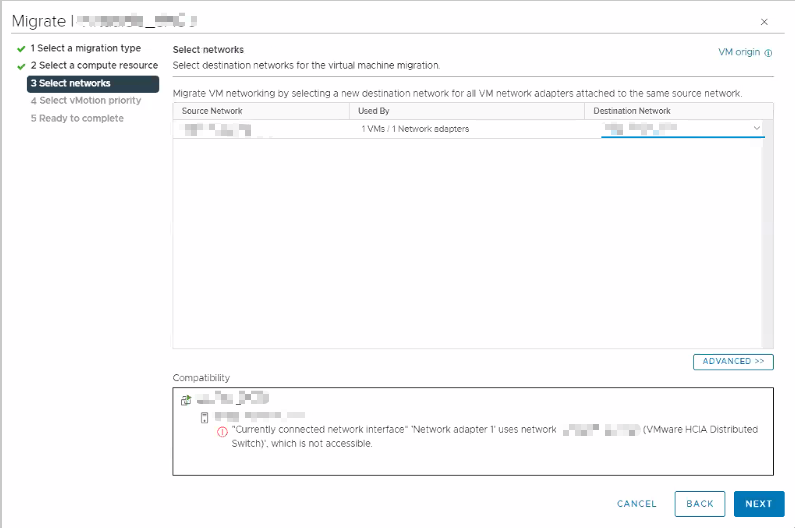

Cause
There could be several causes for this issue:
- Customer may not have followed the VMware procedure to uninstall NSX-T.
- When deleting the NSX-T manager, the N-vDS continues to try and communicate with the NSX-T manager. This causes the vDS status of the host to show a status of "down."
See VMware document https://docs.vmware.com/en/VMware-NSX/4.1/installation/GUID-9C0927E8-F96B-494F-9799-C45DC1ABD9E4.html
Resolution
If the customer has an NSX-T VM backup, restore NSX-T manager. Follow the VMware procedure to safely remove NSX-T solution afterwards.
If the customer has no backup, create a new vDS and migrate all VMkernel of the hosts and VM networking to a new vDS.
Article Properties
Article Number: 000225929
Article Type: Solution
Last Modified: 24 Jul 2024
Version: 2
Find answers to your questions from other Dell users
Support Services
Check if your device is covered by Support Services.