VxRail:解除安裝 NSX-T 管理員後,無法遷移虛擬機器
Summary: 解除安裝 NSX-T 管理員後,無法遷移虛擬機器。
This article applies to
This article does not apply to
This article is not tied to any specific product.
Not all product versions are identified in this article.
Symptoms
客戶無法將 VM 從原始主機遷移到其他主機。
vDS 顯示目標連接埠群組:
Currently connected network interface "Network adapter 1" uses network XXXXX (Vmware HCIA Distributed Switch)", which is not accessible.
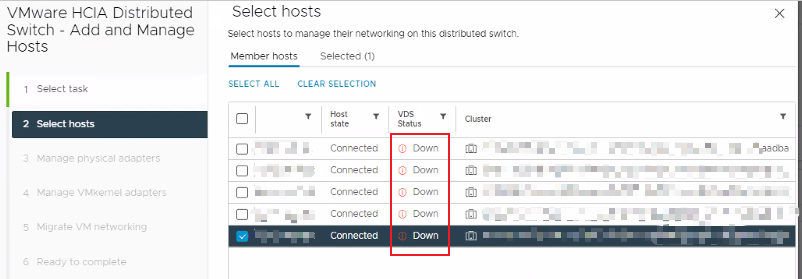
檢查 vDS 狀態時,所有節點都會顯示 vDS 的「關閉」狀態。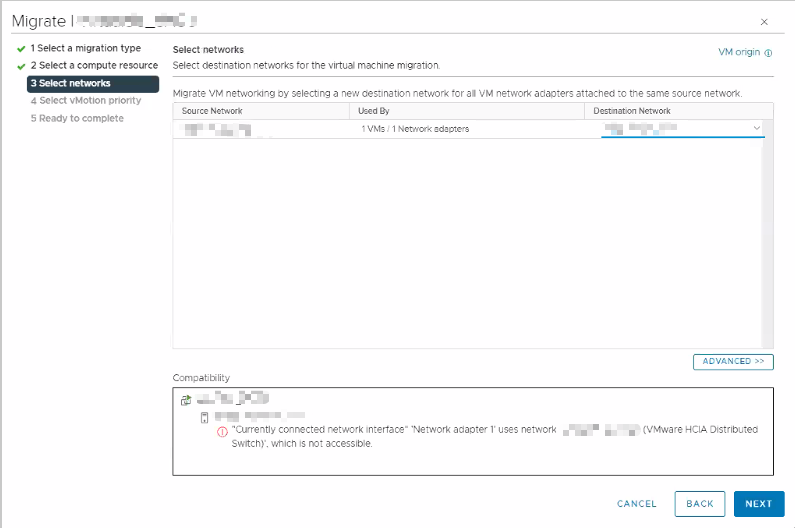
Cause
此問題可能有多種原因:
- 客戶可能未遵循 VMware 解除安裝 NSX-T 的程序。
- 刪除 NSX-T 管理員時,N-vDS 會繼續嘗試與 NSX-T 管理員通訊。這會導致主機的 vDS 狀態顯示為「關閉」狀態。
如需詳細資訊,請參閱 VMware 文件 https://docs.vmware.com/en/VMware-NSX/4.1/installation/GUID-9C0927E8-F96B-494F-9799-C45DC1ABD9E4.html
Resolution
如果客戶有 NSX-T VM 備份,請還原 NSX-T Manager。之後,請依照 VMware 程序安全地移除 NSX-T 解決方案。
如果客戶沒有備份,請建立新的 vDS,並將主機和 VM 網路的所有 VMkernel 遷移至新的 vDS。
Article Properties
Article Number: 000225929
Article Type: Solution
Last Modified: 24 Jul 2024
Version: 2
Find answers to your questions from other Dell users
Support Services
Check if your device is covered by Support Services.