ECS:IAMユーザーのurn:ecs:iam::ns_name:user/user_nameにはリスト バケット権限がありません
Summary: バージョン3.8.x.xへのアップグレード後、IAMユーザーはバケットを一覧表示できず、そのための権限がないことを示すエラーを受信しました。ただし、この機能は3.8.x.xより前のバージョンでは動作していました。
This article applies to
This article does not apply to
This article is not tied to any specific product.
Not all product versions are identified in this article.
Symptoms
アプリケーション ログに次の情報が表示されます。
com.amazonaws.services.s3.model.Amazon.S3.Exception: Access Denied (Service: Amazon S3; Status Code: 403; Error Code: AccessDenied; Request ID xxxxxxxx:xxxxxxxxxxx:xxx:xxx; S3 Extended Request ID: null)ECS dataheadsvc-access.log:
169.254.1.1 dataheadsvc-access.log 2024-07-13 08:25:39,993 0a0a0721:190aa2853bc:399:b26 10.1.2.100:9021 10.10.10.100:59871 urn:ecs:iam::ns_name:user/user_name S3%20Browser%209.5.5%20https://s3browser.com GET ns_name - - - HTTP/1.1 403 22 - 123 9 - - - - 'x-amz-date: Sat, 13 Jul 2024 08:25:39 GMT' 'Connection: Keep-Alive'
169.254.1.1 dataheadsvc-access.log 2024-07-13 08:25:39,993 0a0a0721:190aa2853bc:399:b26 10.1.2.100:9021 10.10.10.100:59871 urn:ecs:iam::ns_name:user/user_name S3%20Browser%209.5.5%20https://s3browser.com GET ns_name - - - HTTP/1.1 403 22 - 123 9 - - - - 'x-amz-date: Sat, 13 Jul 2024 08:25:39 GMT' 'Connection: Keep-Alive'
169.254.1.1 dataheadsvc.log 2024-07-13T08:25:39,990 [qtp439631166-1477-0a0a0721:190aa2853bc:399:b26-s3-10.10.10.100] ERROR  PolicyEvaluator.java (line 184) No policies explicitly allow the operation. rp UNKNOWN pb ALLOW sp ALLOW ip UNKNOWN
169.254.1.1 dataheadsvc.log 2024-07-13T08:25:39,991 [qtp439631166-1477-0a0a0721:190aa2853bc:399:b26-s3-10.10.10.100] ERROR  S3Service.java (line 537) iam user urn:ecs:iam::ns_name:user/user_name don't have list buckets permission
Cause
この変更は意図的なものです。3.8では、AWS標準への準拠性が向上しています。 ListAllMyBuckets アクションの場合、リソースはユーザーにアタッチされたIAMポリシーで*である必要があり、このアクションのバケット ポリシーはサポートされていません。
Resolution
このKBAがアプリケーションが直面している403エラーに適用されるかどうかを確認するには、次の手順を確認してください
次のコマンドを使用して、過去1時間に403エラーが発生したリクエストIDを収集します。
Example:
Command:
Example:
例に示すようにエラー メッセージが表示される場合は、次の手順に従って問題を解決します
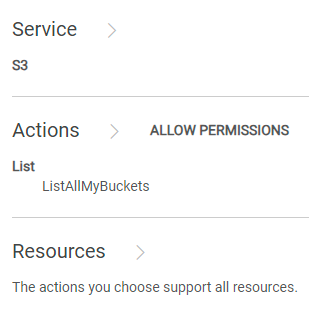
ECS UIに接続し、[Identity and Access Management (S3)]内の[Policies]セクションに移動して、変更が必要なポリシーを見つけます。「権限」で、「ビジュアルエディタ」または「JSON」を選択できます。
ビジュアルエディター:
[ADD ADDITIONAL PERMISSION]をクリックし、次のように入力して[SAVE]をクリックします。
KBAに従っても問題が解決しない場合は、Dell EMCサポート ホットラインに連絡し、サポート リクエストを作成します。KBA 226898を参照してください。
次のコマンドを使用して、過去1時間に403エラーが発生したリクエストIDを収集します。
svc_request summary -t GET -s 403 -start 1h
Example:
admin@ecs01node:~> svc_request summary -t GET -s 403 -start 1h
svc_request v1.2.6 (svc_tools v2.17.0)                 Started 2024-07-13 08:57:43


Time range:                    2024-07-13 07:57:43 - 2024-07-13 08:57:43
Running against node(s):        all
Status Code:                   403
Request Type:                  GET

                                                                                                                       Resp                  Bucket/
                                                                                                           Size        Time                  Object/
Node            Time             Request ID                       Prot  Type   MPU  Client IP       Status (bytes)     (ms)     Namespace    Options
10.1.2.3        07-13 08:25:39   0a0a0721:190aa2853bc:399:b26     s3    GET    -    10.10.7.100     403    123         22       ai_ns        /
10.1.2.3        07-13 08:26:06   0a0a0721:190aa2853bc:456:9c      s3    GET    -    10.10.7.100     403    122         2        ai_ns        /
10.1.2.3        07-13 08:26:18   0a0a0721:190aa2853bc:453:5       s3    GET    -    10.10.7.100     403    121         2        ai_ns        /
10.1.2.3        07-13 08:26:46   0a0a0721:190aa2853bc:446:297     s3    GET    -    10.10.7.100     403    123         2        ai_ns        /
10.1.2.3        07-13 08:27:41   0a0a0721:190aa2853bc:459:ab      s3    GET    -    10.10.7.100     403    122         6        ai_ns        /
10.1.2.3        07-13 08:27:55   0a0a0721:190aa2853bc:45b:1       s3    GET    -    10.10.7.100     403    121         1        ai_ns        /
10.1.2.3        07-13 08:28:30   0a0a0721:190aa2853bc:30c:7a4     s3    GET    -    10.10.7.100     403    123         1        ai_ns        /
10.1.2.3        07-13 08:33:00   0a0a0721:190aa2853bc:451:2b6     s3    GET    -    10.10.7.100     403    123         6        ai_ns        /
10.1.2.3        07-13 08:33:10   0a0a0721:190aa2853bc:461:1       s3    GET    -    10.10.7.100     403    121         6        icrc_pn      /
10.1.2.3        07-13 08:33:18   0a0a0721:190aa2853bc:460:c       s3    GET    -    10.10.7.100     403    121         1        icrc_pn      /
10.1.2.3        07-13 08:34:04   0a0a0721:190aa2853bc:45c:ac      s3    GET    -    10.10.7.100     403    122         1        icrc_pn      /
10.1.2.3        07-13 08:34:33   0a0a0721:190aa2853bc:464:1b      s3    GET    -    10.10.7.100     403    122         2        ai_ns        /
10.1.2.3        07-13 08:34:43   0a0a0721:190aa2853bc:2e4:d3a     s3    GET    -    10.10.7.100     403    123         2        ai_ns        /
10.1.2.3        07-13 08:34:57   0a0a0721:190aa2853bc:468:1       s3    GET    -    10.10.7.100     403    121         2        ai_ns        /
10.1.2.3        07-13 08:35:08   0a0a0721:190aa2853bc:46a:1       s3    GET    -    10.10.7.100     403    121         2        icrc_pn      /
10.1.2.3        07-13 08:37:58   0a0a0721:190aa2853bc:464:39      s3    GET    -    10.10.7.100     403    122         6        icrc_pn      /
10.1.2.3        07-13 08:38:06   0a0a0721:190aa2853bc:451:2d4     s3    GET    -    10.10.7.100     403    123         2        icrc_pn      /
10.1.2.3        07-13 08:38:34   0a0a0721:190aa2853bc:43d:656     s3    GET    -    10.10.7.100     403    123         2        icrc_pn      /
10.1.2.3        07-13 08:39:01   0a0a0721:190aa2853bc:4ec:29      s3    GET    -    10.10.7.100     403    122         1        icrc_pn      /
10.1.2.3        07-13 08:39:15   0a0a0721:190aa2853bc:4ec:2b      s3    GET    -    10.10.7.100     403    122         2        icrc_pn      /
10.1.2.3        07-13 08:39:15   0a0a0721:190aa2853bc:43d:673     s3    GET    -    10.10.7.100     403    123         1        icrc_pn      /
10.1.2.3        07-13 08:39:53   0a0a0721:190aa2853bc:446:2e8     s3    GET    -    10.10.7.100     403    123         1        icrc_pn      /
10.1.2.3        07-13 08:40:25   0a0a0721:190aa2853bc:446:2ec     s3    GET    -    10.10.7.100     403    123         2        icrc_pn      /
10.1.2.3        07-13 08:41:10   0a0a0721:190aa2853bc:4ec:63      s3    GET    -    10.10.7.100     403    122         1        icrc_pn      /
10.1.2.3        07-13 08:41:17   0a0a0721:190aa2853bc:4ec:65      s3    GET    -    10.10.7.100     403    122         1        icrc_pn      /
10.1.2.3        07-13 08:49:21   0a0a0721:190aa2853bc:2e4:d84     s3    GET    -    10.10.7.100     403    123         16       icrc_pn      /
10.1.2.3        07-13 08:49:26   0a0a0721:190aa2853bc:2e4:d86     s3    GET    -    10.10.7.100     403    123         4        icrc_pn      /
10.1.2.3        07-13 08:49:33   0a0a0721:190aa2853bc:4ee:3f6     s3    GET    -    10.10.7.100     403    123         1        icrc_pn      /
10.1.2.4        07-13 08:10:29   0a0a0722:190a9ee8298:12:35c      s3    GET    -    10.10.31.8      403    122         10       datas_ns     /
10.1.2.7        07-13 08:00:40   0a0a0725:190aab7d88f:1f:105      s3    GET    -    10.10.31.8      403    122         29       icrc_pn      /

admin@ecs01node:~>
最後のステップで収集したリクエストIDの1つをgrepします。
Command:
svc_log -f "0a0a0721:190aa281234:399:b26" -sr all -n all -sn -sf -start 1h
Example:
admin@ecsnode01:~> svc_log -f "0a0a0721:190aa281234:399:b26" -sr all -n all -sn -sf -start 1h
svc_log v1.0.33 (svc_tools v2.17.0)                 Started 2024-07-13 09:02:42

Running on nodes:                        <All nodes>
Time range:                              2024-07-13 08:02:42 - 2024-07-13 09:02:42
Filter string(s):                        '0a0a0721:190aa281234:399:b26'
Service(s) to search:                    zk-fabric,cm,am,metering,resourcesvc,nvmeengine,casaccess,vnest,upgrade,ecsportalsvc,blobsvc,coordinatorsvc,authsvc,atlas,rm,eventsvc,dataheadsvc,stat,dm,accesslog,zk-object,objcontrolsvc,ssm,nginx,nvmetargetviewer,messages-object,dtsm,provisionsvc,lifecycle,dataheadsvc-access,georeceiver,sr,transformsvc,dtquery,storageserver,datahead-cas-access
Show filename(s):                        True
Show nodename(s):                        True
Log type(s) to search for each service:  <Main Logs>
Show nodename(s):                        True

169.254.1.1 dataheadsvc-access.log 2024-07-13 08:25:39,993 0a0a0721:190aa281234:399:b26 10.1.2.3:9021 10.10.10.100:59871 urn:ecs:iam::ns_name:user/user_name S3%20Browser%209.5.5%20https://s3browser.com GET ns_name - - - HTTP/1.1 403 22 - 123 9 - - - - 'x-amz-date: Sat, 13 Jul 2024 08:25:39 GMT' 'Connection: Keep-Alive'
169.254.1.1 dataheadsvc-access.log 2024-07-13 08:25:39,993 0a0a0721:190aa281234:399:b26 10.1.2.3:9021 10.10.10.100:59871 urn:ecs:iam::ns_name:user/user_name S3%20Browser%209.5.5%20https://s3browser.com GET ns_name - - - HTTP/1.1 403 22 - 123 9 - - - - 'x-amz-date: Sat, 13 Jul 2024 08:25:39 GMT' 'Connection: Keep-Alive'
169.254.1.1 dataheadsvc.log 2024-07-13T08:25:39,990 [qtp439631166-1477-0a0a0721:190aa281234:399:b26-s3-10.10.10.100] ERROR  PolicyEvaluator.java (line 184) No policies explicitly allow the operation. rp UNKNOWN pb ALLOW sp ALLOW ip UNKNOWN
169.254.1.1 dataheadsvc.log 2024-07-13T08:25:39,991 [qtp439631166-1477-0a0a0721:190aa281234:399:b26-s3-10.10.10.100] ERROR  S3Service.java (line 537) iam user urn:ecs:iam::ns_name:user/user_name don't have list buckets permission

admin@ecsnode01:~>
例に示すようにエラー メッセージが表示される場合は、次の手順に従って問題を解決します
ECS UIに接続し、[Identity and Access Management (S3)]内の[Policies]セクションに移動して、変更が必要なポリシーを見つけます。「権限」で、「ビジュアルエディタ」または「JSON」を選択できます。
ビジュアルエディター:
[ADD ADDITIONAL PERMISSION]をクリックし、次のように入力して[SAVE]をクリックします。
AWS標準によると、 ListAllMyBuckets アクションは、他のIAMユーザーによって作成されたすべてのバケットを一覧表示する機能を提供します。したがって、ListAllMyBucketsアクションのすべてのリソースへのアクセスを許可するビジュアルエディタのアプローチも準拠しています。
基本的に、以下で説明する3つの方法はすべて、すべてのバケットへのアクセスを許可するという同じ目的を達成します。
JSON:ポリシーの既存のステートメントに以下を追加します。
   {
      "Sid": "VisualEditor1",
      "Effect": "Allow",
      "Action": [
        "s3:ListAllMyBuckets"
      ],
      "Resource": []
    }
 {
      "Action": "s3:ListAllMyBuckets",
      "Resource": [
        "arn:aws:s3:::*",
        "arn:aws:s3:::*/*"
      ],
      "Effect": "Allow",
      "Sid": "VisualEditor1"
    }
   {
      "Action": [
        "s3:ListAllMyBuckets"
      ],
      "Resource": "*",
      "Effect": "Allow",
      "Sid": "VisualEditor1"
    }
KBAに従っても問題が解決しない場合は、Dell EMCサポート ホットラインに連絡し、サポート リクエストを作成します。KBA 226898を参照してください。
Affected Products
ECSProducts
ECS Appliance, ECS Appliance Hardware Series, ECS Software, Elastic Cloud StorageArticle Properties
Article Number: 000226898
Article Type: Solution
Last Modified: 15 Aug 2024
Version: 2
Find answers to your questions from other Dell users
Support Services
Check if your device is covered by Support Services.