ECS: Użytkownik IAM urn:ecs:iam::ns_name:user/user_name nie ma uprawnienia do zasobników listy
Summary: Po uaktualnieniu do wersji 3.8.x.x użytkownicy IAM nie mogli wyświetlić listy zasobników i otrzymali błąd wskazujący na brak uprawnień, aby to zrobić. Ta funkcja działała jednak przed wersją 3.8.x.x. ...
This article applies to
This article does not apply to
This article is not tied to any specific product.
Not all product versions are identified in this article.
Symptoms
Dzienniki aplikacji pokazują:
com.amazonaws.services.s3.model.Amazon.S3.Exception: Access Denied (Service: Amazon S3; Status Code: 403; Error Code: AccessDenied; Request ID xxxxxxxx:xxxxxxxxxxx:xxx:xxx; S3 Extended Request ID: null)ECS dataheadsvc-access.log:
169.254.1.1 dataheadsvc-access.log 2024-07-13 08:25:39,993 0a0a0721:190aa2853bc:399:b26 10.1.2.100:9021 10.10.10.100:59871 urn:ecs:iam::ns_name:user/user_name S3%20Browser%209.5.5%20https://s3browser.com GET ns_name - - - HTTP/1.1 403 22 - 123 9 - - - - 'x-amz-date: Sat, 13 Jul 2024 08:25:39 GMT' 'Connection: Keep-Alive'
169.254.1.1 dataheadsvc-access.log 2024-07-13 08:25:39,993 0a0a0721:190aa2853bc:399:b26 10.1.2.100:9021 10.10.10.100:59871 urn:ecs:iam::ns_name:user/user_name S3%20Browser%209.5.5%20https://s3browser.com GET ns_name - - - HTTP/1.1 403 22 - 123 9 - - - - 'x-amz-date: Sat, 13 Jul 2024 08:25:39 GMT' 'Connection: Keep-Alive'
169.254.1.1 dataheadsvc.log 2024-07-13T08:25:39,990 [qtp439631166-1477-0a0a0721:190aa2853bc:399:b26-s3-10.10.10.100] ERROR  PolicyEvaluator.java (line 184) No policies explicitly allow the operation. rp UNKNOWN pb ALLOW sp ALLOW ip UNKNOWN
169.254.1.1 dataheadsvc.log 2024-07-13T08:25:39,991 [qtp439631166-1477-0a0a0721:190aa2853bc:399:b26-s3-10.10.10.100] ERROR  S3Service.java (line 537) iam user urn:ecs:iam::ns_name:user/user_name don't have list buckets permission
Cause
Ta modyfikacja była celowa. Teraz w wersji 3.8 jest bardziej zgodny ze standardami AWS, gdzie dla akcji ListAllMyBuckets zasób musi znajdować się * w polityce IAM dołączonej do użytkownika, żadna polityka zasobnika dla tej akcji nie jest obsługiwana.
Resolution
Wykonaj poniższe czynności, aby sprawdzić, czy ta baza wiedzy dotyczy błędu 403, z którym boryka się aplikacja.
Użyj poniższego polecenia, aby zebrać identyfikator żądania, który napotkał błąd 403 w ciągu ostatniej godziny:
Przykład:
Polecenie:
Przykład:
Jeśli widzisz komunikat o błędzie w sposób przedstawiony w przykładzie, wykonaj poniższe czynności, aby rozwiązać problem.
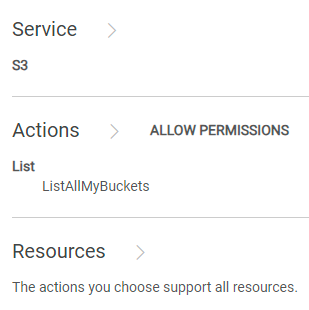
Połącz się z interfejsem ECS i przejdź do sekcji "Policies" w sekcji "Identity and Access Management (S3)", aby zlokalizować zasady, które należy zmodyfikować. W sekcji "Uprawnienia" możesz wybrać opcję "Edytor wizualny" lub "JSON".
Edytor wizualny:
Kliknij przycisk "DODAJ DODATKOWE UPRAWNIENIE", wprowadź poniższe informacje, a następnie kliknij przycisk "ZAPISZ":
Jeśli po wykonaniu instrukcji z bazy wiedzy problemy nadal występują, skontaktuj się z infolinią pomocy technicznej Dell EMC i utwórz zgłoszenie serwisowe. Patrz artykuł z bazy wiedzy 226898.
Użyj poniższego polecenia, aby zebrać identyfikator żądania, który napotkał błąd 403 w ciągu ostatniej godziny:
svc_request summary -t GET -s 403 -start 1h
Przykład:
admin@ecs01node:~> svc_request summary -t GET -s 403 -start 1h
svc_request v1.2.6 (svc_tools v2.17.0)                 Started 2024-07-13 08:57:43


Time range:                    2024-07-13 07:57:43 - 2024-07-13 08:57:43
Running against node(s):        all
Status Code:                   403
Request Type:                  GET

                                                                                                                       Resp                  Bucket/
                                                                                                           Size        Time                  Object/
Node            Time             Request ID                       Prot  Type   MPU  Client IP       Status (bytes)     (ms)     Namespace    Options
10.1.2.3        07-13 08:25:39   0a0a0721:190aa2853bc:399:b26     s3    GET    -    10.10.7.100     403    123         22       ai_ns        /
10.1.2.3        07-13 08:26:06   0a0a0721:190aa2853bc:456:9c      s3    GET    -    10.10.7.100     403    122         2        ai_ns        /
10.1.2.3        07-13 08:26:18   0a0a0721:190aa2853bc:453:5       s3    GET    -    10.10.7.100     403    121         2        ai_ns        /
10.1.2.3        07-13 08:26:46   0a0a0721:190aa2853bc:446:297     s3    GET    -    10.10.7.100     403    123         2        ai_ns        /
10.1.2.3        07-13 08:27:41   0a0a0721:190aa2853bc:459:ab      s3    GET    -    10.10.7.100     403    122         6        ai_ns        /
10.1.2.3        07-13 08:27:55   0a0a0721:190aa2853bc:45b:1       s3    GET    -    10.10.7.100     403    121         1        ai_ns        /
10.1.2.3        07-13 08:28:30   0a0a0721:190aa2853bc:30c:7a4     s3    GET    -    10.10.7.100     403    123         1        ai_ns        /
10.1.2.3        07-13 08:33:00   0a0a0721:190aa2853bc:451:2b6     s3    GET    -    10.10.7.100     403    123         6        ai_ns        /
10.1.2.3        07-13 08:33:10   0a0a0721:190aa2853bc:461:1       s3    GET    -    10.10.7.100     403    121         6        icrc_pn      /
10.1.2.3        07-13 08:33:18   0a0a0721:190aa2853bc:460:c       s3    GET    -    10.10.7.100     403    121         1        icrc_pn      /
10.1.2.3        07-13 08:34:04   0a0a0721:190aa2853bc:45c:ac      s3    GET    -    10.10.7.100     403    122         1        icrc_pn      /
10.1.2.3        07-13 08:34:33   0a0a0721:190aa2853bc:464:1b      s3    GET    -    10.10.7.100     403    122         2        ai_ns        /
10.1.2.3        07-13 08:34:43   0a0a0721:190aa2853bc:2e4:d3a     s3    GET    -    10.10.7.100     403    123         2        ai_ns        /
10.1.2.3        07-13 08:34:57   0a0a0721:190aa2853bc:468:1       s3    GET    -    10.10.7.100     403    121         2        ai_ns        /
10.1.2.3        07-13 08:35:08   0a0a0721:190aa2853bc:46a:1       s3    GET    -    10.10.7.100     403    121         2        icrc_pn      /
10.1.2.3        07-13 08:37:58   0a0a0721:190aa2853bc:464:39      s3    GET    -    10.10.7.100     403    122         6        icrc_pn      /
10.1.2.3        07-13 08:38:06   0a0a0721:190aa2853bc:451:2d4     s3    GET    -    10.10.7.100     403    123         2        icrc_pn      /
10.1.2.3        07-13 08:38:34   0a0a0721:190aa2853bc:43d:656     s3    GET    -    10.10.7.100     403    123         2        icrc_pn      /
10.1.2.3        07-13 08:39:01   0a0a0721:190aa2853bc:4ec:29      s3    GET    -    10.10.7.100     403    122         1        icrc_pn      /
10.1.2.3        07-13 08:39:15   0a0a0721:190aa2853bc:4ec:2b      s3    GET    -    10.10.7.100     403    122         2        icrc_pn      /
10.1.2.3        07-13 08:39:15   0a0a0721:190aa2853bc:43d:673     s3    GET    -    10.10.7.100     403    123         1        icrc_pn      /
10.1.2.3        07-13 08:39:53   0a0a0721:190aa2853bc:446:2e8     s3    GET    -    10.10.7.100     403    123         1        icrc_pn      /
10.1.2.3        07-13 08:40:25   0a0a0721:190aa2853bc:446:2ec     s3    GET    -    10.10.7.100     403    123         2        icrc_pn      /
10.1.2.3        07-13 08:41:10   0a0a0721:190aa2853bc:4ec:63      s3    GET    -    10.10.7.100     403    122         1        icrc_pn      /
10.1.2.3        07-13 08:41:17   0a0a0721:190aa2853bc:4ec:65      s3    GET    -    10.10.7.100     403    122         1        icrc_pn      /
10.1.2.3        07-13 08:49:21   0a0a0721:190aa2853bc:2e4:d84     s3    GET    -    10.10.7.100     403    123         16       icrc_pn      /
10.1.2.3        07-13 08:49:26   0a0a0721:190aa2853bc:2e4:d86     s3    GET    -    10.10.7.100     403    123         4        icrc_pn      /
10.1.2.3        07-13 08:49:33   0a0a0721:190aa2853bc:4ee:3f6     s3    GET    -    10.10.7.100     403    123         1        icrc_pn      /
10.1.2.4        07-13 08:10:29   0a0a0722:190a9ee8298:12:35c      s3    GET    -    10.10.31.8      403    122         10       datas_ns     /
10.1.2.7        07-13 08:00:40   0a0a0725:190aab7d88f:1f:105      s3    GET    -    10.10.31.8      403    122         29       icrc_pn      /

admin@ecs01node:~>
Grep dla jednego z identyfikatorów żądań zebranych z ostatniego kroku:
Polecenie:
svc_log -f "0a0a0721:190aa281234:399:b26" -sr all -n all -sn -sf -start 1h
Przykład:
admin@ecsnode01:~> svc_log -f "0a0a0721:190aa281234:399:b26" -sr all -n all -sn -sf -start 1h
svc_log v1.0.33 (svc_tools v2.17.0)                 Started 2024-07-13 09:02:42

Running on nodes:                        <All nodes>
Time range:                              2024-07-13 08:02:42 - 2024-07-13 09:02:42
Filter string(s):                        '0a0a0721:190aa281234:399:b26'
Service(s) to search:                    zk-fabric,cm,am,metering,resourcesvc,nvmeengine,casaccess,vnest,upgrade,ecsportalsvc,blobsvc,coordinatorsvc,authsvc,atlas,rm,eventsvc,dataheadsvc,stat,dm,accesslog,zk-object,objcontrolsvc,ssm,nginx,nvmetargetviewer,messages-object,dtsm,provisionsvc,lifecycle,dataheadsvc-access,georeceiver,sr,transformsvc,dtquery,storageserver,datahead-cas-access
Show filename(s):                        True
Show nodename(s):                        True
Log type(s) to search for each service:  <Main Logs>
Show nodename(s):                        True

169.254.1.1 dataheadsvc-access.log 2024-07-13 08:25:39,993 0a0a0721:190aa281234:399:b26 10.1.2.3:9021 10.10.10.100:59871 urn:ecs:iam::ns_name:user/user_name S3%20Browser%209.5.5%20https://s3browser.com GET ns_name - - - HTTP/1.1 403 22 - 123 9 - - - - 'x-amz-date: Sat, 13 Jul 2024 08:25:39 GMT' 'Connection: Keep-Alive'
169.254.1.1 dataheadsvc-access.log 2024-07-13 08:25:39,993 0a0a0721:190aa281234:399:b26 10.1.2.3:9021 10.10.10.100:59871 urn:ecs:iam::ns_name:user/user_name S3%20Browser%209.5.5%20https://s3browser.com GET ns_name - - - HTTP/1.1 403 22 - 123 9 - - - - 'x-amz-date: Sat, 13 Jul 2024 08:25:39 GMT' 'Connection: Keep-Alive'
169.254.1.1 dataheadsvc.log 2024-07-13T08:25:39,990 [qtp439631166-1477-0a0a0721:190aa281234:399:b26-s3-10.10.10.100] ERROR  PolicyEvaluator.java (line 184) No policies explicitly allow the operation. rp UNKNOWN pb ALLOW sp ALLOW ip UNKNOWN
169.254.1.1 dataheadsvc.log 2024-07-13T08:25:39,991 [qtp439631166-1477-0a0a0721:190aa281234:399:b26-s3-10.10.10.100] ERROR  S3Service.java (line 537) iam user urn:ecs:iam::ns_name:user/user_name don't have list buckets permission

admin@ecsnode01:~>
Jeśli widzisz komunikat o błędzie w sposób przedstawiony w przykładzie, wykonaj poniższe czynności, aby rozwiązać problem.
Połącz się z interfejsem ECS i przejdź do sekcji "Policies" w sekcji "Identity and Access Management (S3)", aby zlokalizować zasady, które należy zmodyfikować. W sekcji "Uprawnienia" możesz wybrać opcję "Edytor wizualny" lub "JSON".
Edytor wizualny:
Kliknij przycisk "DODAJ DODATKOWE UPRAWNIENIE", wprowadź poniższe informacje, a następnie kliknij przycisk "ZAPISZ":
Zgodnie ze standardami AWS akcja ListAllMyBuckets zapewnia możliwość wyświetlenia listy wszystkich zasobników utworzonych przez innych użytkowników IAM. W związku z tym podejście edytora wizualnego, które udziela dostępu do wszystkich zasobów dla akcji ListAllMyBuckets, jest również zgodne.
Zasadniczo wszystkie trzy wymienione poniżej metody osiągają ten sam cel, czyli zapewnienie dostępu do wszystkich zasobników.
JSON:Dołącz poniższe informacje do istniejącego oświadczenia o zasadach.
   {
      "Sid": "VisualEditor1",
      "Effect": "Allow",
      "Action": [
        "s3:ListAllMyBuckets"
      ],
      "Resource": []
    }
 {
      "Action": "s3:ListAllMyBuckets",
      "Resource": [
        "arn:aws:s3:::*",
        "arn:aws:s3:::*/*"
      ],
      "Effect": "Allow",
      "Sid": "VisualEditor1"
    }
   {
      "Action": [
        "s3:ListAllMyBuckets"
      ],
      "Resource": "*",
      "Effect": "Allow",
      "Sid": "VisualEditor1"
    }
Jeśli po wykonaniu instrukcji z bazy wiedzy problemy nadal występują, skontaktuj się z infolinią pomocy technicznej Dell EMC i utwórz zgłoszenie serwisowe. Patrz artykuł z bazy wiedzy 226898.
Affected Products
ECSProducts
ECS Appliance, ECS Appliance Hardware Series, ECS Software, Elastic Cloud StorageArticle Properties
Article Number: 000226898
Article Type: Solution
Last Modified: 15 Aug 2024
Version: 2
Find answers to your questions from other Dell users
Support Services
Check if your device is covered by Support Services.