XPS 13 9345 Laptop Stops Responding at the Splash Screen with On-Screen Error Code 22
Summary: The following article provides information about resolving a start-up problem on the XPS 14 9345 laptop. Plugging in the AC Adapter and immediately pressing the power button causes the laptop to stop responding at the splash screen. ...
This article applies to
This article does not apply to
This article is not tied to any specific product.
Not all product versions are identified in this article.
Symptoms
XPS 13 9345 laptop does not pass the splash screen during start-up
Owners of XPS 13 9345 laptops may experience the following symptoms if they plug in the AC adapter and immediately press the power button on the laptop:
-
The laptop stops responding at the Dell splash screen with the XPS logo.

-
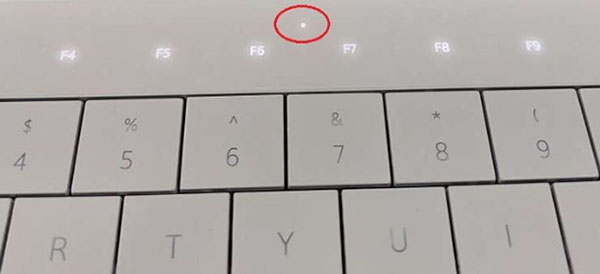
After sitting at the splash screen for longer than 60 seconds, you see an on-screen error code 22. The diagnostic Light Emitting Diode (LED) flashes two amber, and two white repeating No Power-On Self-Test (POST) error.
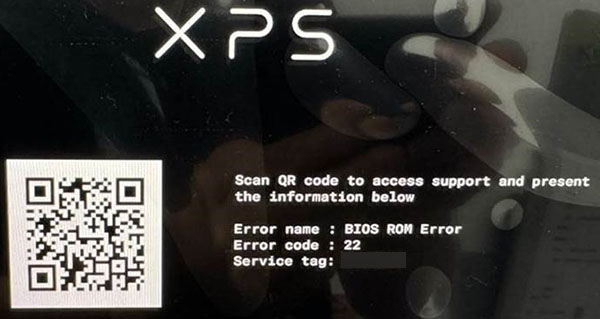
-
If you press the laptop power button again, you can still see the same flash code error.
Cause
Pressing the power button immediately after connecting the AC adapter to the laptop means that the Qualcomm processor is not ready to handle initialization. The laptop cannot handle the power button event so quickly after plugging in the AC adapter.
Resolution
While the laptop is working as designed, we have released an update to handle this type of start-up exception. You can recover from the start-up error by removing the AC adapter connector from the laptop and restart laptop. When it boots into the operating system, update the BIOS to the latest revision to stop this from happening again:
Update the BIOS driver to Dell XPS 13 9345 System BIOS, version 1.7.0, or later. To download and install the XPS_9345_1.7.0.exe see:
Affected Products
XPS 13 9345Article Properties
Article Number: 000228156
Article Type: Solution
Last Modified: 03 Sept 2024
Version: 1
Find answers to your questions from other Dell users
Support Services
Check if your device is covered by Support Services.