Recommended Way of Opening the Lid of Latitude 3540 and 3550 to Protect LCD Bezel and LCD Cover
Summary: Learn about the correct way of opening the lid of Latitude 3540 and 3550.
This article applies to
This article does not apply to
This article is not tied to any specific product.
Not all product versions are identified in this article.
Symptoms
Follow this step to correctly open the lid of Latitude 3540 and 3550. Avoid lifting up the LCD at a shutter area (highlighted in red). It is recommended to lift up the LCD by the finger recess besides a shutter area (highlighted in green).
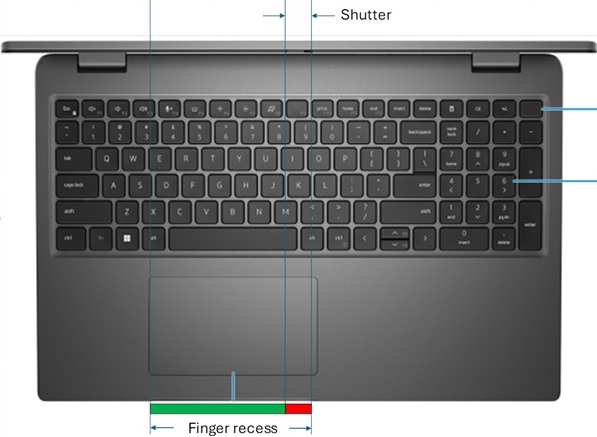
Affected Platforms:
- Latitude 3540
- Latitude 3550
Cause
LCD bezel and LCD cover on a Latitude 3540 or 3550 may separate during the usage if this step is not followed.
Resolution
- Place your thumb on the front edge of the laptop screen for a small opening.
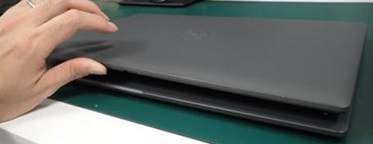
- Hold the palm rest with the other hand.
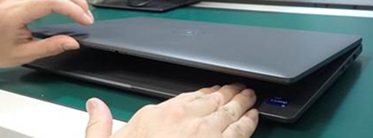
- Gently lift the lid upwards to its right position.
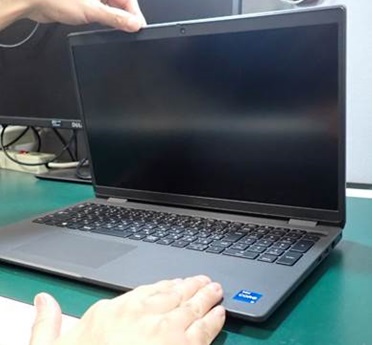
Affected Products
Latitude 3540, Latitude 3550Article Properties
Article Number: 000259310
Article Type: Solution
Last Modified: 29 Aug 2025
Version: 5
Find answers to your questions from other Dell users
Support Services
Check if your device is covered by Support Services.