Data Protection Advisor: error irrecuperable de LAX cuando se intenta instalar o actualizar DPA
Summary: Se obtiene el siguiente error: "La invocación de esta aplicación Java ha causado una InvocationTargetException. Esta aplicación ahora saldrá de (LAX)" cuando intente actualizar o instalar DPA. ...
Symptoms
Cuando se intenta instalar o actualizar el almacén de datos de DPA, se muestra el siguiente error en la pantalla y la actualización no continúa:
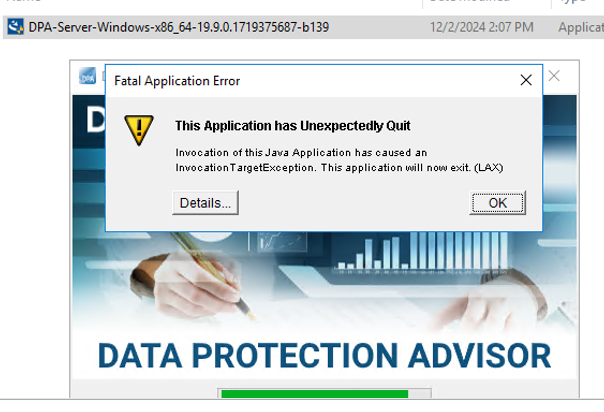
ERROR: "Invocation of this Java Application has caused an InvocationTargetException. This application will now exit. (LAX)"
Complete Error message: Invocation of this Java Application has caused and InvocationTargetException. This application will now exit (LAX)
La pestaña Details muestra el error Java Lang:java.lang.NullPointerException at com.zerog.ia.installer.LifeCycleManager.getEnable8dot3(Unknown Source) at com.zerog.ia.installer.LifeCycleManager.a6(Unknown Source) at com.zerog.ia.installer.LifeCycleManager.executeApplication(Unknown Source) at com.zerog.ia.installer.Main.main(Unknown Source) at sun.reflect.NativeMethodAccessorImpl.invoke0(Native Method) at sun.reflect.NativeMethodAccessorImpl.invoke(NativeMethodAccessorImpl.java:62) at sun.reflect.DelegatingMethodAccessorImpl.invoke(DelegatingMethodAccessorImpl.java:43) at java.lang.reflect.Method.invoke(Method.java:498) at com.zerog.lax.LAX.launch(Unknown Source) at com.zerog.lax.LAX.main(Unknown Source)
Cause
Mirando el mensaje en negrita dentro del Error:
getEnable8dot3(Unknown Source)
Este no es un problema de DPA, sino un problema en el registro de Windows al que le falta una clave.
En el servidor en el que intenta realizar la instalación/actualización, ejecute el siguiente comando en un símbolo del sistema:reg query HKEY_LOCAL_MACHINE\SYSTEM\CurrentControlSet\Control\FileSystem\ /v NtfsDisable8dot3NameCreation
Debería arrojar lo siguiente: HKEY_LOCAL_MACHINE\SYSTEM\CurrentControlSet\Control\FileSystem
NtfsDisable8dot3NameCreation REG_DWORD 0x2
Sin embargo, si se devuelve lo siguiente, se confirma el problema:This command resulted with the same message on both the application and datastore servers:C:\Windows\system32>reg query HKEY_LOCAL_MACHINE\SYSTEM\CurrentControlSet\Control\FileSystem\ /v NtfsDisable8dot3NameCreation
ERROR: The system was unable to find the specified registry key or value
Resolution
La clave REG_DWORD 0x2 se puede agregar al registro de Windows.
Consulte con el equipo de seguridad del sistema operativo/Windows del cliente, ya que puede haber una política que bloquee la creación de esta clave.