Data Protection Advisor - Erreur LAX fatale lors de la tentative d’installation ou de mise à niveau de DPA
Summary: Erreur d’obtention : « L’invocation de cette application Java a provoqué une exception InvocationTargetException. This application will now exit (LAX) » lors de la tentative de mise à niveau ou d’installation de DPA. ...
Symptoms
Lorsque vous tentez d’installer ou de mettre à niveau le datastore DPA, l’erreur suivante s’affiche à l’écran et la mise à niveau ne se poursuit pas :
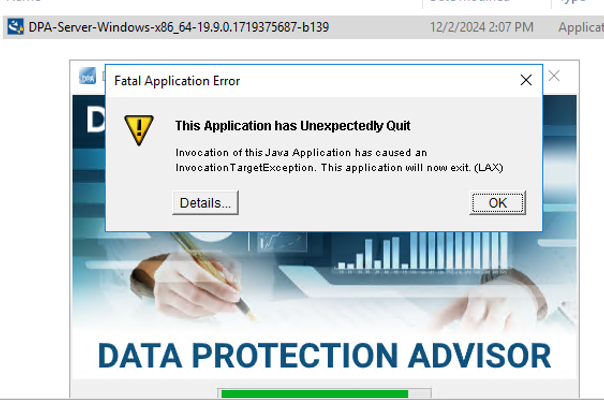
ERROR: "Invocation of this Java Application has caused an InvocationTargetException. This application will now exit. (LAX)"
Complete Error message: Invocation of this Java Application has caused and InvocationTargetException. This application will now exit (LAX)
L’onglet Details affiche l’erreur Java Lang :java.lang.NullPointerException at com.zerog.ia.installer.LifeCycleManager.getEnable8dot3(Unknown Source) at com.zerog.ia.installer.LifeCycleManager.a6(Unknown Source) at com.zerog.ia.installer.LifeCycleManager.executeApplication(Unknown Source) at com.zerog.ia.installer.Main.main(Unknown Source) at sun.reflect.NativeMethodAccessorImpl.invoke0(Native Method) at sun.reflect.NativeMethodAccessorImpl.invoke(NativeMethodAccessorImpl.java:62) at sun.reflect.DelegatingMethodAccessorImpl.invoke(DelegatingMethodAccessorImpl.java:43) at java.lang.reflect.Method.invoke(Method.java:498) at com.zerog.lax.LAX.launch(Unknown Source) at com.zerog.lax.LAX.main(Unknown Source)
Cause
En regardant le message en gras dans l’erreur :
getEnable8dot3(Unknown Source)
Il ne s’agit pas d’un problème DPA, mais d’un problème sur le Registre Windows auquel il manque une clé.
Sur le serveur sur lequel vous tentez l’installation/la mise à niveau, exécutez la commande suivante sur une invite de commande :reg query HKEY_LOCAL_MACHINE\SYSTEM\CurrentControlSet\Control\FileSystem\ /v NtfsDisable8dot3NameCreation
Il doit renvoyer : HKEY_LOCAL_MACHINE\SYSTEM\CurrentControlSet\Control\FileSystem
NtfsDisable8dot3NameCreation REG_DWORD 0x2
Toutefois, si les éléments suivants sont renvoyés, le problème est confirmé :This command resulted with the same message on both the application and datastore servers:C:\Windows\system32>reg query HKEY_LOCAL_MACHINE\SYSTEM\CurrentControlSet\Control\FileSystem\ /v NtfsDisable8dot3NameCreation
ERROR: The system was unable to find the specified registry key or value
Resolution
La clé REG_DWORD 0x2 peut être ajoutée au registre Windows.
Contactez l’équipe de sécurité du système d’exploitation/Windows du client, car une règle peut bloquer la création de cette clé.