Data Protection Advisor - Fatale LAX-fout bij het installeren of upgraden van DPA
Summary: Getting error: "Het aanroepen van deze Java-applicatie heeft en InvocationTargetException veroorzaakt. Deze applicatie wordt nu afgesloten (LAX) wanneer u probeert de DPA te upgraden of te installeren. ...
Symptoms
Wanneer u probeert de DPA-datastore te installeren of te upgraden, wordt de volgende fout op het scherm weergegeven en gaat de upgrade niet door:
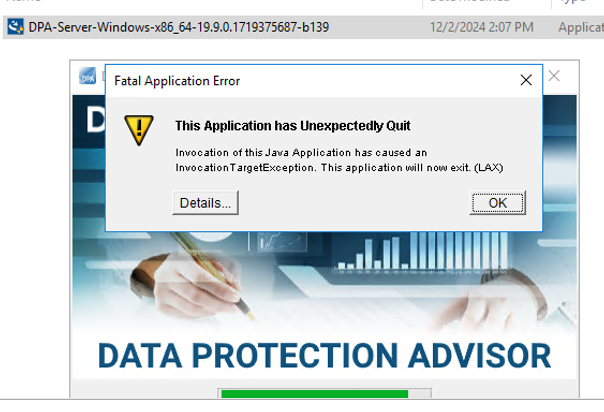
ERROR: "Invocation of this Java Application has caused an InvocationTargetException. This application will now exit. (LAX)"
Complete Error message: Invocation of this Java Application has caused and InvocationTargetException. This application will now exit (LAX)
Het tabblad Details geeft de Java Lang-fout weer:java.lang.NullPointerException at com.zerog.ia.installer.LifeCycleManager.getEnable8dot3(Unknown Source) at com.zerog.ia.installer.LifeCycleManager.a6(Unknown Source) at com.zerog.ia.installer.LifeCycleManager.executeApplication(Unknown Source) at com.zerog.ia.installer.Main.main(Unknown Source) at sun.reflect.NativeMethodAccessorImpl.invoke0(Native Method) at sun.reflect.NativeMethodAccessorImpl.invoke(NativeMethodAccessorImpl.java:62) at sun.reflect.DelegatingMethodAccessorImpl.invoke(DelegatingMethodAccessorImpl.java:43) at java.lang.reflect.Method.invoke(Method.java:498) at com.zerog.lax.LAX.launch(Unknown Source) at com.zerog.lax.LAX.main(Unknown Source)
Cause
Kijkend naar het vetgedrukte bericht in de fout:
getEnable8dot3(Unknown Source)
Dit is geen DPA-probleem, maar een probleem in het Windows-register waarbij een sleutel ontbreekt.
Op de server waar u de installatie/upgrade probeert uit te voeren, voert u de volgende opdracht uit op een opdrachtprompt:reg query HKEY_LOCAL_MACHINE\SYSTEM\CurrentControlSet\Control\FileSystem\ /v NtfsDisable8dot3NameCreation
Het zou moeten terugkeren: HKEY_LOCAL_MACHINE\SYSTEM\CurrentControlSet\Control\FileSystem
NtfsDisable8dot3NameCreation REG_DWORD 0x2
Als echter het volgende wordt geretourneerd, bevestigt dit het probleem:This command resulted with the same message on both the application and datastore servers:C:\Windows\system32>reg query HKEY_LOCAL_MACHINE\SYSTEM\CurrentControlSet\Control\FileSystem\ /v NtfsDisable8dot3NameCreation
ERROR: The system was unable to find the specified registry key or value
Resolution
De REG_DWORD 0x2 sleutel kan worden toegevoegd aan het Windows-register.
Neem contact op met het OS/Windows-beveiligingsteam van de klant, aangezien er een beleid kan zijn dat het maken van deze sleutel blokkeert.